An AI CRM is customer relationship management software that uses artificial intelligence to help with tasks like writing content, analyzing customer data, completing work, and customizing the system. What AI can do depends on the platform. For example, some platforms focus on generating suggestions and drafts, while others can execute tasks or adapt the CRM to your team’s processes.
This guide compares seven of the best AI CRM options by three things: what the AI changes, what it needs to work, and how much work is left for you once it’s done.
Disclosure: Method AI is our product. This guide compares where it fits and when another AI CRM may better match your needs.
TL;DR
- Decide what you need help with first: AI can do plenty of things, but a tool that’s great at generating content might not be the best choice for automating tasks or customizing your CRM.
- Check what you’ll actually pay: The advertised monthly fee may not include the AI features, usage allowance, or integrations your team needs.
- Give it a proper test: Use a familiar workflow, ask the AI to fix something, and see whether it makes the task easier to complete.
- Think about the software you already use: Check how the CRM connects with your accounting, marketing, and productivity tools, including Google Workspace if your team relies on Gmail and Google Calendar.
- Treat CRM automation and AI as separate things: Look for a clear explanation of how AI contributes to the features being advertised.
Which AI CRM should you shortlist?
Shortlist the CRM whose AI does the job you need most. Here’s how the seven options line up. Ask each vendor to demonstrate a task from your own workflow; use the examples below as starting points.
| CRM/AI offering | Best for | Example task to try |
| Method CRM/Method AI | Plain-English CRM customization for businesses that want to keep QuickBooks and tailor their operations around how their team works | Ask Method AI to bring the details your team needs into view; add a field to an estimate screen, adjust the layout, and refine the change. |
| HubSpot/Breeze | AI across marketing, sales, and service | Summarize a customer’s recent interactions and draft a follow-up email using that context. |
| Salesforce/Agentforce | Configurable agents in Salesforce environments | Use opportunity notes and emails to recommend a next step, then show how the rep reviews and accepts the update. |
| Zoho CRM/Zia | AI assistance within the Zoho ecosystem | Show the predicted likelihood of winning an open deal. |
| Freshsales/Freddy AI | AI-assisted sales prioritization | Identify a high-priority contact and show which attributes and activities contributed to its score. |
| Pipedrive/AI Sales Assistant | Focused pipeline assistance | Answer a question about your deals and suggest a next step. |
| Attio/Ask Attio | Flexible customer data and AI workflows | Run an AI workflow on a custom record type. |
What do you want AI to do in your CRM?
Most AI CRM features fall into four jobs, listed below. Finding the one that costs your team the most time is a good place to start your evaluation process.
That focus will help you identify whether the AI is useful for everyday work. In McKinsey’s 2026 State of AI survey, nearly nine in ten respondents said their organizations use AI regularly in at least one business function. But only 44% said AI is scaling across their organization. For your CRM evaluation, the practical question is whether a feature can improve a workflow your team relies on.
Create content
When using an AI for content creation, typical outputs include:
- Email drafts: A follow-up written from the customer record and recent activity.
- Summaries: A recap of a long email thread, call, or account history.
- Templates and copy: Sequence steps, quote cover notes, or marketing text.
Judge it by how much editing the draft needs before you’d send it.
Interpret information
Certain AI platforms can read your data and tell you what it means.
Examples include:
- Lead and deal prioritization: AI scores make it easier to see which leads and sales opportunities should come first.
- Predictive analytics and insights: Use past and current data to forecast revenue, identify customers at risk of leaving, and predict deal outcomes.
- Customer data questions: Ask questions in everyday language, such as “Which quotes over $10,000 haven’t received a follow-up in the past two weeks?”
Judge it by whether it shows its evidence. A score with no explanation is hard to act on.
Complete tasks
AI can also help you carry out tasks directly in your CRM. For example:
- Approved record updates: Record the outcome of a call or move a deal to another stage once you’ve approved the change.
- Configured agent actions: A support agent can answer and resolve customer questions, while a prospecting agent can research potential accounts.
- Follow-up tasks: Turn meeting notes into assigned tasks with due dates, so your team knows what to do next.
Judge it by its permissions and review steps. You should know exactly what it can change without asking you first.
Change how the CRM works
Using AI for customization allows you to make changes in the CRM. Examples include:
- Fields and labels: Adding a territory manager field or renaming “Item” to “Part number.”
- Columns and layouts: Showing a customer’s part number on a sales order or hiding cost from a field crew’s screen.
- Buttons and workflows: Adjusting the steps behind a button, such as creating a follow-up task after an estimate is sent.
Judge it by whether the change is usable right away and easy to refine or undo.
These categories overlap. One vendor can support several, so evaluate each capability on its own.
Workflow automation doesn’t always involve AI. Fixed rules can create follow-up reminders three days after a quote goes out. That’s useful, but it doesn’t demonstrate an AI capability.
This distinction matters because the market is noisy. In 2025, Gartner warned about “agent washing” (rebranding chatbots, assistants, and robotic process automation as AI agents) and estimated only about 130 of the thousands of agentic AI vendors at the time were real.
How we compare the best AI CRM options
We reviewed each AI CRM against published documentation, pricing information, and independent reviews, using the same five criteria for every tool:
- Best for: Which team and setup the tool suits best.
- What the AI does: What the AI can do today, including whether a feature is generally available or still in beta.
- Ask to see: A demo task from your own workflow. It shows whether the first result is usable and how much correcting it needs.
- What you need: What has to be in place before the AI works. Examples include a specific plan or edition, clean records, a connected inbox, or an admin to set permissions and control what the AI can change.
- Cost to watch: The full cost of using the AI, meaning CRM licenses, AI features, usage charges, and setup, rather than one headline price.
The best AI CRM options by use case
Each entry uses the same five points, so you can compare like with like.
Prices are in USD and reflect published list prices as of November 2026.
Method AI (for conversational CRM customization in a QuickBooks-based business)
- Best for: Growing businesses (especially manufacturers, distributors, and field service teams) that want their CRM to fit how they work while keeping QuickBooks for accounting.
- What the AI does: Method AI lets you describe changes to your CRM in plain English, from adding fields and checkboxes to adjusting columns, labels, and layouts. It can also explain screens and the steps behind buttons. Customization happens inside Method CRM, alongside your existing QuickBooks integration.
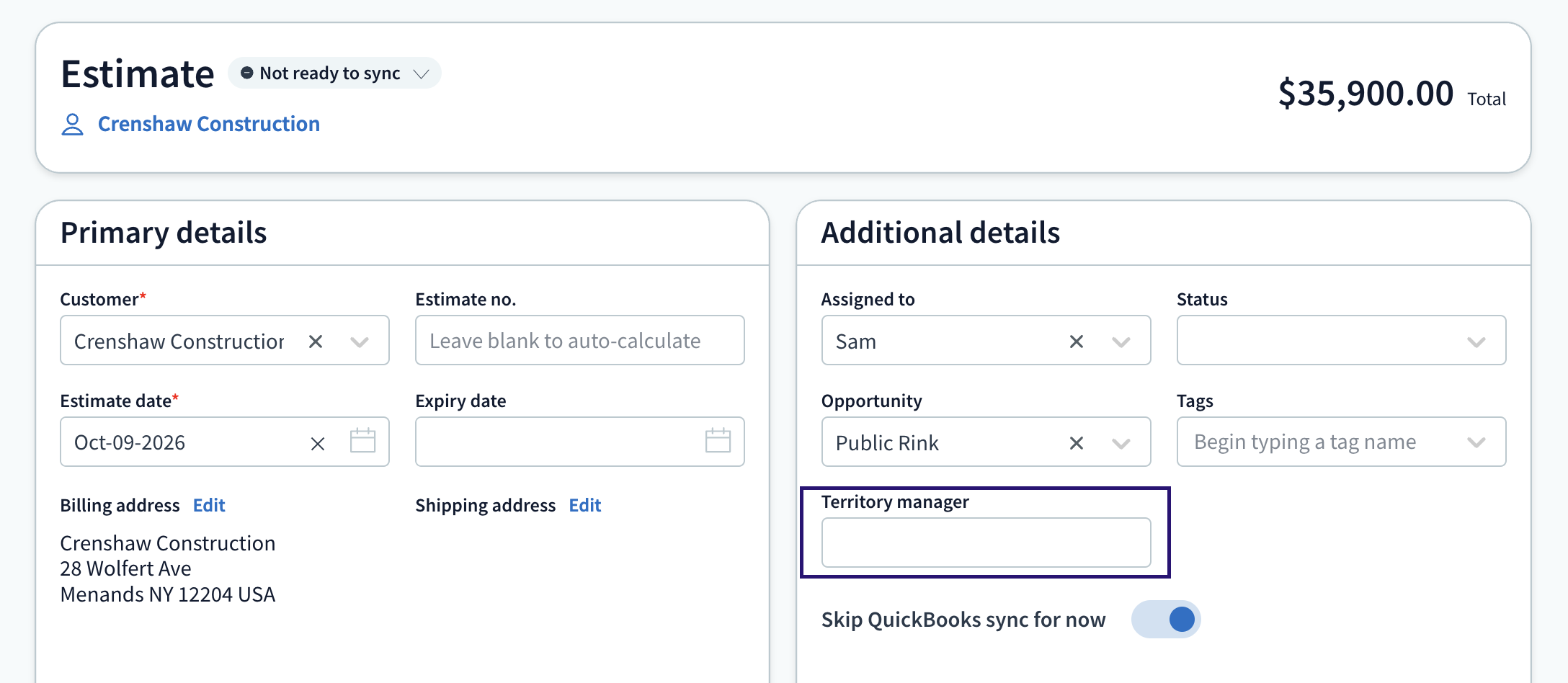
- Ask to see: Add a territory manager field to an estimate, then ask Method AI to move it to its own row. Distributors can also ask to show a customer’s part number on sales orders; field service teams can add site access details to estimates.
- What you need: A user with customization access in Method CRM. For more complex workflows, Method’s customization experts can help, with the first hour free.
- Cost to watch: Method AI is included in your Method CRM subscription at no extra charge (it is also included with a free trial). Method CRM starts at $35 per user per month on published pricing. The current promotion offers 25% off for three months for accounts with three or more users. A 10-day free trial is also available.
HubSpot Breeze (HubSpot’s AI across marketing, sales and service)
- Best for: Marketing-led teams that want one platform for campaigns, sales follow-up, and support, with AI spread across all three.
- What the AI does: Breeze Assistant drafts content and summarizes records. HubSpot’s agents handle whole jobs: the Customer Agent resolves support conversations, the Prospecting Agent researches accounts, and the Data Agent answers questions from your CRM data. You activate, configure, and monitor HubSpot’s pre-built and custom agents in Agent Hub.
- Ask to see: A summary of one of your real deals, then the Customer Agent working through a sample support question from your knowledge base.
- What you need: A Professional or Enterprise subscription for the Customer Agent, plus clean CRM data and a configured knowledge base. Check plan requirements for the other agents.
- Cost to watch: Agents run on HubSpot Credits at $10 per 1,000 on monthly billing. Since April 14, 2026, a resolved Customer Agent conversation uses 50 credits (about $0.50). Professional plans include roughly 3,000 credits a month, and credits don’t roll over.
For a head-to-head on customization and a 10-user cost example, read Method AI vs. HubSpot Breeze.
Salesforce Agentforce (for configured agents in Salesforce)
- Best for: Mid-size and enterprise organizations already on Salesforce that want governed agents working across departments.
- What the AI does: You can use Agentforce Builder to create agents that answer questions, make authorized updates to Salesforce records, and start workflows. Setup with Agentforce also lets approved admins request certain configuration changes through plain-English prompts.
- Ask to see: An agent carry out a multi-step sales task, such as updating an opportunity and preparing a follow-up email. The demonstration should also show how permissions are handled.
- What you need: An eligible Salesforce plan, an admin to configure permissions and test the agents, and a decision on the pricing model.
- Cost to watch: Flex Credits are priced at $500 per 100,000, and a standard action uses 20 credits, or $0.10. Conversations cost $2 each. Salesforce offers several pricing models, so compare per-action, per-conversation, and user-based costs before you commit.
See how the two approaches differ for a QuickBooks-based team in Method AI vs. Salesforce Agentforce.
Zoho Zia (for AI assistance in Zoho CRM)
- Best for: Businesses already using Zoho apps such as Books, Desk, or Campaigns that want AI inside a low-cost, customizable suite.
- What the AI does: Zia supports predictive lead scoring, sales forecasting, anomaly detection, questions through Ask Zia, and email drafting.
- Ask to see: Have Zia AI predict the outcome of one of your deals and explain which factors influenced its score.
- What you need: Enterprise edition or higher for the Zia sales assistant. The free edition doesn’t include Zia.
- Cost to watch: Zoho CRM’s paid plans start at $14 per user per month, billed annually. For Zia’s AI sales assistant, budget for Enterprise at $40 per user per month with annual billing, or $50 with monthly billing. Some AI features are available on lower tiers, so check the plan requirements for the capabilities you need.
Compare features, pricing, and fit for your business in our Method AI vs. Zoho Zia comparison.
Freshsales Freddy AI (for AI-assisted sales prioritization)
- Best for: Sales teams that need help deciding which contacts and deals to focus on each day.
- What the AI does: Freddy AI scores contacts, identifies deals at risk, and recommends the next best action.
- Ask to see: Freddy explaining why one contact scored higher than another, using fields and activity from your own data.
- What you need: Contact scoring and deal insights start at Pro, and revenue forecasting insights start at Enterprise.
- Cost to watch: Pro is $39 per user per month, and Enterprise is $59 (annual billing).
Pipedrive (for AI assistance in a focused sales pipeline)
- Best for: Small sales teams that want straightforward lead management, a visual pipeline, and light AI assistance.
- What the AI does: The AI Sales Assistant answers questions about your Pipedrive data, summarizes content, and creates notes. Pipedrive also offers AI-assisted report creation, email writing, and summaries.
- Ask to see: The Sales Assistant answering “Which of my deals have stalled this month, and what should I do next?”
- What you need: An admin to switch AI features on for the account. Several features are in beta and only available to selected users.
- Cost to watch: AI email drafting and summaries require Premium or a higher-tier plan, with pricing starting at $59 per seat per month. Make sure the features you need are available before committing.
Attio (for flexible customer data and AI workflows)
- Best for: Teams with nonstandard data (custom objects for partners, projects, or investors) that want AI built into their workflows.
- What the AI does: Ask Attio answers questions and can build workflows. AI attributes summarize or classify records, while a web research agent handles data enrichment inside workflows.
- Ask to see: A workflow that runs the research agent on a custom record type and writes the result back to a field.
- What you need: A defined data model and Pro or higher if your workflow requires custom objects.
- Cost to watch: Plus is $35, and Pro is $79 per seat per month (annual billing, after a July 2026 repricing). AI draws from seat and workspace credits. One hands-on Attio review measured about 18 credits per Ask Attio request.
A real Method AI example: From a request to a usable CRM change
We ran one request through Method AI on a distribution estimate screen and recorded each step. Here’s what happened.
The problem: Quotes need an account owner
Consider a distributor whose inside sales reps create most of the estimates. Territory managers are responsible for the customer accounts, but the estimate screen only displays the rep’s name.
When a quote needs follow-up, nobody can tell from the record who owns the account. Commission questions and coverage gaps get settled from memory, which is where mistakes creep in.
The fix is one field. The question is how long it takes to add it in a way the team can actually use. (See how Method handles estimates if you’re new to the screen.)
The request: Add a territory manager field
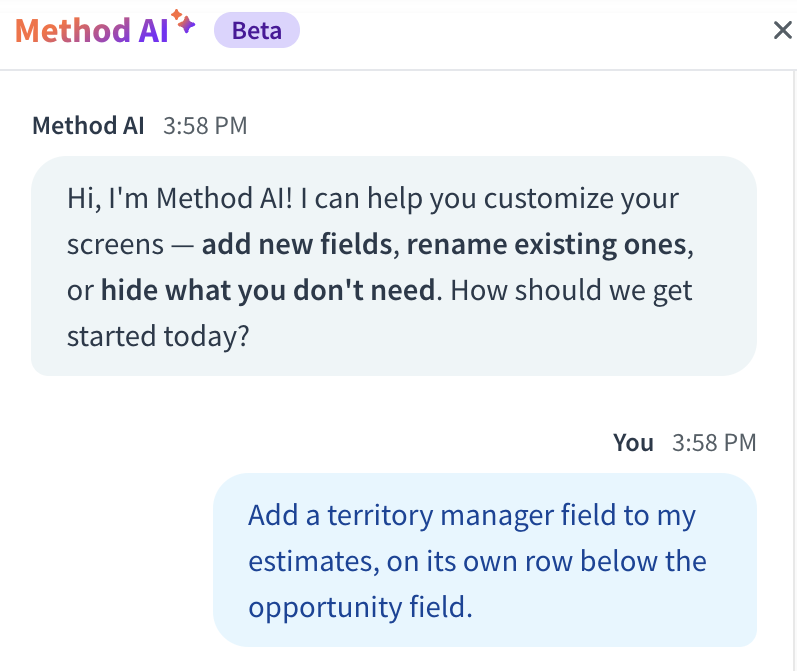
The prompt we typed into Method AI:
“Add a territory manager field to my estimates, on its own row below the opportunity field.”
The correction: Refine the layout
The check: Can the team use the result?
A field on a screen is only the start. Before you roll a change out to the team, run through these checks:
- Placement: Is the field in a logical spot for your team, and does it display properly on smaller screens?
- Storage: Enter a value, save the estimate, and open it again to check that the information was saved.
- Views: Decide whether the field should appear as a column in the estimate list so managers can filter by territory.
- Access: Who can see and edit the field? Hiding a field on a screen doesn’t restrict the data in it, so set permissions separately if that matters.
How to test an AI CRM before you buy
Test each tool on the AI job you need, using your own data. A vendor’s best demo shows you their strongest feature, and that feature may have nothing to do with your problem.
If your goal is to automate workflows, ask the vendor to show the full process, including what triggers it, where AI contributes, and which steps still need your approval.
Testing also helps you catch mistakes before they reach your customers. AI can return answers that sound confident but are wrong, so check each result against records you know well.
| AI Job | Trial Request | What to Inspect |
| Content | Draft a follow-up from an actual customer record | Accuracy, relevant detail and editing required |
| Insights | Explain which quotes or deals need attention | Evidence, assumptions and missing information |
| Execution | Complete a permitted record task | Actual result, review and permissions |
| Customization | Add or adjust a supported field or screen element | Usable configuration and refinements required |
Run every request twice: once as written, then once with a correction. The second round tells you how much work is left for your team after the first result.
Ask for a trial account loaded with a sample of your real records. Method CRM includes a 10-day free trial with a complimentary workflow build session, and most vendors on this list offer a trial or guided demo.
What does AI CRM really cost?
Two AI CRMs might advertise similar monthly prices but end up costing very different amounts. That’s because the subscription is only the starting point. AI add-ons, usage fees, implementation, and ongoing administration can all affect your final bill. The lowest-priced CRM tier may not even include the AI features you need.
Compare the numbers using the same currency and billing period. Then check how much AI usage is included, what happens when you exceed it, whether seat minimums apply, and what setup and administration will cost.
Which AI CRM fits your business?
Match your primary need and your existing systems to the shortlist below, then take the demo task into your first call.
| Your Primary Need | Business Setup | Recommended AI CRM | Demo Task to Request |
| A CRM customized to how your team works | Growing businesses using QuickBooks Online or Desktop whose processes don’t fit a standard CRM | Method AI | Add a field to an estimate and refine its placement |
| AI across campaigns, sales and support | Marketing-led team, many SaaS tools | HubSpot Breeze | Resolve a sample support question with the Customer Agent |
| Governed agents across departments | Salesforce already in place | Salesforce Agentforce | Complete an approved multi-step record task |
| Predictions inside a low-cost suite | Zoho Books, Desk or Campaigns | Zoho Zia | Explain a deal prediction on your own data |
| Knowing which deals to work today | Focused sales team | Freshsales Freddy AI or Pipedrive | Explain a contact score, or flag stalled deals |
| AI workflows on custom data | Nonstandard objects and relationships | Attio | Run the research agent on a custom record |
Operations-heavy businesses have real customization needs. Method CRM’s team spent 24,572 hours customizing CRMs in 2025, and Method AI can now handle the smaller, everyday share of those requests through conversation.
Frequently asked questions
The best AI CRM for a small business is the one whose AI handles your most time-consuming job at a predictable price. Three factors determine it: the AI task, your budget, and your setup capacity.
QuickBooks-based operations: Method AI, included in Method CRM plans from $35 per user per month. Method CRM holds a 4.4/5 rating across 330 G2 reviews, with about 90% of reviewers from small businesses.
Zoho users: Zoho Zia, as long as you budget for Enterprise ($40 per user per month).
Focused sales teams: Pipedrive or Freshsales for deal and contact prioritization.
Marketing-led teams: HubSpot Breeze, with onboarding fees and credit usage built into the budget.
Teams without a CRM admin should hold off on usage-metered agent platforms until they can model a busy month.
Yes, within the changes the vendor supports. Method AI is a working example: you describe a field, column, dropdown, checkbox, label, or layout change, and it makes the change on the screen. When a request falls outside what it supports, it tells you.
Salesforce offers a similar idea for admins through Setup with Agentforce, which proposes configuration changes for review. Neither tool builds an unrestricted system from a sentence.
An AI-powered CRM assistant responds when you need help, whether that’s drafting an email, answering a question, or suggesting what to do next. An agent is designed to go beyond suggestions and carry out actions within the permissions it’s been given.
The distinction isn’t always clear from product names. HubSpot keeps Breeze Assistant as its in-app helper and groups its autonomous agents, such as the Customer Agent and Prospecting Agent, in Agent Hub. Zoho uses Zia Agents for its autonomous tools. Other vendors call features “agents” even when users still have to take action themselves.
Adoption is still early, especially for smaller businesses. In McKinsey’s 2026 survey, about two in ten respondents said their organizations had reached the scaling phase with AI agents. Larger companies (over $1 billion in annual revenue) are pulling ahead. Among them, 40% are scaling agents in at least one function, up from 27% a year earlier. Among smaller companies, that share held flat at 22%.
Yes, but the QuickBooks connection comes from the CRM’s integration, and the AI sits on top of it. Check the two separately.
Method CRM has native two-way sync with QuickBooks Online and Desktop for supported records. HubSpot offers a native QuickBooks Online integration. Salesforce connects to QuickBooks Online through third-party connectors or MuleSoft, and Desktop needs a third-party tool or custom build.
For every tool, confirm your QuickBooks edition, which records sync, and whether the sync runs both ways.
No. Start by checking which AI features your current CRM includes on a higher tier or as an add-on.
You can also connect an outside AI assistant to your CRM data. Attio and Pipedrive offer MCP servers, and Method’s API lets you connect Method CRM to an LLM such as Claude or ChatGPT to ask questions and build reports.
These options aren’t equivalent. An outside assistant that reads your data won’t reshape your screens, and a native customization tool won’t run outreach. Replace your CRM when it can’t fit your workflow at all. For answers from other real-life users, the Method CRM community on Reddit is a good place to ask.