Method AI and Zoho Zia both bring AI into CRM, but their strengths suit different business needs. Method AI is a strong fit for teams looking for conversational customization in a CRM built around QuickBooks. Zoho Zia suits teams in need of AI-powered sales insights and assistance across Zoho’s applications.
This article compares the two tools, describes three possible workflow applications for each product, and lists additional costs beyond the subscription.
Note: Method AI is rolling out in stages, so feature availability may vary by account. For customizations beyond Method AI’s current capabilities, Method’s expert team can help assess your needs and build a solution.
TL;DR
- Method lets teams customize their CRM through conversation and keep supported customer and transaction records in two-way sync with QuickBooks Online or Desktop.
- Method AI lets employees adjust fields and layouts by describing what they need. Deeper workflows can be built through Method’s customization tools and expert services.
- Zoho Zia offers predictive, generative, and agent capabilities, with availability depending on edition and rollout.
- Compare the cost of supporting your full workflow (not just licenses). Zoho’s lower subscription prices are one factor; accounting sync, implementation, and ongoing administration also matter.
Method AI vs. Zoho Zia at a glance
Below is a snapshot of Method AI and Zoho Zia.
| What to compare | Method AI / Method CRM | Zoho Zia / Zoho CRM |
| What the AI does | Customizes CRM screens, adds or edits automation steps, and explains existing setup. | CRM customization, predictions, content, and AI agents. |
| Customer profile | Teams using QuickBooks with their own customized sales and fulfillment process. | Businesses that need low-cost CRM options or use a collection of related Zoho applications. |
| Pricing model | Per-user CRM subscription; AI included in initial packaging. | Per-user CRM plans; AI capabilities and limits vary by edition. |
| Published entry price | Quick Start: $35/user/month (includes Method AI). | Professional: $35 per user/agent per month (Introduces basic Zia features and sales automation). |
| Administration | Users request supported changes in plain language; drag and drop builder changes are drafted and reviewed before publishing. | Appropriate permissions and editions are required for setup changes. |
| QuickBooks connection | Two-way sync with supported Online and Desktop records. | QuickBooks integration with different sync directions by record type. |
| Prompt-based building | Supported fields, views, columns, layouts, buttons, validation rules, and automation steps. | Modules and workflows through supported Zia setup features. |
| Current limits | Capabilities vary by surface. Changes need review. | Features vary by tier, rollout, permissions, and supported language. |
| Operational records | Sales orders and work orders in Method CRM. | Sales orders in CRM; work orders through Zoho FSM or a custom setup. |
| Relevant fit | Adapting workflows around an existing QuickBooks file. | Using AI across CRM and a wider set of Zoho applications. |
Part 1: What Zoho Zia is built to do
Method AI and Zoho Zia both support conversational customization, with different capabilities and limits. Zia offers AI-assisted CRM setup and agent configuration within Zoho’s ecosystem. Method pairs supported screen and automation changes with a CRM built for QuickBooks-based operations. This comparison looks at what each AI can customize, then how the CRM connects business data across sales, orders, and billing.
How Zia works
Zia is Zoho’s artificial intelligence assistant that has access to Zoho’s CRM data and various business applications. In Zoho CRM, Zia assists with all sorts of tasks, from generating content to providing predictive insights for sales and customer interactions. It also offers AI agents that can be configured to perform supported tasks.
For example, an authorized user can describe a new module and let Zia propose fields and a layout. Afterward, the user will review the proposed layout and adjust the necessary permissions or properties for each field as appropriate. As previously mentioned, users’ access to specific creation tools depends on the product edition and release.
Zoho Zia pricing and which plan it sits in
Zoho’s monthly subscription is $20/month per user for Standard, $35/month for Professional, $50/month for Enterprise, and $65/month for Ultimate. The Professional version provides users with access to select AI tools, whereas the Enterprise version expands on those by providing additional predictive and agent-based tools. Each individual tool may be restricted from use due to an edition requirement or to roll out the functionality across all users in your organization.
| Zoho CRM plan (billed monthly) | 10 users/month | 25 users/month | 50 users/month |
| Professional at $35/user | $350 | $875 | $1,750 |
| Enterprise at $50/user | $500 | $1,250 | $2,500 |
| Ultimate at $65/user | $650 | $1,625 | $3,250 |
Where Zoho Zia fits best
Zia is a natural fit for businesses already using Zoho’s applications. Its capabilities span predictions, content generation, record summaries, conversational setup, and AI agents, depending on the product and edition. Teams can extend these capabilities across connected Zoho tools, though more involved workflows may still require configuration, additional products, or developer support.
Where a Zoho build gets expensive for a smaller team
Zoho’s total cost depends on the workflow a business needs. A business may also need a connector that supports its exact QuickBooks transactions, configuration of quoting and fulfillment records, data migration, training, and ongoing administration.
Zoho CRM includes sales orders, so start by checking whether its built-in functionality meets your needs before budgeting for customization. Work orders are available through Zoho FSM, which may mean managing an additional application and its connection to your CRM. More specialized requirements, such as tracking a manufacturing job through production stages, may call for a custom setup.
Summary of Zoho Zia for a QuickBooks-based business
A QuickBooks-based team should test its required transaction flow before comparing license totals. The accounting connection may be a minor requirement or a central part of the CRM decision.
What to verify before choosing Zoho
- AI capabilities: Does your chosen edition include the Zia features you need, and are they available to your team?
- Customization: Can Zia make your required changes through prompts, or will they need manual configuration or developer support?
- QuickBooks integration: Which records and fields sync, in which direction, and where must transaction edits be made?
- Sales and work orders: Do Zoho CRM’s built-in sales orders meet your needs? Would work orders require Zoho FSM or a custom setup?
- Total cost: What will you pay for the complete setup, including CRM licenses, additional applications, connectors and implementation?
Also weighing other options? See how Method AI compares with Salesforce Agentforce on features, cost, and fit.
Part 2: Method AI vs. Zia for everyday customization
Both Method AI and Zoho Zia support conversational CRM customization. The following scenarios show how each approaches everyday changes and how those changes fit into your team’s workflow.
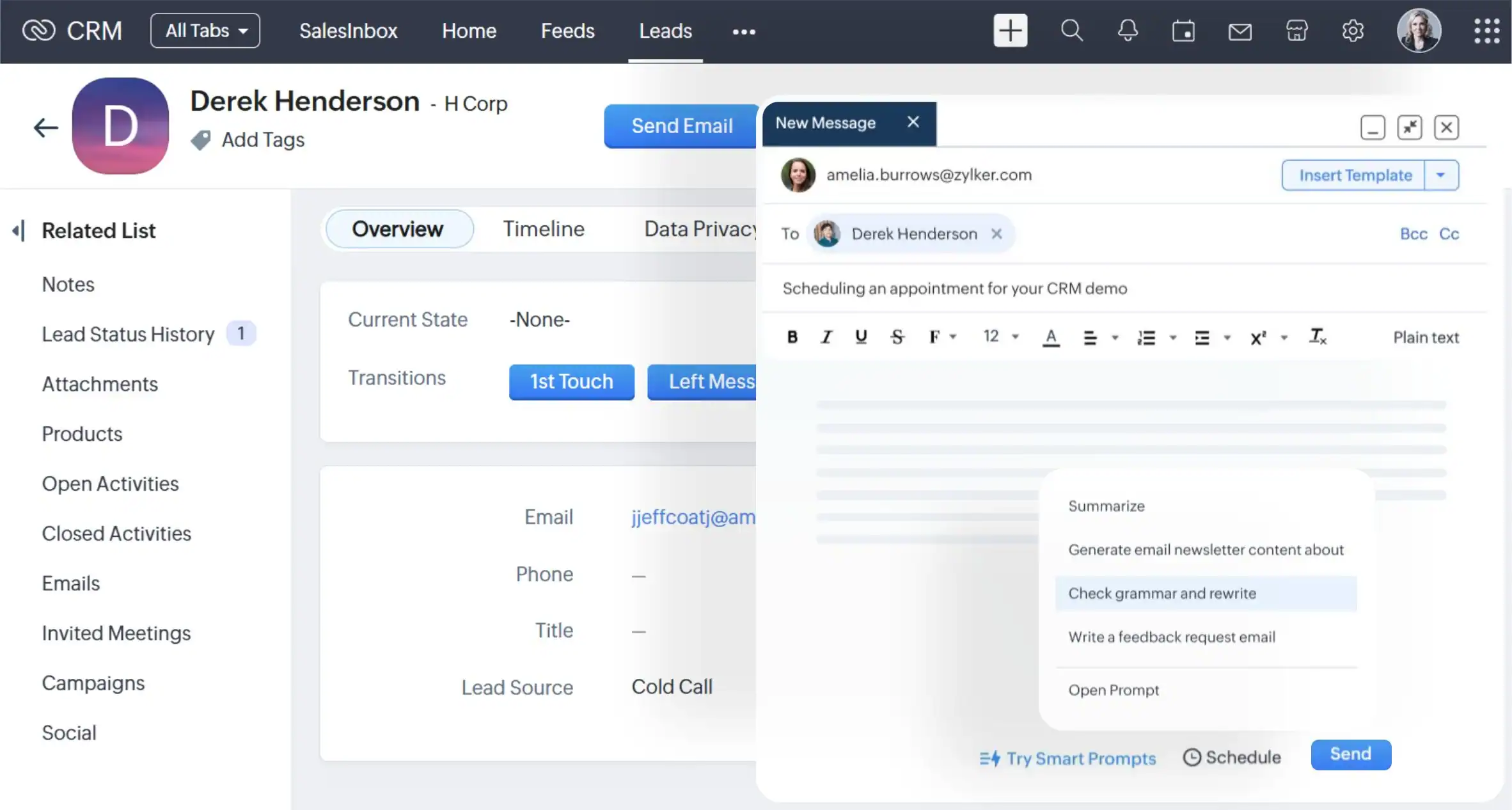
Zoho Zia overview
Zia supports prompts for selected CRM configuration tasks and offers broader AI assistance. Users need the appropriate edition, permissions, and feature access. The resulting records work within Zoho’s data model and configured integrations.
Method AI overview
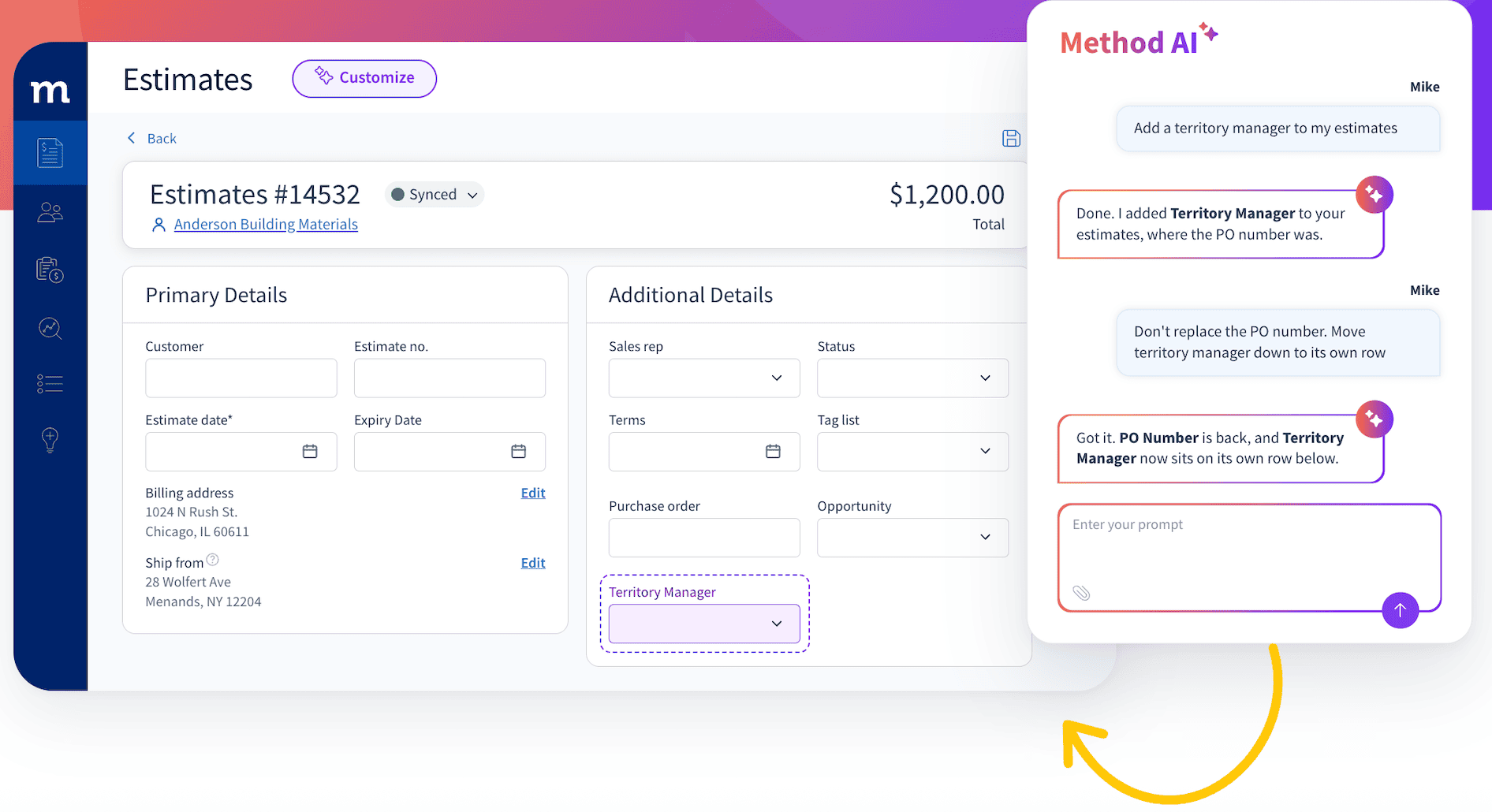
Method AI supports changes to fields and layouts through conversation. Where a form exposes a supported QuickBooks field, values can continue through Method’s established two-way sync rather than remaining only in the CRM.
Use case 1: Add build lead times to estimates
A manufacturer quotes a configured machine and needs to record its build lead time consistently.
For a team using Zoho CRM’s own quoting tools, build lead time can be recorded through custom configuration. If the team uses the native QuickBooks Online integration, imported estimates are read-only, so it must confirm where lead time will be entered and how it will appear on the customer-facing quote.
With Method, an employee can ask Method AI to add a build lead-time field to the estimate screen, giving the team a consistent place to record how long production will take. The team should check the customer-facing estimate template separately if that information also needs to appear on the quote.
For either platform, adding a custom field does not automatically make its value sync to QuickBooks.
Use case 2: Show customer and internal part numbers together
A distributor and an end user will have different identifier numbers for their products. Employees and customers need to know they are referring to the same product.
The Zoho CRM system provides native sales order functionality and custom fields. The team can customize the appropriate product information in Zoho and utilize its own terminology. Whether the customer’s part number carries over to other applications depends on which field mappings were chosen during the Zoho integration.
Method AI helps put the product details employees need directly on the sales order screen. An employee can ask it to display an existing customer part-number field beside the distributor’s internal item number and adjust supported column labels to match the team’s terminology. This lets staff check both identifiers while reviewing the order, reducing the need to cross-reference spreadsheets or clarify product numbers with the customer.
Use case 3: Tracking work beyond the sales order
A manufacturer needs to track a job after the customer places an order. Employees need one place to check its production stage, scheduled date and relevant notes instead of searching several spreadsheets.
With Zoho, the team can use Zoho FSM for service work orders or configure a custom CRM module for manufacturing jobs. Zia can assist with supported module-creation tasks where available; the team still needs to configure how the job connects to the customer and order.
Method CRM provides built-in work order capabilities. An employee can ask Method AI: “Move the job status and scheduled date to the top of the work order screen.” Method AI can make layout changes using existing fields, putting the details employees check most often in view.
What each one actually costs over two years
Method AI is included in Method Quick Start at $35/user/month. Method Pro, at $59/user/month, adds the estimate, sales-order and invoice capabilities used in the examples above. For Zoho, Professional at $35/user/month and Enterprise at $50/user/month provide access to the Zia capabilities discussed here, with availability and limits varying by feature.
The comparison below uses monthly billing and the same number of users throughout 24 months. All figures are in USD and exclude taxes, promotional discounts and implementation costs.
| Two-year subscription cost | 10 users | 25 users | 50 users |
| Method Quick Start — $35/user/month | $8,400 | $21,000 | $42,000 |
| Method Pro — $59/user/month | $14,160 | $35,400 | $70,800 |
| Zoho Professional — $35/user/month | $8,400 | $21,000 | $42,000 |
| Zoho Enterprise — $50/user/month | $12,000 | $30,000 | $60,000 |
These totals cover CRM subscriptions only. The full cost depends on the configuration, integrations and support your workflow requires. Zia feature availability also varies by edition and eligibility requirements, so confirm that your chosen plan and team size support the capabilities you need.
| Additional cost | Method | Zoho |
| QuickBooks connection | Built-in sync; special mappings may require work | Native integration available; other sync requirements may need an extension |
| Work orders | Method CRM capability; configuration varies | Zoho FSM or a custom process may be needed |
| Implementation and migration | Scope-dependent | Scope-dependent |
| Training and ongoing admin | Depends on customization and team roles | Depends on apps, permissions, and workflows |
| Changes after launch | Supported AI changes or expert services | Supported Zia changes or configuration services |
The value of either option depends on the work it removes from the team. A lower license total does not establish a lower overall cost.
Method AI vs. Zoho Zia: feature comparison
| Capability | Method AI / Method CRM | Zoho Zia / Zoho CRM |
| QuickBooks Online workflows | Create and update transactions in Method, with two-way QuickBooks sync | Native integration syncs selected records both ways; imported transactions are read-only |
| QuickBooks Desktop connection | Built-in integration for supported records | Requires a separately verified connector |
| Conversational customization | Ask Method AI to make supported changes to CRM fields, screens and layouts | Ask Zia to assist with supported module and workflow setup; availability varies |
| Sales order management | Sales orders within a customizable, QuickBooks-connected CRM | Native sales orders; accounting sync depends on the integration |
| Work order management | Built-in work orders with customizable screens and fields | Available through Zoho FSM or a custom setup |
| Workflow automation | Customization tools and expert services to adapt operational processes | CRM workflows and eligible Zia tools; setup depends on requirements |
| Connections to other applications | Integrations and API for extending your existing setup | Connected Zoho applications and third-party integrations |
| Expert customization support | Method’s team can scope and build custom workflows and integrations | Zoho services and partners; scope and availability vary |
Where Zoho Zia stands out
Zia offers sales predictions, generative writing, AI agents, and supported prompt-based workflow creation. For teams that prioritize understanding their pipeline or reducing time spent preparing sales communications, these capabilities may be a deciding factor.
Where Method AI stands out
Method AI focuses on helping teams adapt their CRM through conversation. Employees with the appropriate access can describe a supported change (such as adding a build lead-time field to an estimate screen, displaying existing product identifiers side by side, or moving job details to the top of a work order) and have Method AI make that adjustment. This makes everyday customization more accessible.
Which one should you choose?
Use the accounting workflow and the work your team needs AI to perform as your decision criteria. Compare the actual configuration required, not just the number of features in each product.
Follow your workflow
- Considering Zoho? Confirm the required Zia features and the total cost of the accounting workflow before choosing an edition.
- Need estimates, orders, and work orders linked to QuickBooks? Test the corresponding workflows in Method.
- Accounting sync decides the purchase? Demonstrate the same transaction and field change in both configurations.
- Still working from spreadsheets? Map where data is copied before deciding which CRM or integration to buy.
For teams that rely on QuickBooks, Method’s free 10-day trial is a practical place to start. Use real quotes and orders to test supported AI customization and the accounting flow your staff needs.
Frequently asked questions
Method is worth prioritizing if employees need to create and update supported transactions in the CRM and sync them with QuickBooks Online or Desktop. Zoho may fit if your priority is its wider application ecosystem. Compare the exact records, fields and sync directions your team needs before choosing.
Method AI lets users with appropriate access describe supported screen, field and layout changes in plain English. Zia also supports conversational setup tasks, with availability depending on the feature and edition. During your evaluation, ask each tool to make a change your employees actually need and review the result.
With Method, teams can use the platform’s customization tools or work directly with Method’s expert team. With Zoho, the solution may involve CRM configuration, connected applications or partner support. Ask each provider how it would deliver your most complex requirement, who would maintain it and what it would cost.