
You can connect Method CRM to Claude so Claude can work with the information in your Method account. The connection uses Method’s API, which is an interface that allows Method to exchange information and instructions with other software. In this case, it lets Claude access the Method data you authorize so you can ask questions about your business or get CRM work done.
If you want control over exactly how Claude interacts with Method, Method’s team can build a custom MCP for your business. This can be configured around your specific workflows, the records and fields you want Claude to access, and the actions Claude is allowed to take.
>>> Reach out to Method’s team for a custom MCP here.
Definitions:
- API: How two pieces of software talk to each other. Method’s API lets Claude, or another LLM, read and change your Method data.
- MCP: A connector that sits between Claude and Method’s API, controlling what Claude can see and do.
If you prefer to set up the connection yourself without an MCP, Method provides an API key and documentation that Claude can use to understand the available records, fields, and endpoints.
Be careful and understand the risks if you decide to give Claude or any other LLM direct access to Method’s API: the API includes permissions that allow Claude to make changes to your Method account, not just read information. For example, direct API access can give an LLM permissions to modify and even delete items like invoices, estimates, customer data, and much more. By extension, this can also affect your QuickBooks file, and if any data is deleted, it may be beyond recovery. This is why the recommended approach is to have a custom MCP built by Method’s customization team.
If you do allow Claude to use the API, make sure you understand what actions the connection can perform and start with read-only requests where possible.
Key Takeaways
- A Method API key is required, but a separate Claude API key isn’t.
- Method’s documentation gives Claude the context it needs to work with the API correctly.
- Claude needs both code execution permission and network access to Method’s API.
- Keep the Method API key out of your conversation with Claude, and never bake it into a Skill.
- Let Claude read your Method data first. Hold off on “create” and “update” permissions until you trust the setup.
Warning: Method’s API can create, update, and delete records (and because many records sync to QuickBooks or Xero, a deletion in Method can mean a deletion in your accounting software as well). Read more about the risks here.
If you would rather connect with limited permissions, contact our team for a custom MCP instead.
What do you need to connect Method CRM with Claude?
Here’s the short list of what has to be in place:
- A Method API key.
- Method’s API documentation
- Claude with code execution turned on.
- Network access so Claude can reach Method’s API.
- A secure way for Claude’s execution environment to use your API key.
In practice, a request moves through four steps:
- You ask a question
- Claude reaches out to the Method API
- Method sends back the data
- Claude turns that into an answer
Make sure Claude can connect to Method
Claude needs permission to connect to Method’s API before it can do anything with it.
Team and Enterprise accounts often have this locked down at the organization level, so your admin may need to check two things:
- Skills and code execution are enabled.
- Claude is allowed to connect to rest.method.me.
Not sure if these are switched on? Whoever manages your organization’s Claude settings can tell you.
Generate your Method API key
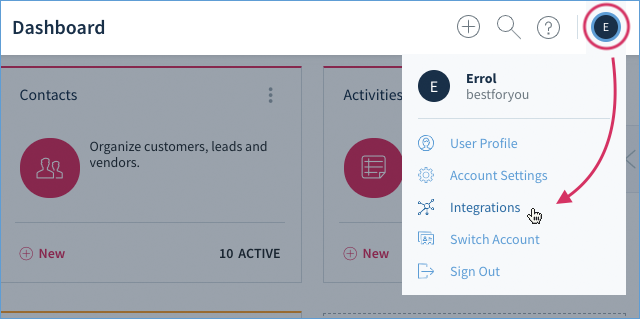
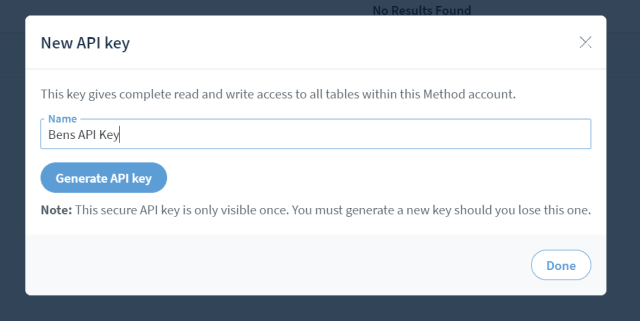
To generate a key:
- Log in to the Method account you want Claude to work with.
- Open the account menu.
- Select Integrations.
- Select API.
- Click New under API keys.
- Give the key a name you’ll recognize later.
- Generate the key.
- Copy it and store it somewhere secure.
Copy your key the moment it’s created. Method shows it to you exactly once, and there’s no way to view it again afterward.
This key is what authenticates Claude’s requests to your Method account. Without it, the API won’t recognize the request as coming from you.
Note: Creating API keys requires the Admin role in Method.
Warning: Handle this key the way you’d handle a password. Keep it out of public repositories, screenshots, and shared documents. If you suspect someone else has seen it, revoke it in Method and generate a replacement.
Give Claude Method’s API documentation
Share the link to developer.method.me with Claude, along with a plain description of the task at hand.
For example: “Use Method CRM’s API documentation to help me find a customer and retrieve their open invoices.”
From there, Claude works out the endpoints, fields, and request format on its own by reading through Method’s documentation, including the OpenAPI specification built specifically so tools like Claude can parse it without opening the interactive site.
You won’t be writing any API calls by hand. Claude handles that translation from your request into the right technical steps.
Make your Method API key available
For Claude to talk to Method, it needs your API key somewhere it can reach it.
You can keep things simple by storing the API key in a local file and allowing Claude to read it when a task requires API access. That way, the key stays out of the chat itself.
Important: An API key is a sensitive credential. Giving Claude access to a file containing your API key means Claude can read that credential while completing the task. Keep the file private, don’t store it in a shared folder, and don’t include the key in screenshots, Skills, example code, or conversations.
Prefer a more secure setup? Connect with our team for help choosing the best way to provide your API credentials securely.
Test Claude with a read-only Method request first
Pick a test where you already know what the right answer looks like.
Try something like: “Find [company name].” Then follow up with: “Show me this customer’s open invoices.”
Look for these things:
- Claude pulled up the correct customer, not a similarly named one.
- What Claude shows matches what you see when you log into Method directly.
- Claude stuck to what you asked for, nothing extra.
- The response is easy to follow and accurate.
If anything looks wrong, go back and check your setup before you move on to new workflows or turn on write access.
What can Claude do with the Method API?
Retrieve Method information
Through the API, Claude can look up records including:
- Customers
- Activities
- Orders
- Estimates
- Invoices
Try asking: “Show me [company]’s open invoices.”
Summarize Method information
Claude can also combine several pieces of Method data into one clear answer.
Ask something like: “Review [company] and tell me what needs my attention.”
A review like that might cover recent activity, open orders, outstanding estimates, unpaid invoices, and anything due for follow-up.
Create or update Method records
Beyond reading data, Method’s API also lets Claude create, update, and delete records.
Once you’ve tested a workflow and trust how it behaves, you might try: “Create a follow-up activity for [company] next Friday.” Or: “Add this meeting note to [company]’s account.”
Note: Write actions, especially deletions, carry more risk than simple lookups. Deleted records can be difficult or impossible to restore, and changes to records that sync with your accounting software may also be reflected there. Save these types of workflows for after you’ve confirmed Claude handles read and update requests the way you expect.
Understand the risks and limitations
A Method API key is a powerful credential
Whatever access the Method user has, the API key tied to that user has too.
Method doesn’t split this into narrower permissions right now. There’s no way to generate a key that only reads invoices, or one that’s blocked from ever writing changes.
Given that, a few habits are worth building in:
- Build each workflow around the specific data it needs, nothing broader.
- Be deliberate about who gets access to the Claude workflow.
- Test with read-only requests before you open the door to changes.
- If you have any doubt the key leaked, revoke it and issue a new one right away.
Changes may affect QuickBooks or Xero
Method syncs certain records with QuickBooks or Xero. If Claude edits or deletes one of those records through the API, that edit can carry over into your accounting software too.
Run workflows through careful testing before you let Claude touch anything connected to live transactions.
The Method API has its own limitations
Claude works within what the Method API actually supports, which is narrower than everything you can do inside Method itself.
Keep a few limits in mind:
- You can’t use the API to turn invoices or estimates into PDFs.
- Credit card capture and payment processing aren’t available through the API.
- Some features work differently depending on whether you use QuickBooks or Xero.
- The API limits how many requests you can make within a set period.
Frequently asked questions
No. This setup relies on Claude’s built-in code execution to reach Method’s API directly. It’s different from building an application that calls the Claude API from the outside.
No. As long as Claude has network access and a secure way to use your API key, it can read Method’s documentation and make API requests on its own. For businesses that want a more controlled or customized setup, Method can also build a custom MCP tailored to their workflows and requirements.
Yes. Method’s OpenAPI specification gives Claude a clear reference for the API, including its endpoints, fields, and expected behavior.
Yes, Method’s API allows it. That said, hold off on enabling updates until you’ve tested read-only workflows and you understand what’s at risk if something goes wrong.
No. Method hasn’t built scoped or read-only keys yet. Every key carries the full permissions of the user it’s tied to.
No. Keep it out of the conversation and out of any Skill you write. Use a secure, supported method to give Claude’s execution environment access to the credential instead.