
Method AI helps teams customize CRM screens, fields, views, and supported workflow logic using natural language, making it a strong fit for businesses that want adaptable workflows connected to QuickBooks. Salesforce Agentforce helps organizations build agents that execute approved tasks across Salesforce and connected applications. The better fit depends on whether your priority is customizing a QuickBooks-connected CRM or deploying agents across business processes.
TL;DR
- Method AI lets users customize their CRM to fit their business needs using natural language.
- Agentforce helps organizations using Salesforce create autonomous agents from both their Salesforce integration and other integrated applications.
- Agentforce offers usage-based pricing, while Method AI’s initial offering has no separate per-action charge.
- Your overall investment cost will depend on your licensing, integration, implementation, and future administrative costs.
Method AI vs. Salesforce Agentforce at a glance
Method AI and Salesforce both use AI, but their purposes and use cases differ significantly.
| Decision factor | Method AI/Method CRM | Agentforce/Salesforce |
| Primary purpose | Customize CRM screens, add or edit supported automation steps, and explain existing setup | AI agents performing workflows across connected systems using Salesforce |
| Typical customer | QuickBooks-based small business looking for adaptable workflows | Organizations needing governed automation across departments of their organization. |
| Pricing model | Per-user CRM subscription; AI included in initial packaging | CRM licensing plus usage-based or other Agentforce pricing |
| Published starting price | CRM Quick Start: $35/user/month | Flex Credits: $500 per 100,000 credits; eligible underlying CRM required |
| Administration | Users with customization access can request changes; more advanced builds may require an experienced customizer or Method’s customization team | Set up permissions, test agent configuration, governance. |
| QuickBooks | Built-in, two-way QuickBooks Online and Desktop sync for supported records | QuickBooks Online integration through additional connector capabilities |
| Customization | Conversational changes to supported CRM screens, fields, list views, and workflow logic | Conversational setup, including supported fields and pages |
| Time to first change | Supported form changes can be made in the current session | Depends on access, configuration, testing, and approval |
| Current limitations | Capabilities vary by customization surface; complex builds may require manual configuration | External actions require appropriate connections, permissions, and configuration |
| Core use case | Customizing CRM screens and operational workflows for businesses using QuickBooks | Deploying governed AI agents across business processes |
Pricing was checked on October 2, 2026, against the published Method pricing page and Salesforce Agentforce pricing page. Actual costs depend on the selected plans, configuration, and required integrations.
What this comparison covers: We compare the products’ AI capabilities and the CRM platforms they work within. Conversational Salesforce administration refers specifically to Setup with Agentforce. QuickBooks sync, sales orders, and work orders are underlying platform capabilities; their availability depends on the selected product and configuration.
What is Salesforce Agentforce built to do?
Salesforce Agentforce is a platform for building AI agents that answer questions and carry out tasks across sales, service, and other business functions.
How Agentforce works
Agentforce uses a combination of data from Salesforce, instructions, and permitted actions to help organizations complete specific tasks, such as answering customer inquiries, updating existing records, or initiating workflow automation. Agents can be configured by authorized personnel using Agentforce Builder to access approved information and application systems.
Additionally, Salesforce has introduced Setup with Agentforce, allowing authorized users to submit requests for permitted configuration modifications via conversational means, including creating custom fields, objects, pages, and flows. All submitted proposed configurations adhere to Salesforce’s established governance process for requesting permissions and approvals.
Agentforce pricing and how it’s metered
Salesforce offers multiple Agentforce pricing structures. For example, Flex Credits are priced at $500 per 100,000 credits, and a standard Agentforce action uses 20 credits, equivalent to US$0.10 per action. An action is a task an agent executes; this means a single request or workflow may involve multiple actions. For example, 5,000 standard actions would consume US$500 worth of credits.
Salesforce also lists conversation-based pricing at US$2 per conversation for applicable offerings. This is a separate pricing option, rather than an additional charge applied to every Flex Credit action.
Illustrative Agentforce action costs
- 1,000 actions: $100 at the standard action rate.
- 5,000 actions: $500 at the standard action rate.
- 10,000 actions: $1,000 at the standard action rate.
Where Agentforce can be a stronger fit
Agentforce enables you to create agent types that can leverage your Salesforce records, execute pre-approved actions, and interact with other connected applications. Additionally, Agentforce’s builder and governance tool sets enable more sophisticated deployment environments across multiple departments.
Additionally, as part of Salesforce’s broader ecosystem of capabilities, there are additional options via APIs, integrations, and the suite of Salesforce admin tools. The ability to leverage these options is important to customers who are planning to automate their customer service operations, integrate multiple applications into a single solution, or enable multiple business processes for an agent.
Where Agentforce gets expensive for a smaller team
The total investment depends on exactly what the business needs agents for. Beyond Salesforce CRM licensing and Agentforce usage, costs may include implementation, data migration, integrations, training, and ongoing administration.
Small companies should first determine which of their current processes they will replace and which they will keep connected. If only a small number of updates to the quoting process are needed, there could be additional implementation work related to the larger platform.
What a customization request looks like in Agentforce
Let’s say a sales manager wants to have an Account-Owner field in each of their quotes. An authorized user can make this change by requesting the field as part of setup using Agentforce. Once requested, Salesforce will provide you with a proposed configuration for your review. After reviewing the sample configuration, you can confirm the supported change before applying it.
Before using the change, you’ll need to check the relevant field permissions and layouts, along with any reports or automation that depend on it. The time needed will vary with the request and the organization’s testing and approval practices.
Summary of Agentforce for a QuickBooks-based business
What to consider
- Autonomous agents can execute approved tasks across Salesforce processes.
- Conversational setup supports selected administrative changes.
- Enterprise governance provides structured control over configuration.
- Flex Credit costs depend on agent activity.
- QuickBooks integration requires the appropriate connector and configuration.
- Implementation and ongoing administration may involve additional resources.
For a QuickBooks-based business, the central question is whether it needs Salesforce’s agent platform or a CRM that connects directly to its existing accounting workflows. That distinction should guide the evaluation before the business commits to implementation.
Method AI vs. Agentforce for everyday customization
The difference becomes clearer when both products are evaluated against the same operational requirement. The following examples examine who makes the change, which systems are involved, and what employees need to maintain afterward.
Agentforce customization overview
Salesforce offers conversational administration through Setup with Agentforce, allowing authorized users to request supported changes to objects, fields, pages, and flows. More advanced requirements can use Salesforce’s configuration tools, APIs, and expert support.
Method AI customization overview
Method AI turns plain-language requests into changes to your CRM, from customizing screens, fields, tables, and list views to adding button actions, validation rules, calculations, and workflow steps. It can also explain existing screens and action sets, help troubleshoot workflows, and undo supported changes. More advanced requirements can use Method’s customization tools, API, and in-house customization team.
See Method AI customization in action
Watch this webinar for a closer look at Method AI, then explore the workflow comparisons below.
Use case 1: Every quote carries an owner
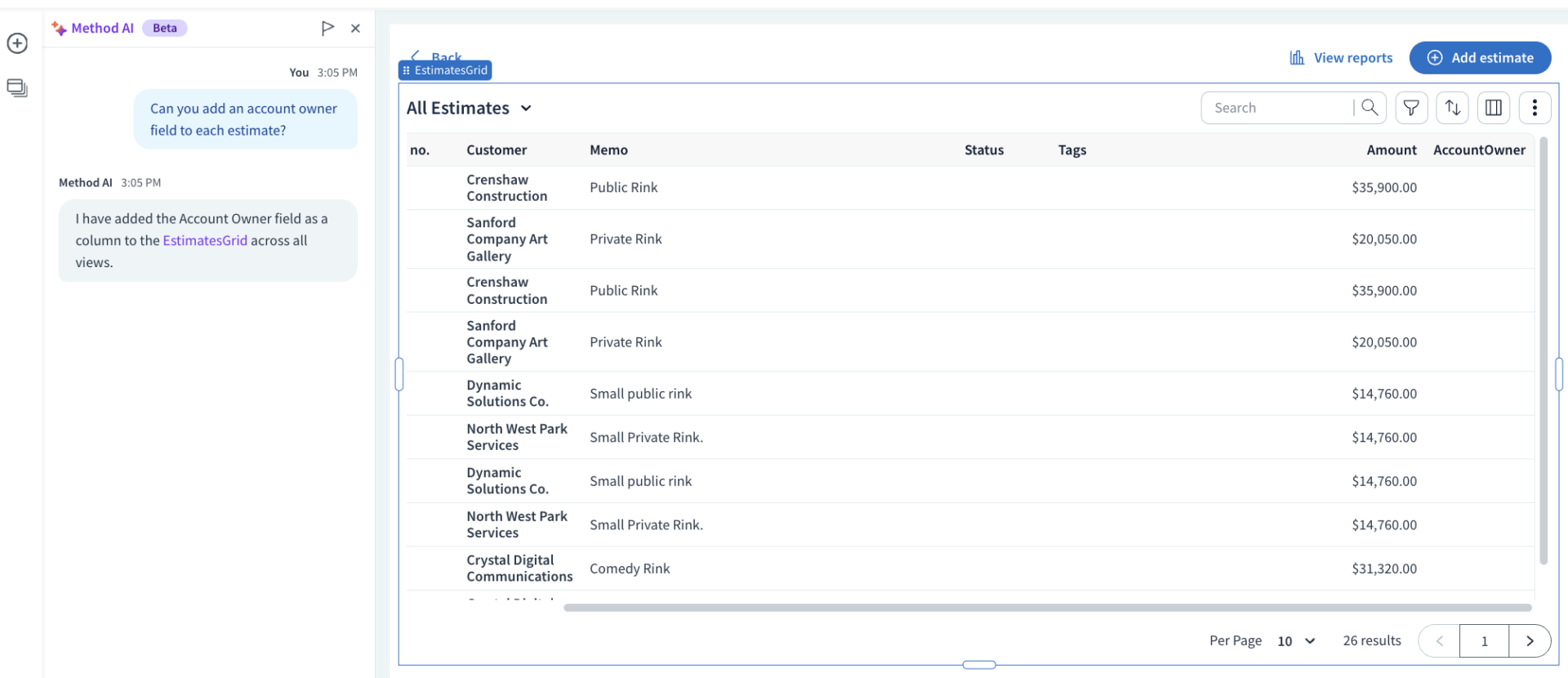
A manufacturer sends estimates without a consistent Account Owner field. Employees have difficulty identifying which employee is best suited for follow-up calls based on previous communications. Management has requested this information be added as a default field in all future estimates sent to clients.
An authorized Salesforce user could use Setup with Agentforce to create a custom field, verify the system-proposed changes, and apply them to the appropriate layouts. The team should also decide whether the Account Owner field should be used for other functions, such as reports, task assignments, or other automated workflows.
Using Method AI in App Builder, a user with customization access could request an Account Owner field on an estimate screen without manually adding it. Automatically assigning an owner would require additional workflow logic, which could be configured through supported AI changes or Method’s broader customization tools.
Use case 2: Hide cost and margin from the copy the floor works from
A production team will need work instructions, materials, and delivery dates for their workflow. Employees in the production area do not need access to sensitive cost/margin data. The business wants to control access for these roles to different parts of the system while maintaining one set of job records.
Salesforce offers three methods to control access. Field-level security allows an admin to limit which fields are visible on a record. Permission sets allow admins to group related actions into a single entity that can be granted to users. Configurable page layouts provide an additional level of granularity by controlling how fields appear on pages. All three can be used together to hide sensitive data while still allowing users to work with the same underlying record.
Method AI users can hide supported fields or columns simply by asking in plain English. However, hiding a field does not restrict the data within that field. Therefore, an administrator will need to configure permissions to prevent employees from viewing sensitive financial information.
Use case 3: Add a check before an estimate is sent
A manufacturer wants employees to confirm site measurements before emailing an estimate. If confirmation is missing, the system should display a message and stop the email from being sent.
An authorized Salesforce user can use Setup with Agentforce to help create supported flow logic. The check must be connected to the relevant estimate-sending process and tested before use.
A Method user with customization access can ask Method AI in App Builder to add a check at the beginning of the Email button’s action set.
Illustrative annual subscription costs for 10 users
These figures compare selected CRM subscriptions, rather than complete deployment costs or equivalent AI packages. Prices are in USD. Billing terms, included AI allowances, additional licenses, integrations, and implementation costs must be assessed separately.
| Cost component | Method CRM Pro | Salesforce Sales Cloud Core |
| 10 users/month | $590 | $1,950 |
| Annual CRM subscription | $7,080 | $23,400 |
| AI consumption | Consumption of AI included with package price | 500,000 Flex Credits per organization annually; additional Agentforce capabilities and usage may cost extra |
| Implementation | Depends on customization scope | Depends on deployment scope |
| QuickBooks integration | Native two-way sync included for supported records and fields | Connector licensing and configuration may cost extra |
| Migration and training | Existing workflows and records will dictate | Existing workflows and records will dictate |
| Illustrative annual base | $7,080 | $23,400 before AI usage |
Method AI vs. Agentforce: Feature comparison
The table below offers an in-depth comparison of Method AI vs. Agentforce.
| Feature | Method AI/Method CRM | Agentforce/Salesforce |
| Conversational customization | Supported screens, fields, list views, and workflow logic | Supported setup and configuration tasks |
| Autonomous agents | Not part of initial AI scope | Available through Agentforce |
| QuickBooks Desktop sync | Two-way sync for supported records | Requires a separate integration approach |
| QuickBooks Online integration | Two-way sync for supported records | Available through MuleSoft connector |
| AI billing | Included under initial packaging | Depends on offering: included allowances, consumption pricing, or per-user licensing |
| Sales orders | Supported in Method CRM | Depends on selected products and configuration |
| Work orders | Supported in Method CRM | Supported through relevant Salesforce service capabilities |
| Advanced automation | Supported AI changes, App Builder, Action Editor, and customization services | Flows, agent actions, and platform tools |
| Permissions | Configurable user access in Method CRM | Enterprise permission and sharing controls in Salesforce |
| External integrations | Method API and configured integrations | Salesforce APIs, connectors, and MuleSoft integrations |
| Expert assistance | Method customization team and partners | Salesforce services and partners |
Capabilities available in Agentforce and not in Method AI
Agentforce supports autonomous agents that execute approved actions across Salesforce and connected applications. Its agent-building and governance capabilities suit organizations deploying AI across multiple business processes. Method AI focuses on CRM customization and supported workflow changes.
Capabilities available in Method and not in Agentforce
Method provides a native two-way QuickBooks integration across supported Online and Desktop records, with conversational customization directly within its operational CRM. Salesforce can integrate with QuickBooks, but the appropriate connector and mapping must be configured. Method also offers an expert customization path for requirements that exceed its AI’s current capabilities.
Which one should you choose?
The decision depends on the business process that needs improvement. A company building autonomous agents across several departments has different requirements from a smaller distributor trying to connect estimates, orders, and accounting without replacing QuickBooks.
Which workflow needs attention?
- Autonomous work across departments: Evaluate Agentforce’s agent capabilities, governance, and integration requirements.
- Customizing CRM around QuickBooks: Evaluate Method’s supported AI changes and existing operational workflows.
- Unclear operational requirements: Map the process and identify the system responsible for each record before selecting either platform.
- Spreadsheets alongside accounting: Test whether a connected CRM can address the immediate workflow gaps before undertaking a broader replacement.
Method offers a 10-day free trial to explore its QuickBooks-connected CRM and supported AI customization. Businesses evaluating Agentforce can explore Salesforce’s trial or demo options. For either platform, test the workflows, permissions, and integrations your team needs.
Explore a CRM that fits your existing business
Method AI and Agentforce solve different problems. Businesses should determine whether they need autonomous agents across a broader platform or an adaptable CRM integrated with their existing accounting system, then test the relevant workflows before investing.
Frequently asked questions
Salesforce doesn’t offer a native QuickBooks Desktop connector, so connecting Agentforce to QuickBooks Desktop requires a third-party integration or a custom build. Before committing to Salesforce, check which integrations support your version of QuickBooks Desktop, which records they sync (such as customers, invoices, or items), and whether the sync runs one way or both ways.
Yes, but the options depend on where you made the change. In Quick Customize with AI, you can ask it to undo the last change, repeat Undo to reverse earlier changes, or reset the screen to its published version. In App Builder, Undo supports screen changes; you can archive the draft to discard other unpublished changes. In Action Editor, Undo reverses the last AI change.
While not every Salesforce deployment requires a full-time administrator, some level of administration is still needed to manage user permissions, configurations, integrations, and changes. Setup with Agentforce can assist with supported administrative tasks, while an authorized person remains responsible for reviewing changes and managing the environment.
Method’s customization team can help with requests beyond Method AI’s supported capabilities, including more complex calculations and multi-step workflows. The initial consultation includes a complimentary hour, allowing businesses to discuss the scope before committing to a larger build.