
HVAC contractors handling commercial, specialty, or bid-driven work need a CRM that supports more than basic lead management. The right platform should connect complex accounts, bids, estimate revisions, approvals, project handoffs, and ongoing service. In this guide, we’ll take you through the best CRMs for HVAC contractors and why they work.
TL;DR
- Commercial contractors need account records that support multiple contacts, locations, projects, and opportunities.
- Bid-heavy teams need tools that connect estimating, approvals, follow-up, and project handoffs.
- Some platforms prioritize marketing automation or enterprise administration over operational workflows.
- A QuickBooks logo alone does not show what data syncs or how the integration works.
- Choose the CRM that best supports your complete sales, operational, and accounting workflow.
How we compared the best CRMs for HVAC contractors
We compared these CRM options using publicly available product information, including vendor websites, documentation, and integration details. We focused on capabilities relevant to specialty and commercial HVAC contractors, such as account management, bid tracking, workflow flexibility, management visibility, and accounting integrations.
Disclosure: Method is our product. We’ve included it because it meets the criteria used for this comparison. We also identify situations in which another CRM may be a better fit.
What should HVAC contractors look for in a CRM?
Here are some questions HVAC contractors should ask when looking for a CRM:
Can one company hold its contacts, locations, documents, service history and opportunities?
Can the pipeline support bids, revisions, follow-up, and handoff into field service workflows?
Which accounting platforms does it support? For contractors using QuickBooks, does it connect with QuickBooks Online, QuickBooks Desktop, or both (and which records sync)?
Can stages, fields, approvals, and handoffs change?
Can leaders see stalled bids, recent activity, expected revenue, and relevant estimate, invoice, or job information?
Can estimators, sales staff, and managers adopt it without unnecessary complexity, such as having a mobile app?
How CRM needs differ across HVAC businesses
HVAC companies do not all win and deliver work the same way. Service-focused businesses often prioritize scheduling, dispatching, technician coordination, and recurring maintenance. Commercial and specialty contractors typically place greater emphasis on complex accounts, bids, estimate revisions, approvals, and project handoffs.
Many HVAC companies perform both types of work. However, this guide focuses primarily on CRM requirements for commercial, specialty, and bid-driven contractors. It also considers how those CRM capabilities connect with service workflows after a job is won.
The need for consistent processes becomes more important as an HVAC company adds teams, locations, or acquired businesses. As Ken Goodrich, an experienced HVAC and home-services operator and CEO of Generator Partners, explains:
“When you’re running one truck, you can wing it. The moment you’re running ten trucks, or ten trucks across three markets like we are now, undocumented admin becomes the single biggest risk in the business.”
His experience highlights the importance of choosing a CRM that can standardize workflows, support consistent reporting, and give management visibility across the business.
Best CRM for HVAC contractors at a glance
| CRM | Best for | Contractor workflow fit | Workflow flexibility | QuickBooks integration | Key consideration |
| Method | QuickBooks-connected custom workflows | High | Very high | Native QuickBooks Online and Desktop sync | Strong when the workflow crosses sales and operations |
| Followup CRM | Construction bid and sales tracking | High | Moderate | Confirm against your accounting workflow | Purpose-built around construction sales |
| HubSpot | Sales and marketing automation | Moderate | High | QuickBooks Online integration is available | Contractor operations usually live elsewhere |
| Pipeline CRM | Focused construction sales management | High | Moderate | QuickBooks Online connectivity is available | Sales CRM rather than full contractor software |
| Pipedrive | Visual opportunity management | Moderate | Moderate to high | QuickBooks Online invoicing integration | Requires configuration for bid-based work |
| Salesforce | Complex or enterprise CRM requirements | Moderate to high | Very high | AppExchange and integration ecosystem | Greater implementation and administration scope |
| Zoho CRM | Flexible CRM within a business-app suite | Moderate | High | Native QuickBooks Online integration on Enterprise and above | Advanced configurations can carry a learning curve |
The 7 best CRM options for specialty HVAC contractors in 2026
Method — Best CRM for customizable, QuickBooks-connected workflows
Best for: Contractors that want to connect sales and operational workflows with QuickBooks.
Why it made the list: Method brings customer, sales, and transaction information together around the data in QuickBooks. This gives teams outside accounting access to the information they need without requiring them to work directly in QuickBooks.
Relevant CRM capabilities: Opportunity tracking, estimates, work orders, customer portals, follow-up automation, and customizable workflows.
Where it stands out: Method offers a native two-way sync with QuickBooks Online and QuickBooks Desktop. Its no-code customization tools and professional customization services can adapt screens, fields, approvals, and handoffs to match how a contractor works.
What to consider: Some reviewers highlight Method’s flexibility and customization capabilities. One construction-sector Method reviewer said: “Developing apps and screens that relate to our business specifically has given us more direct resolutions than other CRM software that we subscribed to previously.“
Consider it if: You use QuickBooks and need a CRM that can connect estimating, follow-up, work orders, and invoicing while adapting to your processes.
Consider another CRM if: You need a full construction project management or ERP platform, or an enterprise-wide marketing suite.
Followup CRM — CRM best suited for tracking bids in the construction industry
Best for: Bid-driven contractors.
Why it made the list: FollowUp CRM made the list because it lets you manage the entire opportunity process from the bid date onward.
Relevant CRM capabilities: Bid logs, custom stages, tasks, and forecasts.
Where it stands out: Its workflow is geared towards the language used by construction salespeople.
What to consider: Weigh the handoffs between accounting software and operations. Reviewers appreciate its construction fit, even though some people want stronger pre-bid lead management.
Consider it if: Your top concern is the discipline around making bids.
Consider another CRM if: You need marketing automation capabilities, or you need more seamless integration with your accounting systems.
HubSpot — Best for sales and marketing teams
Best for: Lead generation and sales automation.
Why it made the list: HubSpot ties together your marketing activities to actual closed deals.
Relevant CRM capabilities: Custom fields, multiple pipelines, workflows, forecasting, customer communication and synchronization of data from QuickBooks Online.
Where it stands out: Its mature sales and marketing ecosystem.
What to consider: Configuration may be required to set up bid revisions or project handovers. Although reviewers have liked the user experience, they note that setting up a lot of complexity can be challenging.
Consider it if: Your marketing team is driving your pipeline.
Consider another CRM if: Your construction workflows are more important than lead generation.
Pipeline CRM — Best for straightforward HVAC and construction sales
Best for: A focused construction sales pipeline.
Why it made the list: Pipeline CRM allows users to track deals while incorporating bid-oriented automated workflows into their process.
Relevant CRM capabilities: Deal tracking, tasks, forecasting, custom fields, sales automation, and integrations.
Where it stands out: It adds construction context without being part of an entire HVAC software suite.
What to consider: QuickBooks Online connectivity is available, but contractors should confirm the connection method, cost, and supported records.
Reviewers appreciate its usability but have experienced inconsistent email and sync issues.
Consider it if: You prioritize bid visibility and simple processes.
Consider another CRM if: Post-sale customization of the system is a priority.
Pipedrive — Best for visual pipeline management
Best for: Viewing clear deal stages and next activity.
Why it made the list: Pipedrive allows users to quickly see which deals are in each stage of the sales process and what needs to be done on overdue deals.
Relevant CRM capabilities: Custom pipelines, reminders, automation, reporting, and forecasting.
Where it stands out: Its visual pipeline can make deal stages and next steps easier for users to understand.
What to consider: It is not designed around HVAC bids; its QuickBooks Online app focuses on invoicing. Reviewers applaud ease of setup and visibility.
Consider it if: Your company’s main goal is to make the adoption of a new sales tracking tool quick and easy.
Consider another CRM if: You need to keep post-sale interactions connected to an accounting entry within the same CRM.
Salesforce — Best for complex CRM requirements
Best for: Larger contractors that need to manage complex sales processes across multiple teams, departments, or business units.
Why it made the list: Salesforce can model detailed relationships among accounts, contacts, opportunities, projects, and other custom records.
Relevant CRM capabilities: Custom objects, configurable workflows, forecasting, automation, permissions, and advanced reporting.
Where it stands out: Its flexibility and administration controls can support complex processes across departments and locations.
What to consider: Salesforce typically connects with QuickBooks through AppExchange solutions or implementation partners. Reviewers value its customization options but often note the time, expertise, and training required to configure and maintain the platform.
Consider it if: Your requirements and team size justify the cost and administration involved in an enterprise CRM.
Consider another CRM if: You need a faster, simpler deployment with fewer ongoing administrative demands.
Zoho CRM — Best CRM within a broader business-app ecosystem
Best for: Businesses using an extensive array of applications that support their operational needs.
Why it made the list: Zoho’s CRM is fully configurable for sales management.
Relevant CRM capabilities: Multiple pipelines, blueprint controls, workflows, forecasting, and custom modules.
Where it stands out: Beyond sales management, Zoho’s ecosystem extends to other areas of the business.
What to consider: Zoho’s QuickBooks Online extension is available for qualifying Zoho CRM editions. Confirm which financial records appear in Zoho, whether they are read-only, and whether any information can move back to QuickBooks. While reviewers appreciate the scope of Zoho, many report there is a steep learning curve.
Consider it if: Your entire business suite matches one you already use.
Consider another CRM if: You need QuickBooks Desktop functionality or want a specialized bidding system for contractors.
How to build your HVAC CRM shortlist
Use this table to identify the products that deserve a closer comparison.
| If your business needs… | CRMs worth comparing |
| Construction-focused bid and opportunity tracking | Followup CRM, Pipeline CRM, Method |
| Customizable workflows for different types of HVAC work | Method, Salesforce, Zoho CRM |
| Strong sales pipeline and follow-up tools | HubSpot, Pipeline CRM, Pipedrive, Method |
| Sales connected with estimates, work orders, and invoicing | Method; Salesforce or Zoho CRM with the appropriate configuration and integrations |
| Native CRM integration with QuickBooks Online and Desktop | Method |
| Sales and marketing automation | HubSpot, Salesforce, Zoho CRM |
| Enterprise-scale customization and administration | Salesforce |
| A simpler, sales-first CRM | Pipeline CRM, Pipedrive |
| A broad suite of sales, marketing, and service products | HubSpot, Salesforce, Zoho CRM |
Choose what best fits your business needs and consider what you may require in the future as your business grows and expands.
Contractors are investing across connected workflows
A CRM rarely operates by itself. Contractors are projected in the AGC and Sage 2025 industry outlook to invest in a wide range of technologies. Thus, when selecting a CRM, HVAC businesses should determine how CRM data can flow into their accounting, document management, inventory management, project management, and customer database.
For service-heavy businesses, that may also mean considering how CRM information interacts with job scheduling, preventive maintenance, maintenance contracts, and other post-sale work.
How much should QuickBooks influence your HVAC CRM choice?
If QuickBooks anchors your accounting, assess the path from customer and sales records to estimates, invoices, and payments before choosing a CRM.
Compare the actual integration, not the logo
Use these questions to understand what the QuickBooks connection supports and where manual work may remain.
QuickBooks compatibility
- Does it support QuickBooks Online, Desktop, or both?
“QuickBooks” can refer to different products. - Do customers sync?
This can reduce duplicate account records.
Estimates and invoices
- Do estimates or proposals connect?
This affects the sales-to-accounting handoff. - Are invoices visible or synchronized?
This determines what customer-facing teams can see.
Sync behavior
- How are payments handled?
This affects account visibility and follow-up. - Is the connection one-way or two-way?
This determines where records can change.
Update speed and workload
- How quickly does data update?
This affects operational visibility. - What remains manual?
This reveals the real workflow cost.
Method supports QuickBooks Online and Desktop through its native two-way sync. Pipeline CRM’s current native integration is specifically for QuickBooks Online. HubSpot and Zoho CRM offer QuickBooks Online connections, but the records, actions, direction of data movement, and plan requirements differ. Pipedrive’s available connection is primarily oriented toward invoicing, while Salesforce generally relies on third-party apps or implementation partners.
Questions to ask during an HVAC CRM demo
Avoid relying on a standard demo. Ask each vendor to show how its CRM would support your real sales process, from the initial opportunity through estimating, follow-up, and handoff.
Accounts and relationships
- How do we create a commercial customer with several contacts?
- Can we record each contact’s role?
- Can we see communications tied to an opportunity?
- Can we add our own fields and forms?
Bids and handoffs
- How do we track an invitation to bid?
- Can stages change for different HVAC opportunities?
- How are estimate revisions recorded?
- How does the CRM prompt follow-up?
- Can we identify stalled bids?
- What happens when an opportunity is won?
Accounting and implementation
- What QuickBooks information connects?
- Which QuickBooks editions are supported?
- Can job or invoice details stay visible?
- What does migration and implementation involve?
- Which plan includes the features shown?
Questions for service-focused HVAC companies
For a service-focused HVAC company, ask how the system supports or connects with field service workflows. If you already use software such as Jobber, FieldEdge, ServiceTrade, FieldPulse, ServiceTitan, or Service Fusion, determine whether the CRM will complement that platform, replace part of it, or connect with it.
Capabilities such as dispatching, GPS tracking, route optimization, online booking, review requests, and flat-rate pricing may exist within the CRM, a field service platform, or a combination of systems. Focus on how customer and job information moves through the complete workflow.
If you operate across several trades or want a cross-industry comparison, see our guide to the best CRMs for service businesses.
Map your current sales process before choosing a CRM
Before comparing features, document how one typical opportunity moves through the business.
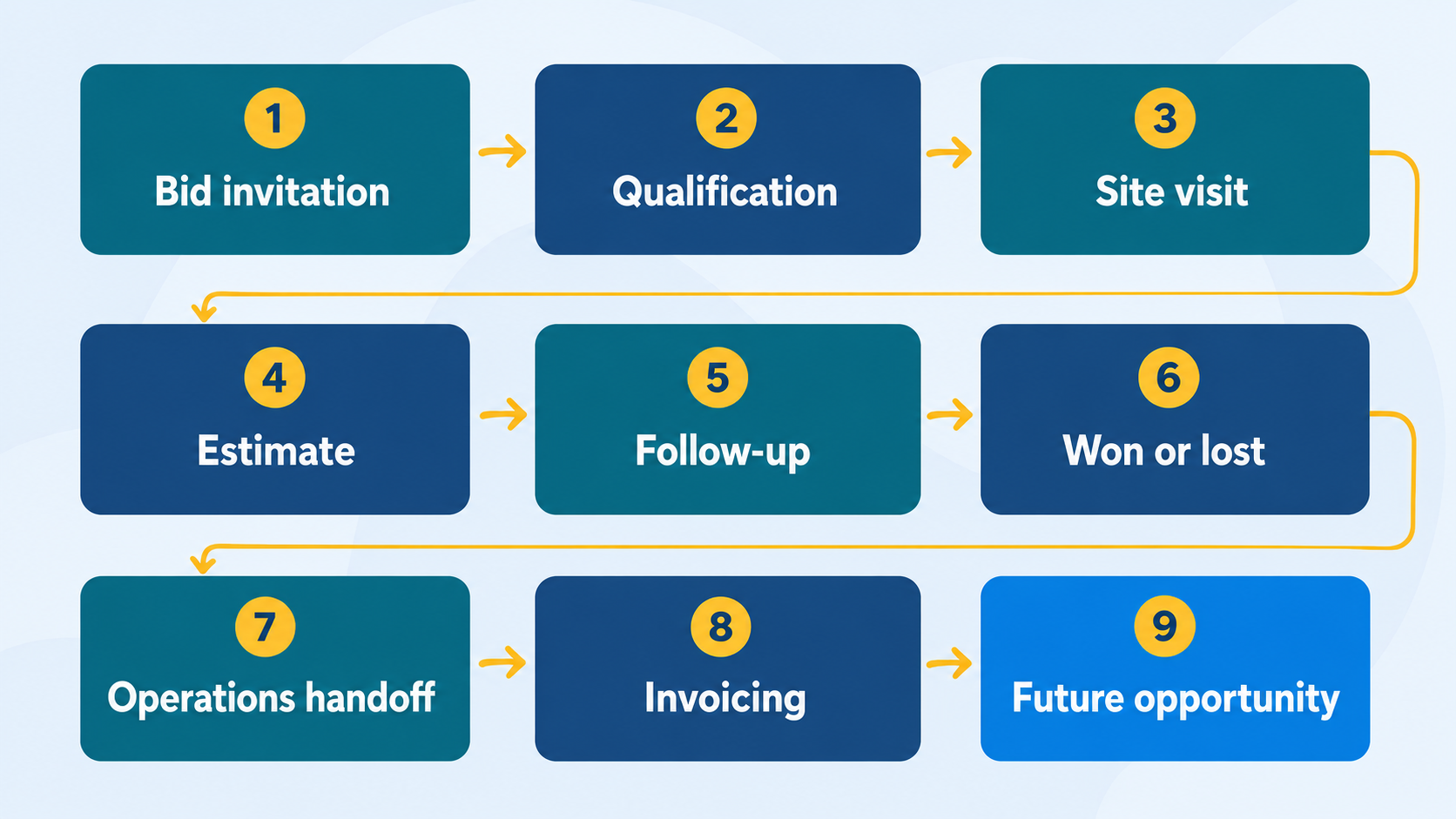
Map your process from the first inquiry through the completed job. Identify who owns each step, which team receives the work next, and where information is currently re-entered or lost. Your CRM should prevent missed follow-ups during the sales process, keep related customer and job records together after the sale, and support clear handoffs to operations. If staff must manually re-enter information into accounting software, consider a CRM that connects directly with it.
For recurring service work, also map what happens after the sale. That could include service agreements, maintenance agreements, scheduling, invoicing, and future customer communication.
Final takeaway: Choose the CRM that fits how your HVAC business wins work
The right CRM will reflect how you do business with customers and help keep things flowing from receiving bids through to handoff. A construction-specific CRM may require less setup time than a more general CRM with more features, such as sales/marketing/enterprise-type control capabilities.
For QuickBooks-based HVAC contractors, Method is worth evaluating when accounting connectivity and customizable workflows are important selection criteria.
Frequently asked questions
The best CRM depends on how the contractor wins and manages work. Pipedrive or Pipeline CRM may suit businesses that primarily need straightforward pipeline and follow-up tools. Followup CRM is worth considering for construction-focused bid tracking, while HubSpot offers broader sales and marketing capabilities. Method is particularly well suited to QuickBooks users that need customizable workflows connecting estimates, follow-up, operations, and accounting.
When selecting a CRM for use in a commercial HVAC contracting firm, look for the ability to maintain company-wide information, support multiple contacts per company, enable bid tracking, provide estimate transparency, automate follow-ups, allow for pipeline reporting, and save history post-win.
Yes, but the CRM account structures vary. During the demo, ask the vendor to create one company with an owner, engineer, site contact, and accounts-payable contact. Confirm that each person’s role is recorded and show where their emails, calls, notes, and follow-up activities appear.
Yes, but the depth of support varies. Some CRMs only track the sales opportunity, while others can also manage estimates or connect them with accounting software. Ask how the CRM handles bid stages, estimate revisions, due dates, follow-up activities, approvals, and won-or-lost reasons.
Some HVAC CRMs integrate with QuickBooks, but the scope of the connection varies. Confirm whether the CRM supports QuickBooks Online, QuickBooks Desktop, or both; which records move between the systems; whether the connection is one-way or two-way; and how frequently information updates. Method offers a native two-way connection with QuickBooks Online and supported QuickBooks Desktop editions.
Not necessarily. A construction-focused CRM may be a good fit when bid and opportunity tracking are the main priorities. Contractors should also consider whether they need marketing automation, customizable operational workflows, or a close connection with accounting software.
Service-focused HVAC companies often use CRM and field service management software to manage customer follow-up, scheduling, dispatching, technician updates, work orders, and recurring maintenance. Commercial and specialty HVAC contractors may place greater emphasis on complex accounts, bid tracking, estimate revisions, approvals, and project handoffs.
Companies that perform both types of work need a system (or connected systems) that can support sales and field service workflows while keeping customer, job, and accounting information connected.