A teal illustration of a handshake.

Steps to get a Michigan general contractor license

Discover the essential steps and best practices to obtain your Michigan general contractor license with our comprehensive guide.

Steps to get a Michigan general contractor license Read More »

Obtaining a general contractor license in Michigan is crucial for legal and professional credibility. It ensures that contractors comply with state regulations and are recognized as qualified professionals authorized to perform general contracting work in Michigan. 

This process involves meeting specific requirements, completing necessary training, and passing a licensing exam.

In this blog, you’ll get all the inforrnation you need to learn how to get a Michigan general contractor license. Let’s dive in!

What are the general contractor license requirements in Michigan?

To become a licensed general contractor in Michigan, you must complete several key steps, which are structured to ensure you meet the state’s rigorous standards for quality and safety in construction:

  1. Ensure you meet basic requirements: You must be at least 18 years old and hold a valid Michigan driver’s license or state identification.
  2. Choose your license type: Decide between Michigan’s two main types of licenses. There is a Residential Builder License and a Maintenance & Alteration Contractor License.
  3. Prelicensure education: You must complete a 60-hour prelicensure education program approved by the state. This education covers critical areas including business management laws, project management, and construction safety standards. Examples of state-approved programs include MI Contractor Training and License to Build.
  4. Relevant work experience: While not a necessity, practical experience is beneficial and sometimes indirectly required through the types of questions and content covered in the licensing exam. The primary emphasis for a Michigan general contractor license is on educational prerequisites, rather than specific work experience.
  5. Submit an application: Submit a detailed application to the Michigan Department of Licensing and Regulatory Affairs (LARA). This application must include proof of your education, work experience, and training, along with the necessary fees. The application fee for first-time applicants is $195.
  6. Take the comprehensive licensing exam: Administered by PSI, the exam tests knowledge of Michigan residential code, building codes, and business management. You will also need to pay a fee to take these exams, which varies based on what license you’re applying for:
    • Residential Builder: $117.
    • Maintenance & Alteration Contractor: $70 to $114 (depending on the number of trades being tested).
  7. Liability insurance and bonding: Michigan does not require contractors to have liability insurance, but employers reserve the right to make it a requirement. While some specific types of contractors, like security alarm contractors, are required at the state level to have a surety bond (in this case, $25,000), most other general contractor bonding requirements are mandated at the local level. This means that the requirements for surety bonds vary by city or county.

Note that while most general contractors must adhere to these requirements, Michigan provides exemptions for certain professions and specific types of contractor licenses. It’s important to consult directly with LARA to understand if your specific trade or profession falls under these exemptions.

Grow your field service business with automation.

Step-by-step guide to getting a general contractor in Michigan

Step 1: Complete your prelicensure education

Prelicensure education is mandatory and includes courses in business management, project management, and construction safety standards. Accredited institutions offer various courses designed to prepare candidates for the licensing exam. 

You must complete 60 hours of approved prelicensure courses. You must spend at least 6 hours in each of the following subjects:

  • Business management, estimating, and job costing.
  • Design and building science.
  • Contracts, liability, and risk management.
  • Marketing and sales.
  • Project management and scheduling.
  • The Michigan residential code.
  • MIOSHA construction safety standards.

Here are some best practices to complete your prelicensure education:

  • Select courses that are state-approved and that align with Michigan’s licensing requirements.
  • Start preparing for the licensing exam by creating study materials during your courses. There are plenty of resources available for free online.
  • Take each lesson one step at a time, and don’t try to rush the process, as it will only negatively impact you down the road.

Step 2: Submit your application and confirm your moral character

  1. Complete the application form and submit the application to the Michigan Department of Licensing and Regulatory Affairs (LARA):
    1. Include proof of completed education.
    2. Pay the applicable fee.
    3. Include supplemental documentation, such as proof of experience and training.
  2. Submit the application along with the required fees.
  3. While there is no specific process to verify your moral character, the law states that applicants must “Be of good moral character.” Try to include supporting evidence to this (i.e., documentation and personal references) in your application.

Step 3: Pass the licensing exam

After meeting other requirements, take the Residential Builder or Maintenance & Alteration Contractor examination.

Each licensing exam covers various topics, including the Michigan residential code, business management, and construction safety standards. It is designed to test the applicant’s knowledge and competency in these areas.

Here’s what you need to know:

  • The exam is administered by PSI.
  • Exams are available at five PSI testing centers throughout Michigan, six days a week.
  • Applicants choose their testing center and day of examination.
  • Exam fees are paid directly to PSI when scheduling the exam.

To give yourself the best chance at passing:

  • Use study guides and practice tests to prepare for the exam.
  • Focus on key areas such as business management laws and building codes.
  • Utilize available resources, like online courses and exam prep books.

What are the consequences of unlicensed general contracting in Michigan?

Operating as an unlicensed general contractor in Michigan can lead to severe legal ramifications, including fines and potential legal action.

Michigan law specifically prohibits unlicensed contractors from enforcing any building contract through court actions. This includes being barred from bringing any action to collect fees or foreclosing on construction liens related to their work.

For residential projects in particular, here are some of the possible consequences of operating without a license in Michigan:

  • Legal ramifications: Unlicensed contractors are prohibited from bringing legal action to collect fees for their work. They also cannot file liens on properties for unpaid work.
  • Financial penalties: If you’re caught operating without a license, you will be charged a fine between $5,000 and $25,000 for your first offense. Fines increase for subsequent violations.
  • Criminal charges: You may even see jail time for working unlicensed. Your first offense could lead to up to one year in jail, while subsequent violations mean up to two years in jail.
  • Reputational damage: Operating without a license could damage your professional reputation if word catches on.
  • Legal action: Without a Michigan general contractor license, you’re vulnerable to lawsuits. The Attorney General’s office has been handling an increased number of cases involving unlicensed builders. In 2022, they dealt with over 200 misdemeanor unlicensed builder cases.

Pro-tip: Michigan has introduced a “Pretrial Diversion Program” that helps unlicensed builders avoid criminal prosecution if they quickly come into compliance with licensing requirements and fully reimburse complainants.

QuickBooks can’t do everything, so let Method:Field Services help.

How much does it cost to get a general contractor license in Michigan?

While your exact Michigan licensing fees are dependent on your specific circumstances, a ballpark estimate for your total cost is $600 to $1,800.

Here’s a more detailed breakdown:

  1. Application fees: $175, non-refundable.
    • Veterans may be exempt from this fee if they can show their separation from the armed forces was “honorable” or “general under honorable conditions”
  2. Exam fees: 
    • Residential Builder Exam: $117.
    • Maintenance & Alteration Contractor Exam: $70 to $114, depending on the number of trades or crafts being tested.
  3. Renewal fee (must be paid every two years): $185.
  4. Prelicensure education: 60 hours worth of lessons. The cost for these courses could range from a few hundred to over a thousand dollars, depending on the provider.
  5. Additional expenses, such as:
    • Study materials for exam preparation.
    • Potential business registration fees.
    • Liability insurance and bonding costs (if required, though not specifically mentioned for general contractors).

Budgeting for these expenses is crucial. Financial assistance and payment plans may be available to help cover the costs.

Do you need a general contractor license in Michigan?

In Michigan, certain construction activities require a licensed general contractor. It is essential to understand who needs a license and the specific activities that mandate licensure.

If you are working on any project valued at more than $600, you need to have either a Residential Builders License or a Maintenance & Alteration Contractors License.

The following jobs require a license under all circumstances:

  • Building new homes.
  • Major renovations and repairs.
  • Commercial construction projects.

Key takeaways

Obtaining your Michigan general contractor license involves several key steps, including: 

  • Completing 60 hours of prelicensure education.
  • Gaining relevant experience.
  • Submitting an application with fees.
  • Passing a licensing exam. 

Remember that operating as an unlicensed contractor can lead to severe legal consequences, including substantial fines and potential jail time. So, you’ll want to comply with all the requirements and get licensed as the very first step in launching your career as a general contractor.

Michigan general contractor license FAQs

Does a general contractor license in Michigan increase your earning potential?

Obtaining a general contractor license in Michigan can significantly enhance your earning potential and access to larger, more lucrative projects. A license validates your qualifications and lets you take on more complex and higher-paying work.

How often do I need to renew my contractor’s license in Michigan?

The renewal process for a general contractor license in Michigan involves periodic renewal fees and depending on your locality, can include continuing education requirements to ensure ongoing compliance with state regulations.

Are there additional requirements for specific types of contractor licenses in Michigan?

Yes, certain types of contractor licenses, such as electrical, plumbing, or mechanical contracting, have additional requirements. These generally include specialized training, certification, and adherence to specific building codes. Additional requirements are entirely dependent on your specific trade and locality. 

See how Method helps general contractors get more done in a day.

A fuchsia illustration representing data analysis, with a person grabbing a pie chart from a smartphone.

How to upgrade QuickBooks Desktop in 5 simple steps

Are you using an outdated version of QuickBooks? Learn how to upgrade QuickBooks Desktop in five steps in this comprehensive guide.

How to upgrade QuickBooks Desktop in 5 simple steps Read More »

Are you still using an older version of QuickBooks Desktop? Whether it’s a conscious decision to resist Intuit’s shift to subscription-based services, or you’ve simply not felt the need to upgrade — now is the time to evaluate your options.

But why? For UK and Ireland customers, Intuit has already discontinued all QuickBooks Desktop services as of June 30, 2023. This includes all versions of QuickBooks Desktop Pro, Premier, and Enterprise. 

Tired of entering data manually into QuickBooks Desktop?

In the United States and Canada, the situation is slightly different. Intuit is gradually phasing out older versions of QuickBooks Desktop. For instance, since May 31, 2024, access to add-on services was discontinued for QuickBooks Desktop 2021 for Windows. The even bigger news is that after September 30, 2024, Intuit will stop selling and servicing all versions of QuickBooks Desktop for US subscribers, except Enterprise.

With this in mind, it’s worth considering your next steps. One option is to switch accounting software — you can stay in the QuickBooks ecosystem with QuickBooks Online, or migrate to an entirely new platform like Xero.

Or, you might choose to upgrade QuickBooks Desktop to the latest version before the stop-sell, or even upgrade to QuickBooks Desktop Enterprise, which will still receive ongoing support after the discontinuation period.

The choice is ultimately yours, but should you choose to upgrade QuickBooks Desktop, this blog is your comprehensive guide to learning how.

Why upgrade QuickBooks Desktop Pro Plus, Premier Plus, or Enterprise?

In a nutshell, upgrading QuickBooks Desktop is essential to give you access to:

  • The latest features.
  • Regular security updates.
  • Compatibility with other software. 
  • Ongoing support.

Why upgrade to the latest version?

Using the latest version of QuickBooks Desktop ensures: 

  • Staying up-to-date with security patches, performance updates, and new feature releases.
  • Compliance with tax laws and accounting regulations.
  • Access to dedicated support.

QuickBooks Desktop 2024, for example, includes new tools for improved workflows (like an enhanced Item List search), more robust reporting options, and better integration with third-party apps. 

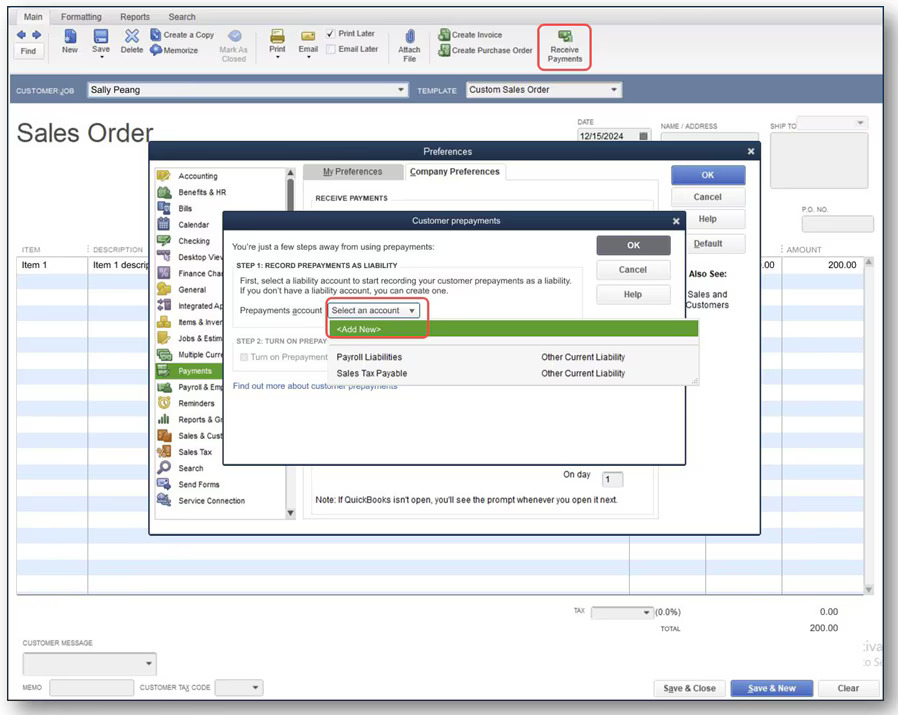
One new feature in QuickBooks Desktop 2024 is the ability to set up prepayments on sales orders, which you can’t do in outdated versions.

A screenshot of QuickBooks Desktop 2024's sales order prepayments feature.

Image credit: Firm of the Future

Why upgrade to Enterprise?

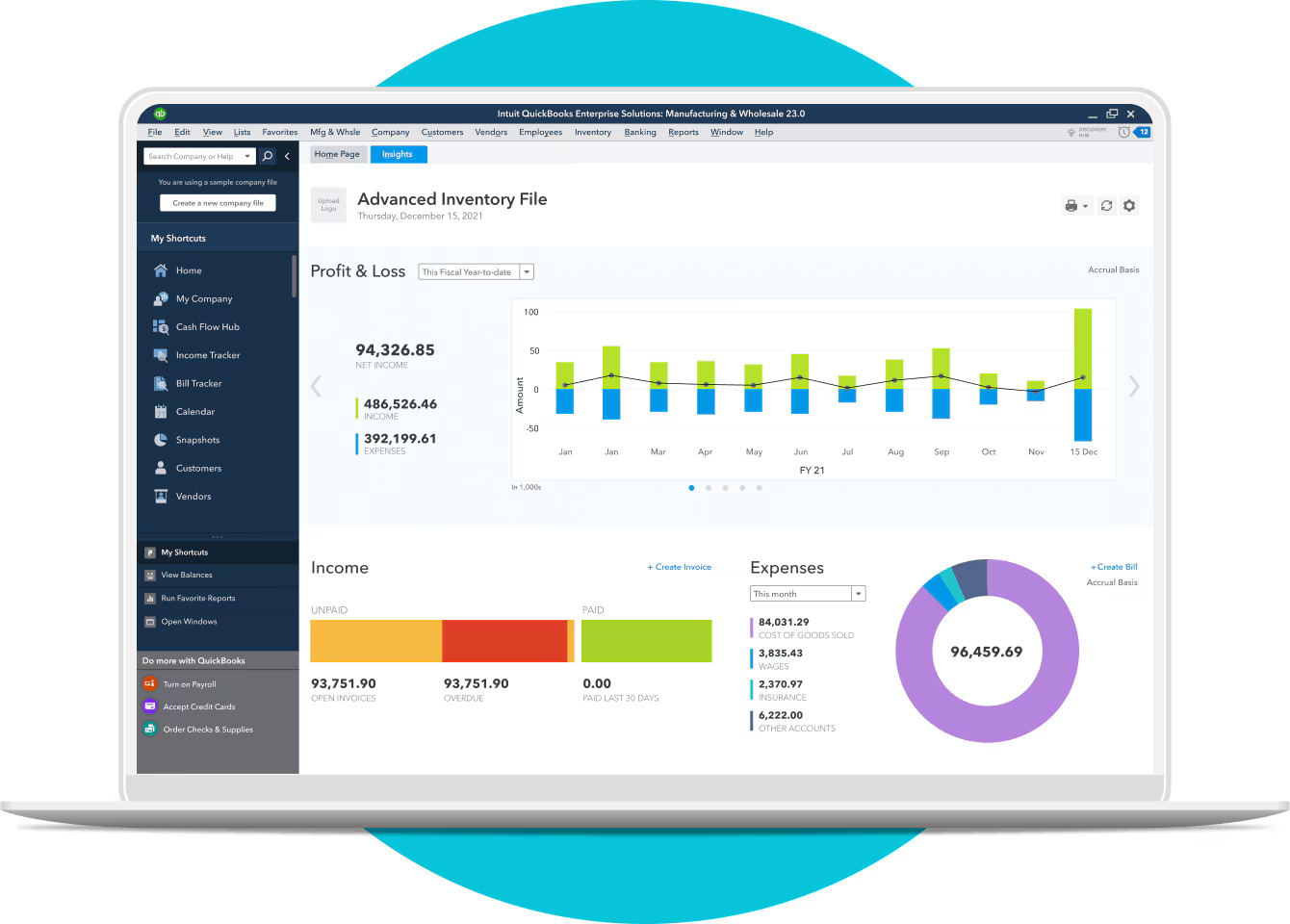
A screenshot of a QuickBooks Enterprise dashboard.

Image credit: QuickBooks

QuickBooks Enterprise is designed for larger businesses with more complex needs. It offers:

  • Advanced, industry-specific reporting.
  • More user licenses (up to 40).
  • Enhanced inventory management. 
  • Improved payroll features.

While it’s significantly more expensive than other versions of Desktop, upgrading to Enterprise can significantly boost your efficiency and scalability. 

QuickBooks Desktop stop-sell

Initially set for July 31, 2024, Intuit has announced that most versions of QuickBooks Desktop are being discontinued on September 30, 2024. After this date, Intuit is stopping all sales and service for: 

  • QuickBooks Desktop Pro. 
  • QuickBooks Desktop Premier. 
  • QuickBooks Desktop Mac. 
  • QuickBooks Desktop Enhanced Payroll.

While new customers cannot purchase these versions after the cut-off date, existing QuickBooks Desktop subscriptions will not be discontinued. Intuit will continue to provide security updates and support for these existing subscriptions. This, however, will not be the case forever.

QuickBooks Desktop Enterprise will continue to be supported and sold, and Intuit has not announced any future plans of sunsetting it.

Why would I not want to upgrade QuickBooks Desktop?

Many long-time users express wariness about Intuit’s push towards subscription-based models and cloud services, fearing they might be forced into more expensive plans or lose access to their data if they don’t upgrade. This reluctance is compounded by reports from some users that updates have occasionally broken critical functions they rely on, such as the ability to open multiple company files simultaneously. Many business owners are more than happy to stay with a program they know and love — especially if they paid a one-time license fee for it.

Upgrades typically necessitate time and money for installation, data migration, and staff training. Some organizations also prefer keeping their financial data locally on desktop versions rather than moving to cloud-based solutions, which newer versions often encourage.

Get everything you need to run your business in one place.

How do I upgrade my QuickBooks Desktop to the latest version?

1. Assess your financial wants and needs

Before upgrading, evaluate your current financial processes and determine what improvements you need, if any. Consider your budget, number of users, and necessary features, such as enhanced payroll or advanced inventory management.

2. Update QuickBooks Desktop to the latest release

Check to see if you have the latest release

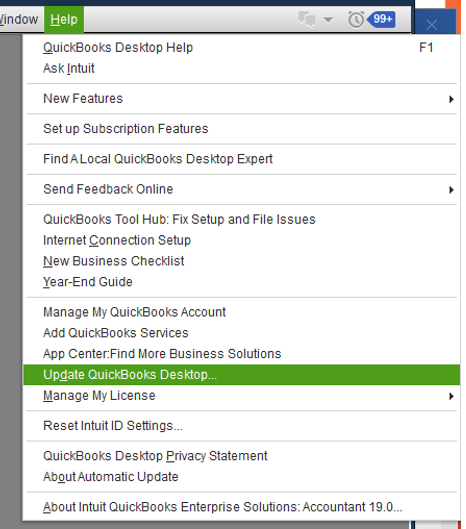
Ensure you are running the most current release of QuickBooks Desktop. You can check this within the software under the “Help” menu by selecting “Update QuickBooks Desktop”

You can also check before you update by pressing F2 while in the product. This will open your “Product Information” window, which includes your product name, product number, and license number.

A screenshot of the "Product information" screen in QuickBooks Desktop.

Image credit: QuickBooks

Use the Discovery Hub or Rightworks Hosting Environment to upgrade

You have two options for upgrading:

  • Discovery Hub: This integrated feature within QuickBooks Desktop guides users through the upgrade process with a user-friendly, step-by-step guide. Users can select “Upgrade to QuickBooks 2024”, “Proceed to upgrade”, then “Upgrade now.” If you want both versions, select “Keep old version on my computer”. Once complete, select “Open QuickBooks”.
  • Rightworks Hosting Environment: For those using the Rightworks hosting environment, the upgrade process involves creating or signing into your Rightworks account, selecting the appropriate user, and installing the new QuickBooks version. This method is ideal for businesses with remote teams or those needing access from multiple locations.

The biggest difference between the two is that the Discovery Hub is best for on-premises updates, while Rightworks is ideal for remote and multi-user access. 

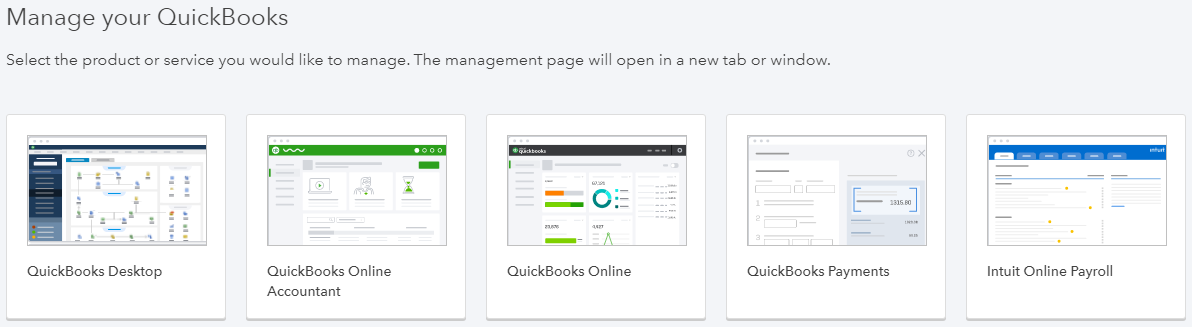
If your upgrade tool cannot find your QuickBooks Desktop purchase, you might need to enter your QuickBooks license information. This typically occurs if the purchase was made with a different email than the one used for the QuickBooks Desktop account. Users can find their license number in the purchase confirmation email or by signing into the Customer Account Management Portal (CAMPs).

A screenshot of the QuickBooks CAMPs screen where it prompts to "Manage your QuickBooks."

Image credit: VARC Solutions

Install the update

In the “Help” menu, click “Update QuickBooks Desktop…”

A screenshot showing where the "Update QuickBooks Desktop..." option is in the "Help" menu.

Image credit: QuickBooks

Follow the prompts in the update wizard to update your QuickBooks account to the newer version.

If you’re unable to install the update, try restarting your computer or using the QuickBooks Install Diagnostic Tool, which provides several fixes for recurrent issues.

For multi-user environments, you also might need to configure network and server settings before installation:

  1. Ensure all users are logged out of QuickBooks and the company file.
  2. On the server computer, open QuickBooks in multi-user mode.
  3. Under “File”, go to “Utilities” then “Host Multi-User Access”
  4. On each workstation:
    1. Open QuickBooks and go to the “File” menu. 
    2. Click “Utilities”, then “Stop Hosting Multi-User Access”.
    3. Map the network drive where the company file is located.
    4. Click “Open or Restore Company” in the “File” menu to open the file from the network location.
  5. Test the multi-user functionality by having multiple users log in simultaneously.

3. Create a backup for your current version

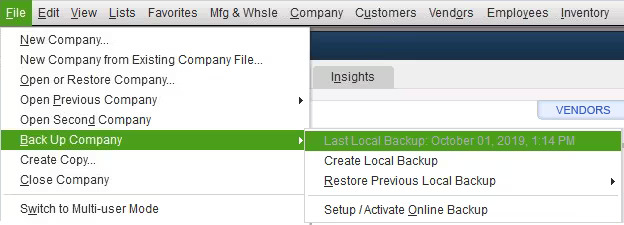
Always back up your company file before upgrading. This ensures you have a safe copy of your data in case anything goes wrong during the upgrade process. To create a backup, go to the “File” menu, select “Back Up Company,” and follow the prompts. Store this backup in a secure location.

A screenshot showing where the "Back Up Company" option is in QuickBooks Desktop.

Image credit: QuickBooks

4. Prep and update your company file

Here’s how to prep and update your QuickBooks company file:

  1. Ensure all users are signed out of the company file.
  2. Open the original version of QuickBooks and the company file you want to update.
  3. Press F2 to open the “Product Information” window and note where the company file is saved on your computer.
  4. If the files are on a server, move them to the local hard drive temporarily.
  5. Prepare your company file by verifying and rebuilding data:
    1. Go to the “File” menu, select “Utilities,” and then “Verify Data.”
    2. If issues are found, select “Rebuild Data” and follow the prompts.
  6. Create a backup of your company file:
    1. Go to “File” > “Back Up Company” > “Create Local Backup”
    2. Choose “Local Backup” and click “Next”
    3. Select the location to save the backup file and click “Save”
  7. Open the new version of QuickBooks Desktop.
  8. In the “File” menu, click “Open or Restore Company”.
  9. Select “Open a company file” and click “Next”.
  10. Locate and select your company file, then click “Open”
  11. If prompted, select “Update Now” to update the file format for the new version.

5. Install and relaunch

Install the new version of QuickBooks Desktop and relaunch the software. 

During the installation or upgrade process, you may be prompted to enter your license information and use a one-time PIN:

  1. When prompted, enter your QuickBooks license number. This can be found in your purchase confirmation email or by logging into your Intuit account.
  2. If you don’t have your license number, you may be asked to log in to your Intuit account directly from the installation window.
  3. After entering your license information, you may also receive a one-time PIN via email or text message.
  4. Enter this PIN when prompted during the installation process.
  5. The PIN is typically valid for a short period (e.g., 10 minutes), so be prepared to enter it quickly.
  6. If the PIN expires before you enter it, you can request a new one through the installation interface.

Ensure everything is working correctly before continuing with your day-to-day tasks. Open QuickBooks Desktop, select your company file, and verify that all data has transferred correctly.

QuickBooks Desktop won’t update to the latest release?

Redownload the update

If the update fails, try redownloading it from the official QuickBooks website. This ensures you have the correct and complete installation files.

Reset task manager

Restart your computer and reset the Task Manager to close any background processes that might interfere with the update. Press Ctrl + Shift + Esc to open Task Manager, end any unnecessary processes, and try the update again

How to upgrade to QuickBooks Enterprise from Desktop Pro/Premier

1. Make sure your computers and server can run QuickBooks Enterprise

Ensure your system meets the requirements for QuickBooks Enterprise, especially if you’re upgrading from 2021 to 2024. Check the system requirements on the QuickBooks website to ensure compatibility. 

2. Purchase and install QuickBooks Enterprise

Buy QuickBooks Enterprise and follow the installation instructions provided. You can purchase directly from Intuit or an authorized reseller. Select “Install” and follow the prompts to complete the installation.

3. Migrate your data from Pro or Premier to Enterprise

Use the built-in migration tools to transfer your data seamlessly from QuickBooks Pro or Premier to Enterprise. This process involves backing up your current company file, opening it in QuickBooks Enterprise, and following the prompts to update the file format.

How Method helps you upgrade QuickBooks Desktop

If you want to expand the limits of and upgrade QuickBooks Desktop without breaking the bank, Method is the tool for you.

Method offers a seamless integration with QuickBooks to help you manage your customer relationships and financial data in one place. It also offers powerful automations that speed up your lead-to-cash process. 

For example, you can create custom workflows using no-code tools to automate your:

  • Estimating and invoicing, 
  • Communications.
  • Collecting customer payments.

Whether you choose to upgrade QuickBooks Desktop or not, if you’re looking to retain your QuickBooks Desktop functionality and gain remote access, consider integrating with Method.

Upgrade QuickBooks Desktop FAQs

My QuickBooks license is not a subscription, but a standalone copy. Should I upgrade?

If your QuickBooks license is a standalone copy, upgrading is advisable to ensure you receive critical updates, security patches, and access to new features. That said, if you have everything you need in a legacy version of Desktop and are not growth-focused, it is more cost-effective to stick with your current system.

How much does QuickBooks Desktop 2024 cost?

The cost of QuickBooks Desktop 2024 varies depending on the version and number of licenses you need. Check the official QuickBooks website for the latest pricing. For Desktop versions that aren’t Enterprise, you need to get in touch with Intuit’s sales team for a price.

How long does a QuickBooks upgrade take?

The upgrade process can take anywhere from a few minutes to several hours, depending on the size of your company file and the speed of your internet connection. Ensure you have ample time set aside for the upgrade and avoid interruptions during the process.

Upgrade QuickBooks Desktop by integrating with Method. See more.

A purple illustration of a man on a mobile phone walking through a doorway.

QuickBooks Desktop discontinued: Next steps for Desktop users

Is QuickBooks Desktop discontinued? Find out everything you need to know about the future of QuickBooks Desktop in this blog.

QuickBooks Desktop discontinued: Next steps for Desktop users Read More »

You’ve probably seen it in the headlines: “QuickBooks Desktop discontinued!” It’s no longer a question of “Will QuickBooks Desktop be discontinued?” Instead, everyone is now asking: “When will QuickBooks Desktop be discontinued?”

The short answer is that after September 30, 2024, Intuit will no longer be selling QuickBooks Desktop.

But what does that mean, and what are the specific details Intuit has provided so far? And most importantly, what are the alternatives and where do you go from here?

This article will guide you through everything you need to know about the QuickBooks Desktop discontinuation and your options moving forward.

Let’s get started!

Sick of hunting for spreadsheets when updating your QuickBooks data?

What does service discontinuation mean?

Is QuickBooks Desktop being phased out? Yes, service discontinuation means that Intuit will no longer provide updates, support, or sales for specific versions of QuickBooks Desktop. This includes critical security patches and updates, making it essential for users to consider their next steps.

Is QuickBooks Desktop going away?

You may be wondering: is Intuit discontinuing QuickBooks Desktop in its entirety, or does QuickBooks still have a desktop version? While QuickBooks Desktop will no longer be sold or supported for certain versions in the near future, QuickBooks Desktop Enterprise products will remain available as Intuit’s sole desktop accounting solution.

That being said, for all intents and purposes, QuickBooks Desktop as it’s evolved over the years will soon be obsolete. Since December 10th, 2021 — when Intuit switched Desktop to a subscription-only service and did away with one-time purchases — QuickBooks Desktop’s days have been numbered.

To learn more, keep reading or check out our video below.

What led to QuickBooks Desktop being discontinued?

QuickBooks discontinuing Desktop is part of Intuit’s broader strategy to focus on cloud-based solutions. The reasoning for this is driven by several factors:

  • Technological advancements: By focusing on newer versions and cloud-based solutions, Intuit can offer more advanced capabilities and ensure compatibility with modern operating systems and hardware.
  • Resource allocation: Intuit is prioritizing fewer versions of its products to dedicate resources to enhancing features, improving security and compliance, and providing timely support for the most current versions.
  • Cost savings and profitability: Maintaining older, one-time purchase software versions is costly, and shifting to cloud-based solutions like QuickBooks Online provides a more predictable and stable subscription-based revenue stream. Cloud solutions also offer higher profit margins, easier updates, and better opportunities for upselling premium features.

When does QuickBooks Desktop service discontinuation take effect?

But exactly when is QuickBooks Desktop going away? Initially set for July 31, 2024, the discontinuation date has been extended to September 30, 2024 and only applies to US subscribers. This gives QuickBooks Desktop customers a bit more time to plan their transition.

What specific products will Intuit no longer be selling/supporting?

The discontinuation affects most QuickBooks Desktop versions, including:

  • QuickBooks Desktop Pro.
  • QuickBooks Desktop Premier.
  • QuickBooks Desktop Mac.
  • QuickBooks Desktop Enhanced Payroll.

Will current subscriptions to QuickBooks Desktop be discontinued?

While new customers cannot purchase these versions after the cut-off date, existing QuickBooks Desktop subscriptions will not be discontinued. 

This means those who have already subscribed to QuickBooks Desktop Pro Plus, Premier Plus, Mac Plus, and Desktop Enhanced Payroll can continue to maintain and renew their subscriptions beyond the cut-off date of September 30, 2024. Intuit will continue to provide security updates and support for these existing subscriptions.

Keep in mind that down the road, current subscriptions can and likely will be discontinued eventually. 

Is QuickBooks Enterprise affected by this change?

QuickBooks Enterprise will continue to be supported and sold. Both new and existing customers can continue to purchase and renew QuickBooks Enterprise subscriptions after the date of discontinuation.

QuickBooks Desktop sunset: What’s next?

As we approach the QuickBooks Desktop end of life period, you need to prepare for the future. Here’s a detailed guide with your three primary options to help you navigate this transition smoothly.

Option 1: Upgrade to QuickBooks Desktop Enterprise

Users of QuickBooks Desktop Pro, Premier, Mac, and Enhanced Payroll can consider upgrading to QuickBooks Desktop Enterprise. 

This version offers enhanced features, such as the ability to handle larger data files and support for up to 30 simultaneous users. 

QuickBooks Desktop Enterprise also includes advanced reporting capabilities and customizable dashboards for all of its Gold, Platinum, and Diamond versions. It also fully includes QuickBooks Desktop Payroll options if you’re worried about losing access to Enhanced Payroll.

To upgrade, ensure your systems meet the necessary requirements and consider consulting an IT professional for network setup or a QuickBooks ProAdvisor for assistance with data migration.

Option 2: Switch to QuickBooks Online

For those ready to move to the cloud and discover the latest critical security patches and updates from Intuit, you can move from Desktop to QuickBooks Online. Intuit offers a seamless transition with these four steps:

1. Prepare and export your data

Back up all your data to ensure nothing is lost during the transition. Here’s how:

  1. Ensure your QuickBooks Desktop software is up to date. Press F2 to check your current version.
  2. Look for your product name, product number, and license number in the Product Information window.
A screenshot of the "Product information" screen in QuickBooks Desktop.

Image credit: QuickBooks

  1. Update your QuickBooks version if necessary (while on the “No Company Open” screen, find the “Help” menu and select “Update QuickBooks Desktop”).
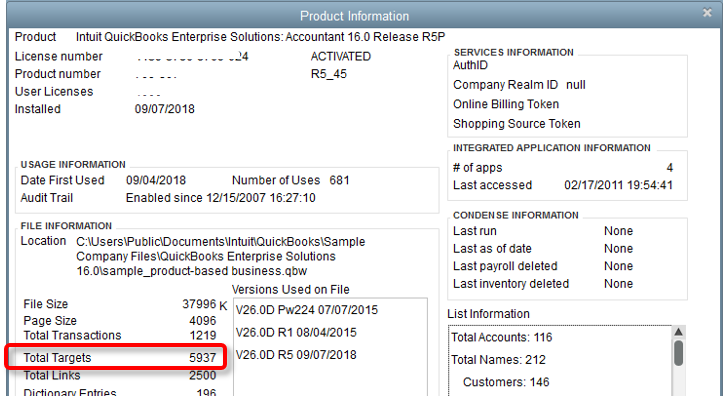
  2. Press Ctrl+1 to check the total targets. If your file exceeds 750,000 targets, you may need to reduce the file size by condensing data or start fresh in QuickBooks Online.
A screenshot showing where to find your total targets in QuickBooks Desktop.

Image credit: QuickBooks

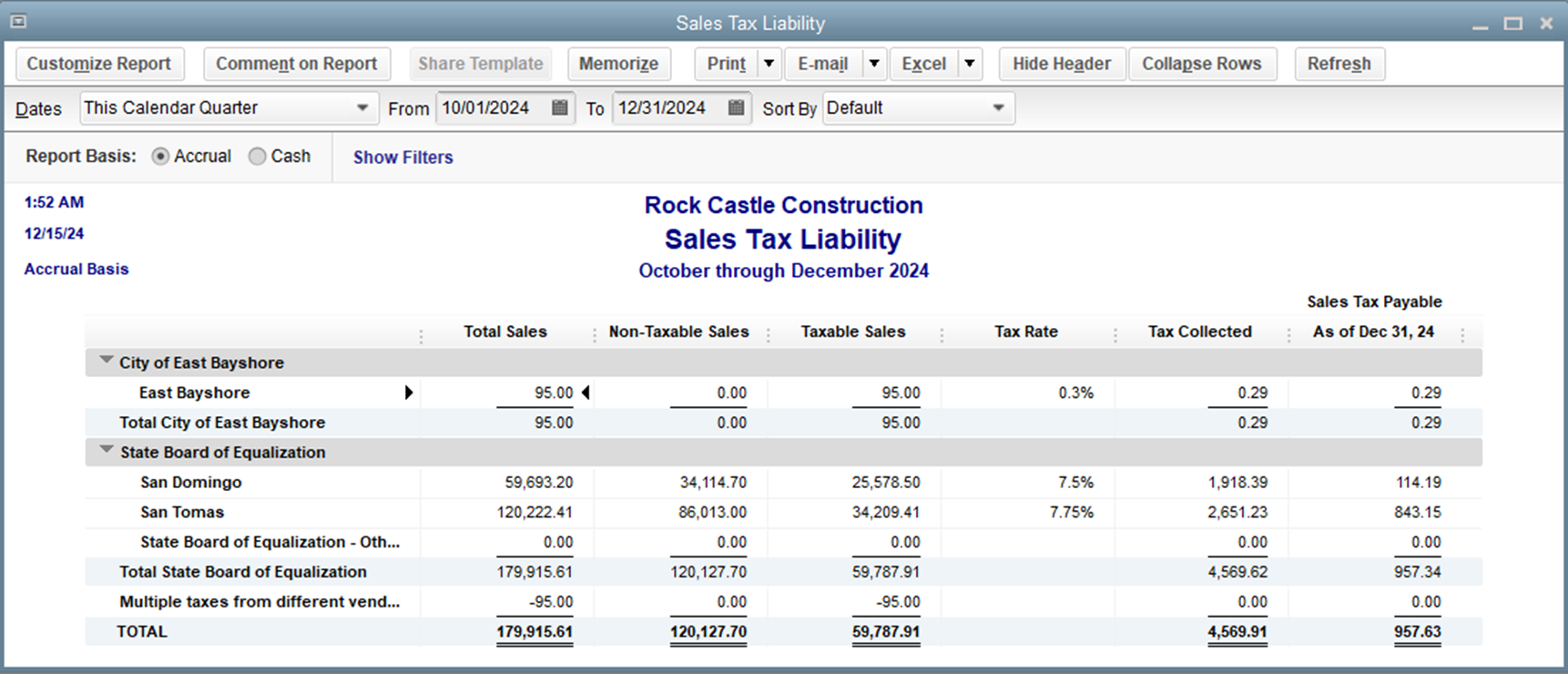
  1. Print a copy of your Sales Tax Liability report. Go to Reports > Vendors & Payables > Sales Tax Liability, select All Dates, and save it as a PDF.
An example Sales Tax Liability report in QuickBooks Desktop.

Image credit: QuickBooks

  1. To prepare payroll data, terminate or deactivate employees who are no longer working for you and ensure all recent payroll data is transferred by waiting 2-3 days after running payroll before moving your data.

2. Plan the migration

Create a detailed migration plan to minimize disruption to your business operations when you move to QuickBooks Online.

Choose a time for the migration that minimizes business disruption, preferably after-hours or on a weekend.

If necessary, consult an IT professional for network setup and a QuickBooks ProAdvisor for data migration assistance.

3. Choose a payment plan

Select a payment plan that fits your business needs.

QuickBooks Online offers several plans: 

  • Simple Start: $30 per month.
  • Essentials: $60 per month.
  • Plus: $90 per month.
  • Advanced: $200 per month.

Compare the features and pricing to determine the best fit for your business needs.

You can either sign up for a 30-day free trial or take advantage of any promotional discounts. Visit the QuickBooks Online website or contact their sales team for assistance.

4. Convert your data

The last step is to export and convert your data. Here’s how:

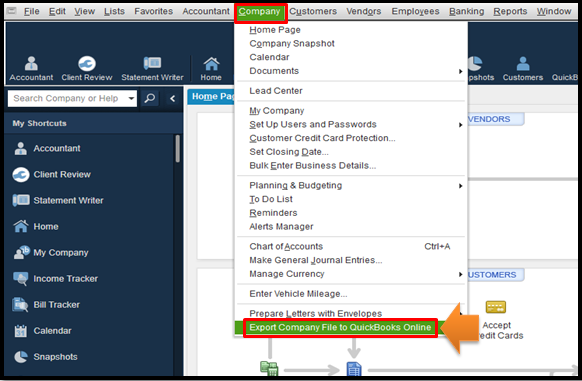
  1. Log in as an admin, go to Company > Export Company File to QuickBooks Online.
A screenshot showing the "Export company file" option in QuickBooks Desktop.

Image credit: QuickBooks

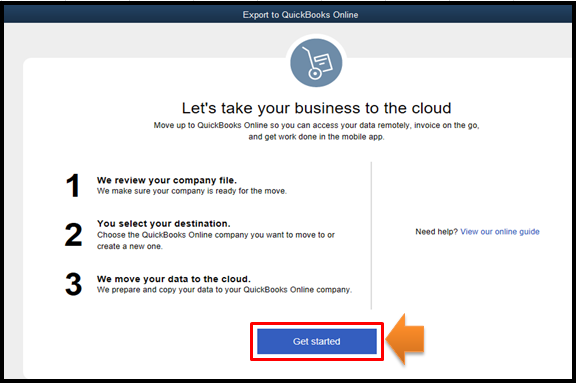
  1. Select “Get Started,” and then click “Start export” when prompted.
A screenshot showing the "Get started" page when you start an export from QuickBooks Desktop to Online.

Image credit: QuickBooks

  1. Sign in to QuickBooks Online as an admin and choose the company to replace in the “Choose online company” drop-down menu.
  2. Click “Continue” and enter “Agree” in the text field. 
  3. Choose “Replace” and confirm by clicking “Yes, go ahead and replace the data.”
  4. If you track inventory, select “Yes” to carry that data over, then specify the “as of” date. Or, select “No” if you want to set up items later (only available in Plus and Advanced).
  5. Connect your bank accounts and set up any additional features required for your business operations.

Method CRM lets you run your business, your way.

QuickBooks Online vs. Desktop: What’s the difference?

QuickBooks Online offers cloud-based accessibility, automatic updates, and real-time collaboration. On the other hand, QuickBooks Desktop provides a more traditional, standalone software experience.

QuickBooks Online’s advantages include:

  • Cloud-based accessibility for access anywhere, any time.
  • Ease of use.
  • Over 750 third-party supported integrations.
  • A mobile app.
  • Automatic updates and security.

That said, it also has its disadvantages:

  • Limited advanced features (i.e., advanced inventory management and job costing​​​​).
  • User limitations (25-user maximum).

In contrast, QuickBooks Desktop strikes a different balance of pros and cons. Here are some of its advantages:

  • Advanced features for inventory management, job costing, and industry-specific reporting.
  • Local installation, which can be preferable for businesses that require more control over their data and/or do not always have reliable internet access​​.
  • Detailed, customizable reporting tools (i.e., the QuickBooks Statement Writer for GAAP compliance).

Its disadvantages include:

  • Lack of accessibility.
  • Integration limitations.
  • Discontinuation for new users.
  • Higher cost.

What if QuickBooks Online doesn’t meet all my needs?

If QuickBooks Online doesn’t meet all your needs, don’t worry — you have other options. Evaluate your specific requirements, such as: 

  • Advanced inventory management.
  • Industry-specific features.
  • Particular integrations that you need. 

You might find that QuickBooks Desktop Enterprise suits your needs better. Or, you might consider other accounting platforms outside the QuickBooks ecosystem. Consider consulting with an accounting professional to help identify the best solution for your business.

Option 3: Migrate to another accounting platform, like Xero

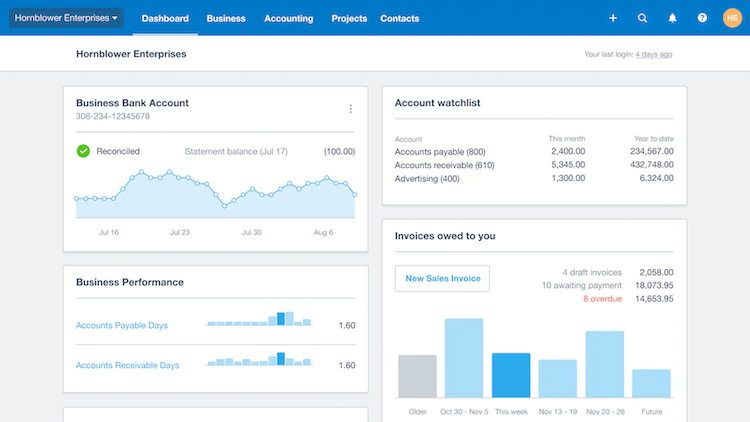
You may choose to switch to a bookkeeping or accountant software not associated with Intuit. If you’re considering alternatives to QuickBooks, Xero is a robust accounting platform worth exploring.

Image credit: Xero

Xero offers a range of features, including: 

  • Real-time financial data.
  • Comprehensive reporting.
  • Seamless integrations with numerous third-party apps. 

Its user-friendly interface and cloud-based accessibility make it an excellent choice for businesses looking for flexibility and scalability. 

Is QuickBooks Desktop still available before the sunset period?

Yes, QuickBooks Desktop is still available for purchase before the sunset period. Intuit will continue selling new subscriptions for QuickBooks Desktop Pro Plus, Premier Plus, Mac Plus, and Enhanced Payroll until September 30, 2024.

How do I purchase QuickBooks Desktop Plus (Pro, Premier, or Mac) or Desktop Enhanced Payroll before the cut-off date?

If you need to purchase these products before the cut-off date, you can contact Intuit’s sales team or call them at 1-888-829-8589. You can no longer purchase them online the traditional way.

If you are looking to purchase an older version of Desktop, be aware that the QuickBooks 2021 end of life date has passed (May 31, 2024). Because QuickBooks Desktop 2021 discontinued before the cut-off date, you can no longer purchase or find support for any versions from that year. 

The future of QuickBooks Desktop

The future of QuickBooks Desktop will focus primarily on supporting existing subscribers rather than attracting new ones as Intuit further stresses cloud-based solutions and a SaaS (software-as-a-service) pricing model.

Experts speculate that QuickBooks Desktop Enterprise is the next to go, once the functionality of QuickBooks Online is able to catch up to Desktop’s robust offerings. That said, there is currently no official indication from Intuit that this will happen anytime soon.

How Method can help

If you’re looking to retain your QuickBooks Desktop functionality and gain remote access, consider integrating with Method.

Method ensures you receive the latest critical updates and security patches while automating key workflows, such as: 

  • Estimating and invoicing, 
  • Communications.
  • Collecting customer payments.

Even after discontinuation, Method stays integrated with QuickBooks Desktop to give you anywhere access and ongoing support.

Recap: Is QuickBooks Desktop being discontinued?

With QuickBooks Desktop discontinued, you need to have a continuity plan in place for your current processes. Whether it’s subscribing before the cut-off date, switching to Enterprise or Online, or migrating to a different accounting software, it’s important to have a strategy ready before it’s too late.

Remember that:

  • Intuit will stop selling new subscriptions for QuickBooks Desktop Pro Plus, Premier Plus, Mac Plus, and Desktop Enhanced Payroll after September 30, 2024.
  • Existing subscribers of these QuickBooks versions can continue to renew their subscriptions beyond the cut-off date. This means you also still have time to purchase subscriptions for them if you are not yet signed up.
  • For the time being, Intuit will also continue to provide security updates, product updates, and support for these existing Desktop subscriptions.
  • QuickBooks Desktop Enterprise will not be affected by this discontinuation and will remain available for purchase and support. 

QuickBooks Desktop discontinued FAQs

How do I know what QuickBooks Desktop version I’m currently using?

To check your QuickBooks Desktop version, press the F2 key or Ctrl+1 on your keyboard to open the “Product Information” window. Here, you’ll see your product name, product number, license number, version, and release information.

What if I am not currently on a supported version of QuickBooks Desktop?

If you’re not currently on a supported version of QuickBooks Desktop, you won’t have access to live technical support, security updates, payroll processing, and other integrated features like online banking and payments. 

If you want these features, you’ll need to upgrade to a supported version as soon as possible, or consider transitioning to QuickBooks Online or QuickBooks Desktop Enterprise. If these features are unimportant to you, you can stay on your unsupported version.

Can I renew a suspended QuickBooks Desktop Plus subscription?

Yes, you can renew a suspended QuickBooks Desktop Plus subscription, provided you do so before the discontinuation cut-off date. If your subscription has been suspended due to non-payment or other issues, you will need to reactivate it to regain full access to your data and features.

Here are the steps to renew a suspended subscription:

  1. Open QuickBooks Desktop and log in with your admin credentials.
  2. Go to the Settings menu, then select “Subscriptions and billing.”
  3. Find your QuickBooks plan and select “Resubscribe.” 
  4. Enter the updated billing information and confirm your payment details.

You will have a grace period of 30 days to renew your subscription after receiving the final notice of suspension. If your subscription remains unpaid after this period, you will only have view-only access to your data for a limited time

How long do I have to resolve any billing or payment issues?

You have until the discontinuation date, September 30, 2024, to resolve any billing or payment issues related to QuickBooks Desktop.

With QuickBooks Desktop discontinued, see how Method helps your business stay afloat.

Orange drawing of a woman working at a desk on a laptop.

How to get Illinois general contractor license

Learn how to get your Illinois general contractor license. Discover requirements, application processes, and tips in this blog.

How to get Illinois general contractor license Read More »

Obtaining a general contractor license in Illinois is a crucial step for anyone looking to perform construction work legally and professionally within the state. 

Having a license demonstrates your compliance with Illinois regulations and ensures you meet the necessary standards to operate as a contractor. 

This guide will walk you through the process, from understanding the different types of contractor licenses to completing the necessary paperwork and fulfilling insurance requirements. 

Let’s jump in!

Significance of understanding state-specific licensing requirements

Knowing state-specific rules and requirements helps ensure compliance with Illinois regulations to:

  • Protect you from legal issues and fines.
  • Streamline the licensing process.
  • Enhance your credibility with clients and customers.

That said, obtaining a general contractor license in Illinois more involves understanding the local licensing requirements, as Illinois does not issue a state-level general contractor license. Instead, licensing is handled at the city or county level, with different requirements based on your location and the type of work you intend to perform.

Illinois offers a variety of contractor licenses to cater to different specialties within the construction industry. These licenses vary based on your county and the type of work you intend to perform, from general contracting to specialized trades.

In Chicago, there are five classes of general contractor licenses, ranging from Class A, which allows for unlimited project values and complex demolition, to Class E, which limits projects to $500,000 and excludes demolition work. Each class has specific insurance requirements and annual fees​​​​. Aurora and Rockford have different approaches. 

Aurora requires a general contractor license, along with proof of insurance and a registration fee. Rockford, however, does not require a general contractor license but mandates permits for various types of construction projects

Common types of contractor licenses in Illinois include those for:

  • General contractors.
  • Plumbing contractors.
  • Roofing contractors.
  • Specialty contractors.

Grow your field service business with automation.

What are the steps to obtain an Illinois general contractor license?

Securing a general contractor license in Illinois involves six steps. Here’s an overview to guide you through the process.

Choose a business entity designation

Selecting the appropriate business structure is a crucial step in establishing your contracting business. Each type of business entity has its implications and benefits.

  • Limited liability company (LLC): Offers liability protection and tax flexibility.
  • Corporation: Provides strong liability protection but may involve more complex regulatory requirements.
  • Sole proprietorship: Simplest form, but the owner is personally liable for business debts.

Choosing the right business structure is essential for your contracting business. Consider factors such as liability, taxation, and administrative requirements to make the best decision.

Register with the department of revenue

Registering with the Illinois Department of Revenue is a necessary step to fulfill your tax obligations and ensure your business operates legally.

  1. Visit the Illinois Department of Revenue website.
  2. Complete the online registration form with your business details.
  3. Submit the required documentation.
  4. Pay the registration fee.
  5. Await confirmation of your registration status in Illinois.

Decide which type of license you need

Choosing the right type of contractor license depends on the scope of work and your specialty areas. Consider the following factors to make an informed decision.

  • Scope of work: Determine the type of construction work or projects you plan to undertake.
  • Specialty areas: Identify any specific trades you will be focusing on, such as plumbing or roofing.
  • License type for general contracting in Illinois: Ensure the license you apply for matches your intended business activities and exact location.

Take the appropriate exam

The examination process for a general contractor license covers various subjects relevant to contracting industries, including construction. Understanding the exam format and passing criteria is essential for success.

  • Exam subjects: Include building codes, safety regulations, and specific trades.
  • Format: Typically includes multiple-choice questions and practical assessments.
  • Passing criteria: Usually requires a minimum score to demonstrate competency.

To best prepare for the exam, seek out educational resources, such as:

  • Study guides.
  • Training courses.
  • Tutorial videos.
  • Online practice exams.
  • Educational workshops.

Submit an application

Completing and submitting your license application requires careful attention to detail. Here are the general steps to follow to ensure a successful application process:

  1. Fill out the application form completely.
  2. Gather all required documentation, such as proof of experience and education.
  3. Submit the application form and documents to the licensing authority in Illinois.
  4. Pay the application fee.
  5. Await approval and issuance of your license number in Illinois.

That said, to submit a general contractor license application in Illinois, the process varies depending on the city or county where you plan to operate, as Illinois does not license general contractors at the state level. Below are steps for submitting applications in Chicago and Aurora, two major cities in Illinois.

For Chicago

  1. Obtain and fill out the general contractor application form provided by the City of Chicago’s Department of Buildings.
  2. Include a statement of your financial standing, proof of insurance matching the requirements of the specific license class you are applying for, and copies of necessary government-issued ID.
  3. Submit these documents to Continental Testing Services for processing. The submission can be done by mailing them to Continental Testing Services at P.O. Box 100, LaGrange, IL 60525​​.

For Aurora

  1. Aurora requires a detailed application that includes all relevant business information and proof that you meet the insurance requirements.
  2. Ensure you have $1,000,000 in total general liability, $500,000 per occurrence, and appropriate workers’ compensation coverage.
  3. Alongside the license application, you must submit a contractor registration application, which includes a $200 fee.
  4. These documents are submitted either online or physically at the city’s Division of Building and Permits located at 77 S Broadway, Aurora, IL 60505​​.

Common mistakes to avoid during the application process include:

  • Incomplete forms.
  • Missing documentation.
  • Incorrect fee payment.
  • Not meeting the experience requirements.

Satisfy insurance requirements

Insurance is a critical component of compliance for general contractors in Illinois. Ensuring you meet the insurance coverage standards protects your business and employees.

Liability insurance

Liability insurance is essential for covering any damages or injuries that may occur during construction work.

Required coverage amounts vary based on the scope of work and potential risks. Here are some suggestions for finding insurance providers:

  • Ask for recommendations from other contractors.
  • Conduct online research.
  • Look for businesses specializing in contractor insurance policies.
  • Consult with insurance agents familiar with the construction industry.

Surety bond

A surety bond guarantees your compliance with state regulations and contractual obligations.

While Illinois does not generally require a state-level contractor license bond, plumbers and roofers are exceptions, as they need to obtain bonds at the state level. Plumbers require a $20,000 bond, and roofing contractors need a $10,000 bond for a limited license or $25,000 for an unlimited one.

For general contractors, bond requirements can range from $5,000 to $50,000 depending on your exact location in Illinois and your scope of the work. The cost of obtaining a surety bond is a fraction of the total bond amount, generally ranging from 1% to 15%, and varies based on your credit score and financial history. Contractors must also renew their bonds periodically to align with their license renewals.

The steps to obtain a surety bond are:

  1. Identify your required bond type: Depending on your profession or business activity in Illinois, determine the type of surety bond you need. This could be a contractor license bond, motor vehicle dealer bond, or another type required by state or local law.
  2. Find a surety bond provider: You can apply for a surety bond through licensed bond companies that operate in Illinois. Providers like Viking Bond Service offer detailed guidance on Illinois-specific requirements and have systems tailored to the state’s bonding needs.
  3. Complete the application: Submit a bond application, which may be available online for convenience. This application will require details about your business and the bond required. Illinois often has specific forms and documentation that must be completed accurately to avoid delays.
  4. Undergo evaluation: The surety company will evaluate your application based on the risk associated with bonding your business. This includes a review of your financial history and credit score. For Illinois, certain bonds might also require additional financial disclosures or compliance checks with state regulations.
  5. Receive your quote and pay premium: Once your application is reviewed and approved, you’ll receive a quote for the bond premium. This premium is a percentage of the bond amount, and payment terms can vary based on your financial standing and the bond’s risk.
  6. Bond issuance: After payment, the surety company issues the bond. This bond is then filed with the Illinois agency requiring it, validating your compliance with state or local mandates.
  7. Maintain and renew the bond: Illinois surety bonds typically require renewal to remain valid. The renewal process might involve demonstrating continued compliance with financial standards and any regulatory changes.

Workers’ compensation insurance

Workers’ compensation insurance is mandatory for contractors with employees, providing coverage for work-related injuries and illnesses.

Securing workers’ compensation insurance in Illinois involves several clear steps:

  1. Determine the requirements: Almost all employers in Illinois are required to provide workers’ compensation insurance for their employees. This includes full-time, part-time, and even family members employed by the company, with very few exceptions​​​​.
  2. Choose an insurance provider: You can purchase workers’ compensation insurance from licensed insurance companies, through a broker who specializes in business insurance, or via the Illinois assigned risk pool if you cannot find coverage from private insurers. The latter is often used as a last resort and tends to be more expensive​​​​.
  3. Purchase the policy: Once you choose a provider, you need to apply for and purchase the insurance. Ensure that the coverage details align with the Illinois Workers’ Compensation Act requirements, covering medical expenses, lost wages, and rehabilitation costs for injured employees​​.
  4. Maintain compliance: Regularly review and update your insurance policy to ensure continuous compliance. You must also display a poster in your workplace that informs employees of their rights and the coverage available under workers’ compensation insurance​​​​.
  5. Manage claims and disputes: If an employee is injured, they should report the injury to you, and you must then notify your insurer. If disputes arise about the insurance claims, you may need to engage with the Illinois Workers’ Compensation Commission or the Illinois Department of Insurance for resolution​​​​.
  6. Understand penalties for non-compliance: Failing to carry workers’ compensation insurance can lead to severe penalties, including fines up to $500 per day of noncompliance, with a minimum fine of $10,000. In severe cases, corporate officers may face criminal charges​​​​.

QuickBooks can’t do everything, so let Method:Field Services help.

Does the state of Illinois offer a general contractor license?

Illinois does not offer a state-level general contractor license. However, licensing requirements vary by jurisdiction. With that in mind, it’s crucial to check with local authorities for specific regulations. It’s important to note:

  • Some localities may recognize licenses from other states.
  • You must understand your local licensing requirements to maintain compliance.

Who needs a contractor license in Illinois?

These projects in Illinois require contractors to hold a valid license state-wide.

  • Plumbing work.
  • Roofing projects.

While Illinois does not have a state-wide license requirement for general contractors, many local jurisdictions, such as the City of Chicago, require licenses for general contracting work, especially for building construction, alteration, repair, and demolition​. Similarly, licensing for specialty trades like electrical contracting is generally handled at the local level.

What are the requirements to become a general licensed contractor in Illinois?

Before applying for a general contractor license in Illinois, ensure you meet the general prerequisites.

  • Typically, the minimum age requirement is 18 years old for required contracting licenses.
  • Proof of relevant educational background or training.
  • Some local jurisdictions might require demonstrated experience in the construction industry.
  • Evidence of legal residency may be required, particularly if the licensing is handled by a state agency, as seen with trades like roofing or plumbing

Key takeaways

Now that you know how to get Illinois general contractor license access, your next step is to study up and earn your license! Remember to:

  • Comply with Illinois licensing regulations to operate legally.
  • Ensure you meet all the requirements before applying.
  • Stay updated on any changes in licensing requirements to maintain your license.

How to get Illinois general contractor license FAQs

How do I check my license status in Illinois?

To check your license status in Illinois:

  1. Visit the IDFPR License Lookup page.
  2. Choose the appropriate division under which the license falls, such as Professional Regulation, Real Estate, etc.
  3. Enter your license number in Illinois.
  4. Verify your license’s current status and expiration date in Illinois.

Do painters need a license in Illinois?

In Illinois, painters do not require a state-issued license to operate. However, local jurisdictions within the state may have their own licensing requirements or business registration mandates for painters. 

How long does it take to get a GC license in CA?

The process for obtaining a general contractor license in California typically takes several months, involving application submission, exams, and approval. Notable differences between Illinois and California requirements include the specific exams and regional regulations.

See how Method:Field Services takes your contracting business to new heights.

A teal illustration of two hands high-fiving.

How to apply for a Florida general contractor license

Learn the steps to apply for a Florida general contractor license in this blog. Make your path to becoming a licensed contractor seamless.

How to apply for a Florida general contractor license Read More »

Becoming a licensed general contractor is a significant step towards building a successful career in the construction industry. 

Whether you’re just starting out or looking to formalize your experience and skills, understanding the licensing process in Florida is crucial.

This guide will walk you through the requirements to apply for a Florida General Contractor License. You’ll learn the necessary steps to:

  1. Research the licensing requirements in Florida. 
  2. Meet the prerequisites, including education and work experience. 
  3. Study for and pass the Florida General Contractor Exam.
  4. Download and complete the application form.

Let’s dive in!

Understanding Florida’s specific licensing laws for general contractors

Florida’s laws ensure that contractors meet stringent requirements to protect consumers and maintain industry standards. Compliance with Florida regulations is mandatory for obtaining and maintaining a valid contractor license.

These laws involve:

  • Licensing requirements.
  • Financial responsibility and insurance.
  • Special provisions depending on your trade.

Do you need a general contractor license in Florida?

In Florida, holding a valid general contractor license is necessary for performing certain types of construction work. Working without a license can lead to significant legal repercussions, including fines and project shutdowns. The licensing process verifies that the contractor meets Florida licensing requirements and complies with state regulations.

Projects requiring a general contractor license include:

  • New residential or commercial construction.
  • Major renovations or additions.
  • Structural repairs and alterations.

In contrast, here are some projects that don’t require a general contractor license:

  • Minor cosmetic work.
  • Painting and landscaping.
  • Small-scale repairs under a specific cost threshold.

How to apply for your general contractor license

  1. Ensure you meet all educational and work experience prerequisites.
  2. Download and complete the Florida State Construction Examination Application.
  3. Submit the completed application and await approval to sit for the exams.
  4. Pass the general contract administration, project management, and business and finance exams.
  5. Download and complete the post-exam application packet.
  6. Provide additional documentation, such as proof of education and experience.
  7. Undergo a background check, including fingerprinting.
  8. Secure general liability and property damage insurance.
  9. Obtain workers’ compensation insurance or apply for an exemption.
  10. Submit your complete application to the Florida licensing board.

Download and complete the Florida state construction examination application

  1. Visit the DBPR site to access the Florida State Construction Examination Application.
  2. Fill out all required fields, including personal details and proof of experience.
  3. Attach necessary supporting documents.
  4. Pay the fees, which vary depending on when you apply. For example, a certified license application fee is $249 if applying between May 1 of an even year and August 31 of an odd year​.
  5. Submit the application online or by mail to the address provided.

Download and complete the application packet post-exam

  1. Visit the DBPR site to download the post-exam application packet.
  2. Complete the packet with accurate and updated information.
  3. Attach the exam pass confirmation and other required documentation.
  4. Submit the completed packet online or directly to the DBPR office in Tallahassee.

Provide additional documentation for application

Provide additional documentation, such as:

  • General liability insurance (minimum $300,000 coverage).
  • Worker’s compensation insurance if you have employees.
  • Proof of financial responsibility.

This proof must be accurate and sourced from recognized institutions or verified records. This includes official transcripts, detailed work experience letters, and certified credit reports.

Undergo a background check including fingerprinting

A background check ensures that applicants have no significant legal issues that could affect their suitability for holding a general contractor license. The process includes fingerprinting and a review of the applicant’s criminal history.

Secure general liability and property damage insurance

General liability and property damage insurance are crucial for protecting the contractor and clients against potential losses. Florida requires minimum coverage amounts, which must be maintained throughout the contractor’s career.

Secure workers’ compensation insurance or obtain an exemption

Workers’ compensation insurance is mandatory for general contractors in Florida unless they qualify for an exemption. This insurance provides coverage for workers in case of injuries or accidents on the job.

Grow your field service business with automation.

What are the requirements for obtaining a Florida general contractor license?

Obtaining a Florida general contractor license involves meeting several requirements, including education, work experience, and passing various exams. 

General contractor requirements

You must:

  • Be at least 18 years old.
  • Hold a valid Social Security Number (SSN) or Individual Taxpayer Identification Number (ITIN).
  • Be a U.S. citizen or legal resident.
  • Have no convictions of disqualifying offenses.
  • Demonstrate financial stability with a credit score of at least 660, or obtain a surety bond if your score is lower​.
  • Show proof of four years of experience in the construction industry, or a combination of college education and practical experience totaling four years​.
  • Undergo a background check including fingerprinting. Submit your fingerprints electronically through an approved vendor at least five days before submitting your application.

Areas of construction that satisfy GC experience requirements

  • Residential building.
  • Commercial construction.
  • HVAC.
  • Plumbing.

General contract administration exam

The general contract administration exam covers topics related to: 

  • Managing construction contracts.
  • Ensuring compliance with Florida law.
  • Understanding the roles and responsibilities of a general contractor.

General project management exam

This exam focuses on project management principles, including planning, scheduling, and overseeing construction projects to ensure they meet client specifications and regulatory requirements.

Business and finance exam

Understanding business and finance principles is crucial for general contractors. This exam tests knowledge in areas such as accounting, financial management, and business operations.

Types of general contractor license in Florida

Florida offers two main types of general contractor licenses: the certified general contractor license and the registered general contractor license. 

Certified general contractor license

  • Statewide recognition, meaning you have the ability to work anywhere in Florida.
  • Example certified licenses include General Contractor, Building Contractor, Residential Contractor, Electrical Contractor, and Plumbing Contractor.

Registered general contractor license

  • Limited to local jurisdictions, meaning you only receive recognition by specific municipalities.

How much does a general contractor license in Florida cost?

A Florida general contractor license will run you upwards of $600, due to the:

  • Application fee: Typically ranges from $145 to $245 depending on when you apply. Applying during odd years may have different fees compared to even years.
  • Examination fee: Costs around $135 for each part of the exam (there are three parts).
  • Additional costs: Includes fingerprinting, background checks, and obtaining the necessary insurance. The fingerprinting fee is approximately $56.25, and the insurance costs vary based on the coverage you choose. 

How to prepare for your general contractor exam in Florida

Effective preparation is key to passing the general contractor exam. Developing a structured study routine and choosing the right study environment can significantly improve your chances of success.

Create a study routine

  • Set a consistent study schedule.
  • Break down study material into manageable parts.
  • Include regular review sessions.

Study in the right environment

  • Choose a quiet, distraction-free space.
  • Ensure good lighting and a comfortable seating arrangement.
  • Keep study materials organized and within reach.

QuickBooks can’t do everything, so let Method:Field Services help.

Key takeaways

Overall, here’s what you need to do to obtain your Florida general contractor license:

  • Understand and meet Florida’s specific licensing requirements.
  • Complete all necessary steps in the application process.
  • Provide accurate and comprehensive documentation.
  • Prepare thoroughly for the required exams.

If you manage to tackle each of these takeaways effectively, you’ll be licensed and profiting off of jobs in no time.

How to apply for a Florida general contractor license FAQs

What happens if my general contractor license expires?

If your general contractor license expires, you must renew it promptly to avoid penalties. Renewal involves submitting an application, paying fees, and providing proof of continuing education if required.

Does Florida reciprocate general contractor licenses?

Florida has reciprocity agreements with certain states, allowing contractors licensed elsewhere to obtain a Florida license. Verify reciprocity details with the Florida licensing authority.

Can you get a license without experience in Canada?

In Canada, the process for obtaining a general contractor license generally requires some level of experience or education, although specific requirements can vary by province.

A fuchsia drawing of someone magnifying a search bar.

How to get HVAC license in 2026: A comprehensive guide

Discover how to get your HVAC license in 2025 in this comprehensive guide. Learn what you need to know to kickstart your HVAC career.

How to get HVAC license in 2026: A comprehensive guide Read More »

If you want to get started in the heating, ventilation, and air conditioning (HVAC) industry, obtaining a license is your first step. 

This comprehensive guide will steer you through the entire process, from understanding the basics of an HVAC license to navigating state-specific requirements and exploring various career opportunities in the industry. 

You’ll dive into a detailed exploration of: 

  • Educational paths.
  • Work experience. 
  • Examination protocols.
  • The steps necessary to secure your certification.

Let’s get started!

What is an HVAC license?

An HVAC license certifies that technicians have met the required professional standards to install, maintain, and repair HVAC systems. In most states, it is a legal requirement for HVAC technicians to hold a license to ensure they comply with safety regulations and are capable of handling hazardous materials safely, such as refrigerants or other possible toxins.

Most jurisdictions mandate that HVAC professionals are licensed to legally operate. This involves:

  • Proof of completed education and training programs.
  • Acquiring an HVAC qualifier certification.
  • Ongoing adherence to state and federal regulations.
  • Verification of hands-on work experience.
  • Compliance with safety and environmental regulations.

What are the types of HVAC licenses?

Various types of HVAC licenses cater to different roles within the industry, such as technician, contractor, and specialist.

  • Technician license: Allows for installation and repair of HVAC equipment.
  • Contractor license: Permits the management of HVAC projects and the operation of an HVAC business.
  • Specialist license: Focuses on specific systems like refrigeration or solar HVAC systems.

What are the HVAC license requirements?

Obtaining an HVAC license involves several general requirements that ensure the competency of technicians across the board.

Basic educational qualifications

Before entering the field, one must typically meet these educational standards:

  • High school diploma or GED.
  • Certified courses in HVAC technology at a community college or technical school.

Required experience or apprenticeships

Practical experience is crucial for prospective HVAC professionals. Here are a few ways you can gain practical experience:

  • Take an apprenticeship under a licensed HVAC contractor.
  • Collaborate on smaller jobs that involve HVAC work experience.
  • Seek co-op opportunities in your studies.

Tips to secure and complete an apprenticeship program in HVAC technology include:

  • Connect with local trade organizations.
  • Submit all necessary documentation, including proof of training.
  • Apply through vocational schools and community colleges.
  • Obtain endorsements for specific types of equipment or systems.

Overview of the examination process

The licensing exam is a pivotal step in the certification process. It involves:

  1. Registration for the exam through your state’s department of professional services.
  2. Submission of an application fee.

From there, your state department will contact you with relevant information to write your exam (i.e., time and date). Exam details include:

  • Multiple-choice questions on installation, maintenance, and safety regulations.
  • Questions testing your electrical knowledge.
  • Practical tests on equipment handling.
  • Location-specific questions on codes and requirements in your state.

Grow your field service business with automation.

How to get an HVAC license in 5 steps

Achieving licensure takes a bit of time, but it’s well-worth working towards to launch your HVAC career. This section covers how to get an HVAC license in five straightforward steps.

Step 1: Complete educational requirements

The first step for HVAC contractors to get their license is to meet the specific educational prerequisites, which include:

  1. HVAC certification programs.
  2. Specialized training in areas like energy efficiency and systems control.

Comparison of training options:

  • Online programs offer flexibility but lack hands-on experience.
  • In-person training provides valuable real-world skills but may require more time and money.

Consider educational progams where you can qualify for additional certifications to enhance your expertise and chances of getting licensed.

Step 2: Gain hands-on experience

Experience in the field is invaluable, so you’ll want to get as much as you can without needing a license. The two main ways to accomplish this are to:

  • Seek apprenticeships with reputable HVAC companies.
  • Look for internship opportunities through your educational institution.

Step 3: Prepare for the licensing exam

Preparation for the exam should be thorough. Ensure that you:

  • Utilize study guides and online resources.
  • Focus on subjects like electrical codes, HVAC theory, and refrigeration systems.

Step 4: Apply for the license

When ready, the application process begins:

  1. Gather necessary documents, including proof of education and experience.
  2. Verify your identity and qualifications during the application process.
  3. Submit the application to the relevant state board. You can visit their in-office location or their website to apply.

Step 5: Pass the examination

Finally, it’s time to pass the required HVAC certification exams. To successfully acquire your license, you must:

  • Study for the licensing exam using approved materials.
  • Understand the format and duration of the test.
  • Be prepared for a possible retake if necessary.

Once licensed, you’re still not completely off the hook, as you’ll eventually need to renew your license. Best practices are to: 

  • Attend continuing education courses to maintain licensure.
  • Document your work experience for license renewal applications.
  • Renew your HVAC license every few years as required.

Grow your field service business with automation.

What are the state-specific licensing requirements?

Requirements for an HVAC license can vary significantly from one state to another, reflecting local climatic and regulatory differences.

For example, in Wisconsin, you need to go to the Department of Safety and Professional Services (DSPS) in person or online. There, you can complete the application process, which includes a fee. Fees in other states vary, but the process is similar across all of the U.S.

For your state, ensure that you:

  • Meet the experience requirements set by the licensing authority.
  • Apply for the HVAC license through the state board.
  • Consult local HVAC professionals for guidance.

How to maintain and advance your HVAC license?

To maintain your HVAC license, you’ll have to recertify periodically to keep up with industry standards. 

Also, continuing education is key to advancing your licensing and in your HVAC career in general. It’s beneficial to:

  • Attend workshops and seminars to stay updated on the latest HVAC technologies and standards.
  • Pursue additional certifications that can broaden your expertise and service offerings.

Career opportunities and growth in the HVAC industry

Licensed HVAC technicians have a wide array of career paths available, from working as independent contractors to managing large commercial projects — independently or across different companies.

Opportunities for licensed HVAC technicians include:

  • More job prospects.
  • Potential for career advancement through specialization and management roles.
  • New skillsets from emerging trends like green technologies and smart HVAC systems.

Key takeaways

Remember that you can successfully obtain your HVAC license and launch your career in the industry by:

  • Completing educational requirements.
  • Gaining hands-on experience.
  • Preparing for and passing the licensing exam.
  • Adhering to state-specific regulations.

Now that you know how to get your HVAC license, there’s nothing standing in your way to success!

How to get HVAC license: Frequently asked questions

Can you do HVAC work without a license?

Working without a license can result in significant legal issues and penalties, particularly in states or cities with strict HVAC regulations.

How long does it take to become a master HVAC technician?

Becoming a master HVAC Technician typically requires several years of education and hands-on experience, culminating in advanced certification exams.

Can you do HVAC work without a license in California?

In California, doing HVAC work without a proper license is illegal, with strict penalties for non-compliance.

See how Method:Field Services takes the stress out of your HVAC admin work.

A photo of a contractor's work belt, with a hammer and X-acto knife visible.

7 best HVAC contractor marketing strategies you must try

Explore the top 7 HVAC marketing strategies to boost your business. From SEO tips to social media tactics, learn how to attract more clients.

7 best HVAC contractor marketing strategies you must try Read More »

Effective marketing strategies are crucial in the HVAC industry. Competition is fierce, and standing out can significantly impact your business’ success. 

In this blog, you’ll explore seven HVAC marketing strategies that contractors need to try to expand their customer base and grow their businesses.

Let’s get started!

Why is it important to plan HVAC marketing strategies?

In the HVAC industry, effective marketing can greatly differentiate a business from its competitors. A structured marketing plan enhances visibility and fosters customer loyalty. These are vital for sustainable growth and success, as:

  • Increased visibility helps attract new clients.
  • Customer loyalty ensures repeat business and positive customer reviews.

What are the best HVAC contractor marketing strategies?

This section serves as a comprehensive guide to the most effective marketing strategies specifically tailored for HVAC contractors. 

Grow your field service business with automation.

1. Understanding your target audience

Identifying and understanding the specific needs and preferences of your target demographic is crucial. This understanding forms the foundation of any successful marketing strategy.

Your very first steps are to:

  1. Conduct market research to gather data about demographics.
  2. Segment the market based on geographic and demographic data.
  3. Analyze consumer behavior to refine marketing approaches, like purchasing patterns and preferences through surveys and customer feedback.

2. Creating an HVAC marketing plan and budget

Developing a strategic marketing plan tailored to HVAC services involves several key steps:

  1. Define clear marketing objectives and goals.
  2. Identify the marketing strategies and channels that will be used.
  3. Allocate a budget for various marketing activities based on projected ROI.
  4. Action your plan and actively measure ROI from various advertising platforms and other marketing campaigns.

3. Branding and positioning your HVAC business

Creating a strong brand identity that resonates with your target audience is essential. This identity sets the tone for all your marketing efforts and helps differentiate your business in the market.

When cementing your brand, ensure you:

  • Develop a unique selling proposition (USP).
  • Ensure all marketing materials are brand-aligned and persuasive.
  • Set measurable goals that revolve around your positioning.

4. Applying online marketing strategies for HVAC

Online marketing is crucial for reaching a broader audience in today’s digital world, especially when it comes to HVAC advertising. There are several avenues you can explore in this regard:

Mobile-friendly website optimization

A mobile-optimized website is vital in today’s mobile-first world. It ensures that your online presence is accessible and engaging for users on mobile devices. 

When designing your website, remember that:

  • Responsive design adapts to different screen sizes.
  • Fast loading times improve user experience and SEO.
  • 30% of consumers prefer to book home services on their phone.

Local HVAC business profile

A well-optimized local business profile on designated platforms can significantly enhance your visibility in local search results. For example, a Google Business Profile is a powerful, cost-effective way to boost your HVAC marketing strategy.

All you have to do is:

  1. Identify the platform where you want to create your profile (such as Google My Business).
  2. Create a detailed profile for your HVAC company with accurate business information.
  3. Regularly update the profile with new services, promotions, and photos.

Search engine optimization (SEO)

SEO increases the visibility of your HVAC website in search engines, making it easier for potential customers to find your business. As you build out your website, you can continue to optimize the website for higher search engine rankings over time.

As a part of your SEO strategy, you should:

  • Perform keyword research to understand what potential customers are searching for.
  • Create content-rich, SEO-optimized blog posts and articles.
  • Continuously report on, analyze, and evolve your content marketing strategy.

Google advertisements

Google Ads can target specific demographics with personalized campaigns, like specific geographic areas. This makes it a powerful tool for local advertising. Best practices are to:

  • Use targeted keywords related to HVAC services.
  • Advertise new HVAC installations through PPC ads.
  • Manage your PPC (pay-per-click) budget effectively to maximize ROI.

Facebook business page advertising

Facebook ads can effectively target local customers and drive engagement through social media advertising. They’re also great platform to engage with customers via interactive online content.

  1. Design engaging ads with compelling visuals and copy.
  2. Segment your audience for more personalized advertising.
  3. Promote seasonal HVAC services on social media.

Email marketing strategies

Email marketing is a great way to keep in touch with customers and nurture leads. You can:

  • Customize email marketing messages for different customer segments.
  • Personalize emails to address the recipient’s needs and interests.
  • Distribute newsletters that offer exclusive discounts and tips or company news.

Customer referral programs

Referral programs leverage your existing customer base to generate new leads through word-of-mouth marketing. Here are some tips for a strong customer referral program:

  • Offer incentives for referrals that result in new business.
  • Create a simple and transparent process for customers to refer others.
  • Implement a customer loyalty program to encourage repeat business and referrals.
  • Leverage user-generated content to build trust and credibility.

5. Implementing offline marketing strategies

Despite the rise of digital marketing, offline methods remain incredibly effective, especially in local community settings. Benefits of offline HVAC marketing strategies include:

  • Direct mail can target specific neighborhoods.
  • Community involvement builds brand recognition and trust.
  • Brand champions who offer brand loyalty and free advertising.

6. Tracking leads and preparing reports

It’s important to track the effectiveness of your marketing activities to understand what works and what doesn’t. For the best reporting process:

  • Use CRM (customer relationship management) tools to track the effectiveness of digital marketing campaigns in real-time.
  • Analyze key metrics and KPIs to gauge your campaigns’ effectiveness.
  • Visualize your data and tell a story with it to set goals and inspire growth.

7. Planning further to get HVAC customers

Continuously adapting your marketing strategy based on market trends and performance data is key to staying competitive. Even with a solid strategy, you must consistently:

  • Regularly review and refine targeting strategies based on customer feedback and analytics.
  • Plan for seasonal promotions and service ads to target specific customer needs.
  • Cast as wide a net as possible across all your established avenues.

QuickBooks can’t do everything, so let Method:Field Services help.

Key takeaways

Equipped with these HVAC marketing strategies, you’ll ensure a more customer-centirc, adaptable, and profitable business.

In a nutshell, remember that:

  • Understanding your target audience is key to build a successful HVAC business.
  • A robust online presenc,e including a mobile-friendly website and active social media platforms, is crucial.
  • Continuous tracking and refinement of marketing strategies ensure sustained growth.

HVAC marketing strategies FAQs

Can video marketing help HVAC companies attract more clients?

Video marketing can significantly enhance your online presence and engagement, making it a valuable tool for HVAC marketing. For best results,

  • Create videos that showcase your HVAC services and customer testimonials.
  • Distribute video content across various platforms like YouTube and social media.

Should HVAC contractors personalize their marketing messages?

Personalized marketing messages can dramatically improve customer response rates and foster loyalty for HVAC contractors. You should also segment email lists to offer more targeted promotions and use data-driven insights to customize advertising messages.

Are customer reviews critical for HVAC marketing success?

Customer reviews are essential for building trust and credibility with potential clients. To garner agreeable customer reviews, you should:

  • Go above and beyond to deliver strong customer service.
  • Encourage satisfied customers to leave positive reviews.
  • Respond to reviews to show that you value customer feedback and are responsive to their needs.

See how Method:Field Services is the perfect sidekick for HVAC contractors.

Image credit: Life Of Pix via Pexels

A purple illustration of a handshake.

How to start an HVAC business in 2026 and mistakes to avoid

Ready to hit the ground running with your HVAC startup? Everything you need to learn how to start an HVAC business in 2025 is in this blog!

How to start an HVAC business in 2026 and mistakes to avoid Read More »

Starting an HVAC business in 2026 offers a promising opportunity due to the growing demand for heating, ventilation, and air conditioning services. 

As climate control technology evolves and old systems require updates or replacements, the timing for launching a new HVAC business could not be better. But for any aspiring business owner, it’s crucial to understand: 

  • The ins and outs of the HVAC industry.
  • The necessary steps to start and register your business.
  • Common mistakes and potential pitfalls.

Knowing your opportunities and challenges upfront saves a lot of time, money, and aggravation. So, without further ado, here is your guide for how to start an HVAC business in 2026.

Quick overview: HVAC business startup checklist

When it comes to learning how to start an HVAC business, here is a basic checklist of the first actions you need to take:

  • Develop a business plan, such as cementing your business name, goals, and budget.
  • Conduct market research to confirm your plan is achievable.
  • Obtain necessary licenses and permits.
  • Purchase or lease essential equipment and materials, like your HVAC tools.
  • Secure financing for initial costs.
  • Set up an office or business location and/or create a website and online presence.
  • Hire qualified technicians and staff and train employees in HVAC services.
  • Market the business to potential clients.

There are plenty of options and tips when it comes to checking off these items, so let’s dive into them further.

See how Method makes running your business easier.

7 steps to start an HVAC business

Starting an HVAC business involves detailed planning and execution. Following these foundational steps helps ensure a structured and efficient setup for your new company.

Each step in the startup process is designed to build a solid foundation for your HVAC business. Careful consideration and thorough execution of these steps ensures that you’re prepared and fairly compensated for each and every job.

1. Research competition and plan your HVAC business

Conducting market research is vital to understand your local HVAC competition and demand. This will help you gauge your potential market share and identify any gaps in the market.

Develop a unique HVAC business plan that addresses your findings from the market research. This plan should outline your business structure, goals, and strategies for gaining a competitive edge in the industry. You should also specifically formulate strategies to handle competition, as it will be fierce when you’re just getting started.

2. Choose your business structure

The structure of your business (sole proprietorship, partnership, LLC, corporation) can have significant implications for liability, taxes, and the management of your HVAC company.

Selecting the right business structure is crucial for optimizing profitability and managing financial risks. It also affects day-to-day operations and long-term business development.

In order to legitimately operate your HVAC business, you’ll ned to take care of everything on the legal side. Make sure you:

  • Apply for all relevant licenses specific to the HVAC industry.
  • Secure general liability and professional insurance.
  • Understand and comply with local, state, and federal regulations.

Knowing where to find these resources is essential. Your state’s business website typically provides a checklist of required licenses and permits.

4. Determine HVAC services and pricing

Deciding on the range of HVAC system services (installation, maintenance, repairs) is also crucial. These decisions should align with the needs of your market and the experience and expertise of you and your team.

Setting competitive pricing strategies requires thorough market research and a clear understanding of your business costs. This helps in maintaining profitability while being competitive.

5. Plan financial goals and calculate HVAC startup costs

Understanding the importance of financial goals helps in steering the direction of your business. It influences budgeting, marketing, and expansion plans.

Calculating startup costs is crucial and should include:

  • Equipment and HVAC tools.
  • Hiring of skilled technicians.
  • Marketing and business development activities.

With these costs in mind, it becomes much easier to establish a pricing strategy for services. With a strategy in place, it becomes easier to: 

  • Negotiate contracts with suppliers and vendors — and clients!
  • Monitor financial performance and manage budgets.
  • Expand service offerings as business grows.
  • Evaluate and adjust marketing strategies.

6. Prepare a targeted marketing strategy

Identifying target markets is essential for effective advertising and business development. Knowing your audience improves the efficacy of your marketing strategy.

Developing a marketing plan might involve:

  • Digital marketing campaigns.
  • Local advertising efforts.
  • Strategic partnerships with building contractors and real estate developers.

When you launch advertising and promotional campaigns, for example you’re driving awareness and attention to your HVAC business.

7. Hire the best HVAC technicians

The success of an HVAC business often hinges on the quality of its technicians. Look for employees who are not only skilled but also customer-focused and reliable. Networking with your community and interrelated circles is a great way to ensure you find the right people.

Effective recruitment strategies give you the foundation for a well-staffed and operationally efficient team. This is vital for maintaining the reputation and service quality of your HVAC business.

Grow your field service business with automation.

Common mistakes to avoid in building an HVAC business

Common mistakes when first learning how to start an HVAC business include:

  • Underestimating the importance of a detailed business plan.
  • Neglecting the impact of comprehensive market research.
  • Failing to secure sufficient capital for operations and growth.
  • Inability to ensure compliance with industry regulations.
  • Failing to evolve and adopt new technologies and tools for efficiency.

To avoid these and other common errors, focus on strategic planning, thorough market analysis, and securing adequate funding.

Key takeaways

In a nutshell, when you’re learning how to start an HVAC business in 2026, make it a priority to:

  • Develop a comprehensive HVAC business plan.
  • Conduct thorough market research.
  • Secure all necessary certifications and licenses.
  • Implement an effective marketing strategy.
  • Hire and train qualified HVAC technicians.

Embarking on your journey to start an HVAC business in 2026 can be a profitable and rewarding venture. With careful planning and execution, you can establish a successful, growth-oriented business in the HVAC industry.

How to start an HVAC business: Frequently asked questions

Is HVAC a good investment?

The HVAC sector offers significant growth potential and financial stability. Return on investment in this industry tends to be favorable due to the essential nature of the services provided.

Can you become a millionaire with HVAC?

While it is possible become a millionaire in the HVAC industry, it depends on various factors, including your: 

  • Business management.
  • Market conditions.
  • Customer service.

Does HVAC save money?

Proper HVAC installation and maintenance leads to significant cost savings for customers. Energy-efficient systems are particularly effective in reducing long-term operational costs, which can be a strong selling point for your services.

See how you can get a leg up on your HVAC competition with Method.

An orange illustration representing data analysis, with a person grabbing a pie chart from a smartphone.

Accounting best practices for QuickBooks Desktop in 2026

Read this blog for the hottest accounting best practices in 2025. See how to level up your financial management and improve your bottom line.

Accounting best practices for QuickBooks Desktop in 2026 Read More »

Maintaining strong accounting practices is essential for QuickBooks Desktop users. Implementing effective accounting practices: 

  • Ensures accuracy.
  • Enhances decision-making.
  • Supports business growth.

So, let’s have a look at the latest accounting best practices and trends to help your business stay ahead.

QuickBooks Desktop stop-sell

One of the significant changes in 2026 is the QuickBooks Desktop stop-sell, affecting all Desktop versions except for Enterprise. This transition means that to ensure minimal disruption to their operations and financial processes, businesses must prepare for the shift and: 

  • Stay on their existing Desktop solution, sacrificing ongoing support.
  • Upgrade to QuickBooks Enterprise.
  • Migrate to QuickBooks Online.
  • Explore alternative accounting software options.

By doing so, these companies can manage their expenses and maintain a solid financial status.

New QuickBooks Enterprise features

QuickBooks Enterprise has introduced several new features this year, designed to streamline accounting functions. Examples include:

  • Prepayment tracking: Track customer prepayments (Customer Deposits) on sales orders. Easily apply these credits when converting sales orders to invoices.
  • Optimized item management: Leverage enhanced category management to efficiently organize and maintain your product catalog and inventory. Set pricing rules by categories to ensure consistent pricing across related items.
  • Comprehensive inventory reporting: Gain valuable insights into your sales and inventory performance with detailed reports at the category level. Make informed decisions based on granular data, enabling better inventory management and strategic planning.
  • Batch/Lot Inventory Tracking: Stay on top of your inventory with a dedicated report on Inventory Stock Status by Lot Numbers. Plus, monitor and manage products developed in batches or lots.

These features: 

  • Enhance financial reporting.
  • Reduce manual errors.
  • Improve overall efficiency.

With this in mind, Enterprise is a crucial tool for accounting teams and professional accountants.

Customer portal implementation

Another trend is the implementation of customer portals. These portals: 

  • Facilitate better customer interactions.
  • Streamline payments with multiple gateways and options for credit cards.
  • Provide real-time access to financial records. 

This integration enhances the customer experience and supports accurate reporting of financial transactions and cash inflow. See an example of Method’s customer portal integration with QuickBooks below.

Screenshot of Best4U's Method portal.

Importance of accounting best practices for businesses

Adhering to the best practices for accounting is vital for maintaining accurate financial records, ensuring compliance with accounting standards, and supporting strategic decisions. Implementing these practices helps your company avoid legal consequences and maintain a solid financial position. Proper budgeting and forecasting are also essential for business growth.

Best practices in accounting for QuickBooks Desktop

Establish internal controls

Internal controls are essential for preventing fraud and ensuring accounting accuracy. By establishing robust internal controls, businesses can safeguard their financial assets and ensure the integrity of their financial statements and balance sheet. This includes setting up a comprehensive chart of accounts to track all financial activities accurately.

Record transactions promptly

Timely recording of transactions is a fundamental accounting principle. It helps in maintaining up-to-date financial records, reducing the risk of errors, and supporting accurate cash flow tracking and forecasting. This also aids in preparing accurate cash flow statements and financial accounting reports.

Implement bill automation tools

Automation tools can significantly enhance the efficiency of accounting processes. Implementing bill automation tools: 

  • Reduces manual entry.
  • Minimizes the risk of errors.
  • Ensures timely payments.

Read more: The accountant’s guide to proposal automation

Document and organize your records

Proper documentation and organization of records are critical for accurate financial reporting. You should establish a system for organizing financial documents, such as bank statements, credit card statements, and invoices, to ensure easy access and compliance with accounting policies. This helps in managing expenses and supporting the overall accounting process.

Reconcile your accounts regularly

Regular account reconciliation is a best practice for maintaining accurate balances and identifying discrepancies. This process helps you ensure the accuracy of the financial position and fill your tax returns on time — and accurate tax filing is one of the most important parts of passing audits and keeping finances healthy. Accurate reconciliation also helps you track expenses and manage your accounting department efficiently.

Take proactive steps to ensure accuracy

Taking proactive steps to ensure accounting accuracy involves regular training for the accounting team and staying updated with the latest accounting standards and practices. This includes adopting both the cash basis and accrual accounting methods as necessary to reflect the true financial status of the business.

Use a CRM that works the way you do.

Best accounting practices for data security

Limit your access

Restricting access to financial data is essential for protecting sensitive information. Limiting access to only those who need it reduces the risk of unauthorized access and potential financial fraud, ensuring compliance with accounting standards.

Accounting professionals should be cautious when clicking on links, especially in emails. Phishing attacks are common, and exercising caution can prevent data breaches and protect the integrity of financial records.

Backup data regularly

Regular data backups are crucial for ensuring the security of financial information. Businesses should implement a robust backup strategy to safeguard against data loss and ensure business continuity. This practice also supports efficient financial forecasting and reduces the risk of errors.

Wrap-up: Overcome QuickBooks growing pains with Method

By following these accounting principles and best practices, you can ensure your accounting systems are robust, accurate, and secure. 

Implementing these strategies supports long-term growth and enhances the overall efficiency of your accounting functions. Tracking expenses and understanding the basis for financial decisions will also help you maintain a strong financial position over an extended period of time.

That said, as QuickBooks evolves, you may face challenges in adapting to new features and processes. Method CRM offers solutions to overcome these growing pains, providing tools that integrate seamlessly with QuickBooks Desktop to expand and simplify your processes. 

Method’s integration supports: 

  • Efficient bookkeeping.
  • Accurate reporting.
  • Streamlined financial operations. 

See how you can master your accounting processes with Method.

Teal illustration of a hand giving a thumbs up, with a checkmark next to it.

Simple steps to obtain a general contractor license

A general contractor license may be the only thing getting between you and your contractor career. Check out this blog for everything you need to know.

Simple steps to obtain a general contractor license Read More »

Navigating the intricacies of construction regulations feels overwhelming, doesn’t it? But obtaining a general contractor license is crucial for anyone looking to engage in construction, renovation, or remodeling projects legally and effectively. 

This license ensures compliance with regulations while instilling trust in clients, proving that the contractor meets licensing requirements and is authorized to perform general contracting work.

This guide provides a comprehensive overview of how to acquire and maintain a general contractor license to ensure compliance and foster trust as a contractor.

Let’s get started!

What is a general contractor license?

A general contractor license is a certification issued by licensing authorities that lets individuals or businesses legally undertake major construction and renovation projects. This license differs from a trade license, which is tailored to specific trades like carpentry or plumbing, and from home improvement licenses, which cover smaller projects.

In a nutshell, a general contractor license:

  • Ensures the contractor holds a valid license.
  • Allows for comprehensive project management.
  • Covers the legal aspects of building, from permits to inspections.

Grow your field service business with automation.

What are the requirements for obtaining a general contractor license?

Below are the prerequisites and contractor licensing requirements necessary to obtain a general contractor license.

General requirements across states

The requirements for obtaining general contractor licenses vary across states, but they typically include:

  • Minimum experience in construction.
  • Liability and other relevant types of insurance.
  • Passing scores on relevant state exams.
  • Proof of bonding and financial stability.

It is crucial to verify these requirements with license regulations, as they can vary significantly across localities and industries. Make sure you know the regulations for the following licenses:

  • Business license.
  • State license.
  • County license.
  • Municipal license.

Specific state requirements

States like Texas may have stringent requirements including specific exams and additional bonding. It’s important for applicants to consult state-specific resources to ensure they comply with all local mandates. 

Differences in requirements for residential, commercial, and specialty contractors

Licensing requirements vary depending on whether the work is residential, commercial, or falls into a specialty category. For instance:

  • Residential contractors might need a home improvement contractor license.
  • Commercial contractors have a broader scope and might require additional permits.
  • Specialty contractors must often hold both a general and a specialty license.

QuickBooks can’t do everything, so let Method:Field Services help.

4 steps to get your general contractor license

Achieving licensure involves a step-by-step process that ensures the contractor is prepared and fully compliant with all relevant laws.

Step 1: Decide on your business structure and name

  1. Choose between sole proprietorship, partnership, or corporation.
  2. Select a name that is unique and reflects the nature of the business.

Choosing the right business structure affects everything from liability to tax obligations. The structure and name you decide on will display on all licensing documentation from the beginning.

Step 2: Take and pass required examinations

Take any required tests to acquire your license. The balance between academic qualifications and on-the-job training is tailored to protect public safety, ensuring that licensed contractors are proficient in both theoretical knowledge and practical construction competencies. 

These could include exams around:

  • General construction knowledge.
  • State-specific regulations and codes.
  • Business and law.

Make sure you understand the specific examinations required by your state.

Step 3: Purchase your surety bond and insurance

Understanding the role of surety bonds and insurance is critical in protecting both the business and its clients. Make sure you get an estimate for your bond and/or insurance, and include the cost in your licensing budget.

Examples include:

  • Liability.
  • Workers’ compensation.
  • Property damage.

Step 4: Visit your local L&I office or register online

Visit your local L&I (Labor and Industries) office or its website to apply for and acquire the license(s) you need. From there:

  1. Submit the completed application and documentation.
  2. Pay the necessary fees and schedule any additional examinations.

It is vital to ensure all documentation is accurate and complete to avoid delays. Pay attention to:

  • License number.
  • License type.
  • Expiration date.
  • Renewal status.

It’s important to note that a contractor who maintains active contractor license requirements and renews license regularly: 

  • Minimizes risks. 
  • Ensures a healthy bottom line. 
  • Is in good standing with licensing authority.

Why would you need a general contractor license?

Holding a general contractor license is mandatory for legally operating and obtaining work in the construction industry.

You need one of these licenses in order:

  • To comply with state and municipal laws.
  • To meet contract requirements for larger, insured projects.
  • To prove your validity as a contractor.

Not to mention, securing a general contractor license drives professional credibility and trust from your clients.

Key takeaways

Licensing is a legal requirement and a mark of professionalism and reliability, crucial for establishing trust and compliance in the construction industry. 

Here are some key points to remember:

  • Holding a “licensed” status can significantly impact your ability to bid on projects, obtain permits, and foster client confidence.
  • Anyone who is licensed as a general contractor must ensure all work complies with licensing regulations, building codes, and safety standards.
  • It is important that one has obtained a contractor license to demonstrate authorization to operate.
  • A good contractor always demonstrates valid licensing credentials when bidding for or taking on new projects, as this reinforces their qualifications and right to operate.

Proper licensing is the first step to becoming a legitimate general contractor — you’ll find that it generates significantly more business down the road.

Run your business better with Method

Start your free trial — no credit card, no contract.

General contractor license FAQs

How does license reciprocity work across state lines?

License reciprocity allows contractors and subcontractors to work across different states without obtaining new licenses, provided those states have reciprocity agreements.

What happens if my business structure or name changes?

If your business structure or name changes, you must notify the licensing board of any changes to maintain your registration status and ensure compliance.

What are the penalties for operating without a license in states like Texas?

Operating without a license in states like Texas can lead to severe penalties, including fines and restrictions on future licensing opportunities.

See how Method:Field Services lands you more jobs in less time.