
Last updated: Sept. 9, 2026
QuickBooks Desktop is not fully discontinued, but Intuit stopped selling new Pro Plus, Premier Plus, and Mac Plus subscriptions in September 2024. If you’re on Desktop 2023, your support ended May 31, 2026, after which payroll, bank feeds, and security updates stopped working. Desktop 2024 was originally set to lose support in 2027, but Intuit announced in August 2026 that it’s moving away from that three-year cutoff for this version. The company now says Desktop 2024 won’t lose support in 2027 as planned and will keep supporting it going forward. Enterprise still has no announced end date.
This article covers the QuickBooks Desktop versions affected, what you lose when support ends, what the alternatives are, the practical steps to take before your deadline hits, and what this new announcement changes if you’re on Desktop 2024.
TL;DR
- Intuit no longer sells new Pro Plus, Premier Plus, or Mac Plus subscriptions, but existing subscribers can still renew.
- Desktop 2023 support ended May 31, 2026. The software still opens, but connected services and security updates are no longer available.
- Desktop 2024 now receives continuous support and in-product updates, with no announced end date.
- Enterprise remains the only Desktop product sold to new customers.
- Depending on your version and needs, you can stay on Desktop 2024, move to Enterprise, or migrate to QuickBooks Online.
QuickBooks Desktop in 2026: What’s actually happening
Short answer: QuickBooks Desktop isn’t dead, but the confusion around “QuickBooks discontinuing” comes from the fact that Intuit is phasing out older Desktop versions gradually, not shutting everything down at once.
If you’ve been searching, “Is QuickBooks phasing out Desktop?” or “Is QuickBooks Desktop still available?”, your confusion is warranted. While the platform still works, the way it’s sold, supported, and maintained has changed in ways that directly affect your timeline.
Here’s the plain-language version of what’s happening when it comes to QuickBooks Desktop end of life:
- No new sales: Intuit stopped selling new Pro Plus, Premier Plus, and Mac Plus subscriptions in September 2024.
- Subscription-only model: The old one-time “lifetime license” option is gone. All current versions run on annual subscriptions.
- Rolling shutdown schedule: Each version receives about three years of support, after which key services are cut off. That fixed three-year clock no longer applies to Desktop 2024. Intuit says it’s stepping away from the historical three-year lifecycle for this version specifically.
- Enterprise is the exception: QuickBooks Desktop Enterprise is still sold, supported, and actively updated. As of August 2026, Desktop 2024 gets the same open-ended treatment, even though it’s no longer sold to new buyers.
What changed in August 2026: QuickBooks Desktop 2024 is sticking around. Intuit reversed its previous plan to discontinue Pro Plus, Premier Plus, and Enterprise Solutions in 2027 and says it will continue supporting the software. Users will receive security patches, tax compliance updates, feature improvements, and other fixes through periodic in-product updates instead of having to move to a new Desktop version each year.
What does “service discontinuation” actually mean?
Service discontinuation does not mean your software suddenly stops opening. Rather, it means Intuit turns off the connected services that make the software fully functional, including:
- Payroll and tax table updates
- Bank feeds and transaction downloads
- Online payments and integrations
- Security patches and technical support
Once those are gone, the software becomes increasingly limited and harder to rely on for day-to-day operations.
First things first: check your version
Before you go any further, confirm which version you’re running.
Open QuickBooks Desktop and press F2 (or Ctrl + 1). Your version year appears at the top of the Product Information screen.
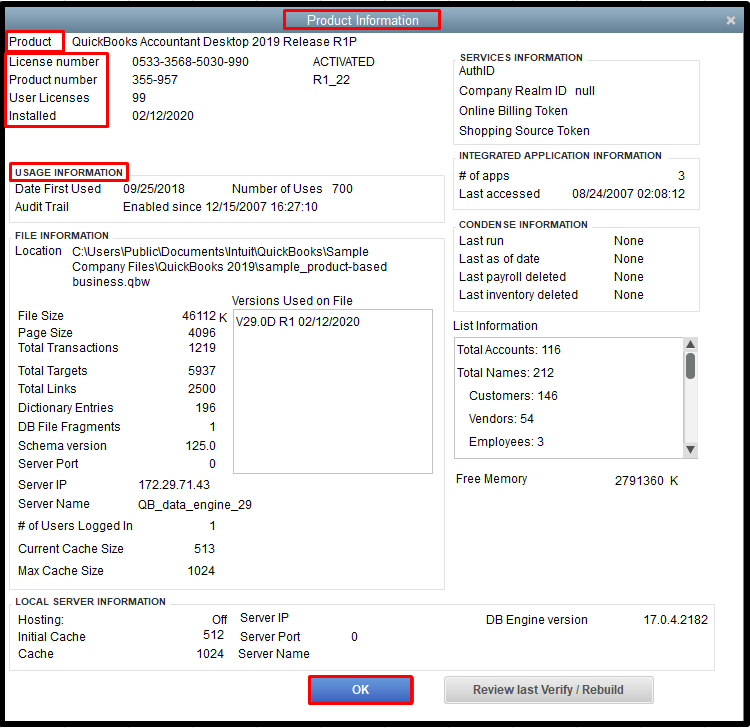
Image Source: Intuit.
Everything in this article depends on that number.
Pro Tip: Check your version before making any decisions: Desktop 2023 and earlier have passed their support deadlines, while Desktop 2024 no longer has a scheduled cutoff.
What does this mean going forward?
QuickBooks Desktop is still available, but access depends on whether you’re an existing subscriber or a new customer. Existing Desktop 2024 subscribers can continue renewing and receiving updates, while Enterprise remains the only Desktop option sold to new customers.
Rather than being phased out entirely, QuickBooks Desktop is moving to a narrower model: continuous support for Desktop 2024 and Enterprise, with no new annual versions planned.
QuickBooks Desktop discontinuation timeline
2021 → Support ended May 31, 2024
QuickBooks Desktop 2021 is now fully past its deadline. If you’ve been asking is QuickBooks 2021 being discontinued, the answer is yes, support has already ended.
These versions still open up, but they no longer have access to payroll, bank feeds, or security updates. If you’re still using 2021, you’re running without connected services.
2022 → Support ended May 31, 2025
QuickBooks Desktop 2022 is now fully unsupported.
Like the 2021 version, core online features are no longer available, which limits day-to-day functionality for most businesses.
2023 → Support ended May 31, 2026
For QuickBooks Desktop 2023 users, support ended May 31, 2026.
This cutoff affected:
- Pro Plus 2023
- Premier Plus 2023 (all editions)
- Mac Plus 2023
- Enterprise Solutions 23.0
Payroll, bank feeds, payments, and security updates no longer function on these versions.
2024 → Ongoing Support
QuickBooks Desktop 2024 is the final non-Enterprise Desktop release. It was previously said to remain fully supported until 2027, making it the last stop for businesses that want to stay on Desktop without moving to Enterprise.
However, Intuit now says Desktop 2024 won’t be discontinued in 2027 after all. The company is moving away from the three-year lifecycle for this version and plans to keep it supported going forward, with security patches, tax compliance updates, and new features delivered through regular in-product releases instead of a new yearly version.
Enterprise → No announced end date
QuickBooks Desktop Enterprise continues to be sold, supported, and updated.
Enterprise remains the only Desktop option sold to new customers. Both Enterprise 24.0 and Desktop 2024 for eligible existing subscribers currently receive continuous support.
2024 onward → No new Desktop versions
Aside from Enterprise, no new Desktop versions will be released.
Desktop 2024 is the final version for Pro Plus, Premier Plus, and Mac Plus.
Pro Tip: If you’re on a version of QuickBooks Desktop that has expired and haven’t started evaluating your options, don’t wait. Payroll and bank feeds stop working the day your product expires if you don’t migrate or upgrade.
As mentioned above, any confusion about when QuickBooks Desktop products expire is understandable. The confusion tends to stem from one of three patterns:
- “Discontinued” vs. “unsupported”: The software doesn’t stop working on the deadline. It loses connected services, which is what most businesses rely on.
- Mixing up version years and support dates: Understandably, some users assume “2023” means support lasts through 2023. In reality, support extends about three years past release.
- Thinking all Desktop versions are treated the same: Enterprise follows a different path. It’s still being developed.
Pro Tip: Not sure where you fall on this timeline? Open QuickBooks Desktop and press F2 (or Ctrl+1). Your version year determines whether your product is still supported and which options are available to you.
What led to QuickBooks Desktop being discontinued?
QuickBooks discontinuing Desktop is part of Intuit’s broader strategy to focus on cloud-based solutions. The reasoning for this is driven by several factors:
- Technological advancements: By focusing on newer versions and cloud-based solutions, Intuit can offer more advanced capabilities and ensure compatibility with modern operating systems and hardware.
- Resource allocation: Intuit is prioritizing fewer versions of its products to dedicate resources to enhancing features, improving security and compliance, and providing timely support for the most current versions.
- Cost savings and profitability: Maintaining older, one-time purchase software versions is costly, and shifting to cloud-based solutions like QuickBooks Online provides a more predictable and stable subscription-based revenue stream. Cloud solutions also offer higher profit margins, easier updates, and better opportunities for upselling premium features.
What happens when QuickBooks Desktop support ends?
When your version reaches the end of support, the software doesn’t stop running immediately. You can still open it, view your data, and run reports. With QuickBooks Desktop support ending on a rolling schedule, the question most users ask is whether the software stops working on the cutoff date.
The answer is no; it doesn’t just stop working. What does stop is the connected services. And the longer you keep using an unsupported version, the riskier this move gets.
When these critical services cease to function, the following will happen:
- Payroll tax tables freeze: Payroll updates stop completely. Tax rates, deductions, and compliance updates are no longer pushed to your system. That means payroll calculations can become inaccurate, which creates real compliance issues if you’re paying employees through Desktop.
- Bank feeds disconnect: Automatic transaction downloads from your bank and credit cards stop. You’ll need to enter everything manually or rely on file imports, which slows down reconciliation and increases the chance of errors.
- Online payments shut off: If you use QuickBooks to accept customer payments, that functionality is removed. Invoices can still be created, but the built-in payment channel is no longer available.
- Security patches stop: No new fixes are released for vulnerabilities. As threats change over time, unsupported software becomes more exposed, especially when it’s storing financial data.
- Technical support ends: Intuit no longer provides phone or chat support. If something breaks, including company file errors or performance issues, you’re left to troubleshoot on your own.
- Email from QuickBooks stops: You can no longer send invoices, statements, or reports directly from within the software. This adds extra steps to your workflow and often requires you to export documents manually.
- Registration and reinstall issues: If you need to move QuickBooks to a new computer after support ends, activation can become unreliable. That creates problems if your hardware fails or you need to switch machines.
What still works?
The software itself remains operational in a static state.
For example, you’ll still be able to:
- Open your company file
- Enter transactions manually
- Run reports
In effect, the shutdown applies to connected services, not the application itself.
One issue that catches many businesses off guard is data integrity over time.
Without updates and support, even small problems, such as minor file corruption or sync issues, can escalate into larger data failures. Since there’s no access to official support or repair tools tied to active subscriptions, recovering that data becomes harder and more expensive.
With all of that said, here’s your overarching takeaway: unsupported QuickBooks Desktop doesn’t stop working, but it becomes progressively harder and riskier to rely on for daily operations.
Is QuickBooks Desktop really going away?
If you already have QuickBooks Desktop, you can keep using it. If you’re trying to buy it new, your only option is Enterprise. Intuit stopped selling new Pro Plus, Premier Plus, and Mac Plus subscriptions on September 30, 2024, and no new Desktop versions are planned for those lines.
What still exists: Existing Desktop 2024 subscriptions that can be renewed and receive continuous support, older versions that remain usable with reduced functionality after their support deadlines, and QuickBooks Desktop Enterprise, which is still sold to new customers with no announced end date.
The versions that lost support on May 31, 2026:
- QuickBooks Desktop Pro Plus 2023
- QuickBooks Desktop Premier Plus 2023 (all editions)
- QuickBooks Enterprise Solutions 23.0
- QuickBooks Premier Accountant Edition Plus 2023
- QuickBooks Enterprise Accountant 23.0
- QuickBooks Desktop for Mac Plus 2023
A quick note on licensing
QuickBooks Desktop now runs on a subscription-only model. That means you pay annually to keep using it.
One-time “lifetime” licenses are no longer sold directly through Intuit. Some resellers still offer previously issued perpetual licenses, but those are limited and not part of Intuit’s current product strategy.
Pro Tip: A quick clarification because it shows up frequently in searches: QuickBooks is made by Intuit, not Microsoft. There is no “Microsoft QuickBooks.” The product runs on Windows, which is where the confusion starts, but it’s an end-to-end Intuit product.
Is QuickBooks only online now?
No. QuickBooks Desktop still exists, although Enterprise is now the only Desktop product available to new customers. Existing Desktop 2024 subscribers can continue renewing their subscriptions.
QuickBooks Desktop pricing in 2026
How much is QuickBooks Desktop 2024? This depends on whether you’re a new buyer or an existing subscriber. Intuit raised prices across all Desktop products effective February 1, 2026.
Existing subscribers (the only buyers who can renew Pro Plus, Premier Plus, or Mac Plus) now pay the following:
| Product | Pre-Feb 2026 | Post-Feb 2026 | Available to new buyers? |
| Pro Plus (1 user) | $999/yr | $1,149/yr | No, existing subscribers only |
| Pro Plus (additional user) | $200/seat/yr | $230/seat/yr | No, existing subscribers only |
| Premier Plus (1 user) | $1,399/yr | $1,609/yr | No, existing subscribers only |
| Premier Plus (additional user) | $300/seat/yr | $345/seat/yr | No, existing subscribers only |
| Mac Plus (1 user) | $999/yr | $1,149/yr | No, existing subscribers only |
| Enterprise Silver (1 user) | ~$1,703/yr | ~$1,873/yr | Yes, still sold |
| QuickBooks Accountant Desktop | Varies | Increased Feb 2026 | Existing subscribers only |
- QuickBooks lifetime license: Intuit no longer sells perpetual QuickBooks Desktop licenses. Be cautious of third-party listings that claim to offer new lifetime licenses.
- QuickBooks Accountant Desktop: Still supported for existing subscribers. ProAdvisor bundles also saw price increases on February 1, 2026.
- Math worth running before your renewal: Desktop 2024 no longer has a published support deadline, making renewal a more viable long-term option for eligible subscribers. Compare the annual subscription cost with the cost and disruption of moving to Enterprise or QuickBooks Online, based on the capabilities your business actually needs.
QuickBooks for Mac: What’s happening
Is QuickBooks for Mac discontinued? QuickBooks Desktop Mac Plus was discontinued for new subscribers on September 30, 2024, following the same pattern as Pro Plus and Premier Plus.
- Mac Plus existing subscribers can still renew, at the higher post-February 2026 prices we listed above.
- Mac users on the 2023 version faced the same May 31, 2026 support cutoff as Windows users on Desktop 2023.
- QuickBooks Online is the primary path Intuit is directing Mac users toward.
- QuickBooks Online runs natively in any browser, including Safari, with no desktop install required.
If you’re a Mac user weighing options, QuickBooks Online removes the platform-specific friction. Desktop Mac Plus has always lagged the Windows feature set, and that gap is widening as Intuit invests almost exclusively in Online.
What are your options in 2026?
Depending on your version and business needs, you have four realistic paths to choose from in QuickBooks Desktop. The right choice comes down to how you use the software today and how long you plan to keep it.
Searches like “Is QuickBooks Desktop being phased out in 2023?” started picking up a few years ago. By 2026, the picture is clearer: older versions have lost support, Desktop 2024 is being continuously maintained for existing subscribers, and Enterprise remains available to new customers.
Option 1: Upgrade to QuickBooks Desktop 2024
QuickBooks Desktop 2024 was previously expected to receive support through 2027. Intuit has since moved away from that cutoff and committed to continuously supporting the version through ongoing product maintenance and in-product updates.
- Best for: Existing Desktop subscribers who want to keep their current accounting setup.
- How it works: Eligible Plus subscribers can upgrade to Desktop 2024 as part of their annual subscription.
- What to consider: Desktop 2024 is still the final non-Enterprise version and is unavailable to new customers. Although it no longer has a published end date, Intuit’s plans and support policies could change.
- When it makes sense: Your business depends on offline access or Desktop capabilities such as advanced inventory, assemblies, and detailed job costing.
Option 2: Upgrade to QuickBooks Desktop Enterprise
Enterprise is the only Desktop version still sold to new customers, with no announced end date.
- Best for: Businesses that need Desktop features long-term and can justify the cost.
- What’s changed: Pricing increased in February 2026, with entry-level plans starting around $2,210/year for new buyers.
- What to consider: Enterprise offers more capacity, but it’s not a light upgrade. It’s a different tier of software with a higher cost and more features than many businesses need.
- When it makes sense: If you have 5+ users, complex inventory, or need high user limits, Enterprise is worth evaluating. For smaller teams focused on basic invoicing and expenses, it’s often more powerful than necessary.
Option 3: Migrate to QuickBooks Online
QuickBooks Online is where most long-term development is happening. If you’re comparing QuickBooks Desktop vs Online 2026, the difference comes down to flexibility versus depth.
- Best for: Businesses ready to shift to cloud-based workflows.
- Migration window: The time available to import your Desktop file depends on how your QuickBooks Online account was created. Confirm your eligibility and deadline with Intuit before beginning the migration.
- Timeline: Most migrations take a few weeks when done properly. The data transfer itself is quick (within 72 hours), but cleanup, validation, and reconnecting bank feeds take time.
- When it makes sense: If your team works remotely, needs mobile access, or isn’t using advanced inventory or job costing, Online is often the smoother long-term path.
Option 4: Stay on Desktop and extend It
Some teams want to keep Desktop while adding features it no longer handles well on its own.
Integration tools like Method can:
- Add CRM functionality
- Improve invoicing workflows
- Automate processes without switching platforms
This approach lets you keep your current setup while filling in the gaps.
- Best for: Businesses that aren’t ready to migrate but need more flexibility
QuickBooks Desktop vs. QuickBooks Online in 2026
Desktop and Online serve different types of businesses. The decision comes down to which one matches your actual workflow.
Below, we’ve put together a comparison table to help you quickly see the QuickBooks Online vs. Desktop pros and cons:
| Feature | QuickBooks Desktop | QuickBooks Online |
| Still sold to new users? | Enterprise only | Yes |
| Lifetime license available? | No | No (subscription only) |
| Approximate annual cost | Pro Plus: $1,149/yr (post Feb 2026). Premier Plus: $1,609/yr. Enterprise Silver starts at ~$1,873/yr and scales by tier and seat count. | Simple Start: $38/mo; Plus: $115/mo; Advanced: $275/mo |
| Offline access | Full | Requires internet |
| Mobile access | Limited; no full mobile accounting access | Yes |
| Multi-user access | Limited by tier (up to 40 on Enterprise Diamond) | Up to 25 (varies by plan) |
| Inventory tracking | More advanced (FIFO + average) | Basic, FIFO only (Plus/Advanced) |
| Sales orders | Yes | Yes, with Plus and Advanced |
| Job costing | Stronger (full Job WIP, Estimates vs. Actuals) | Basic (limited reports) |
| Industry-specific reports | Yes (Premier and Enterprise) | Limited |
| Bank feeds | Available (until support ends) | Available |
| New feature development | Ongoing updates for Desktop 2024 and Enterprise 24.0 | Active |
| Long-term viability | Desktop 2024 and Enterprise are supported; older versions are unsupported | Intuit’s primary focus |
| Data migration difficulty | Moderate to high | N/A |
- What you may lose moving to Online: Some advanced inventory, job-costing, reporting, and offline capabilities available in Desktop. Although QuickBooks Online Plus and Advanced now support sales orders, your existing sales-order data and workflows may not transfer exactly as configured.
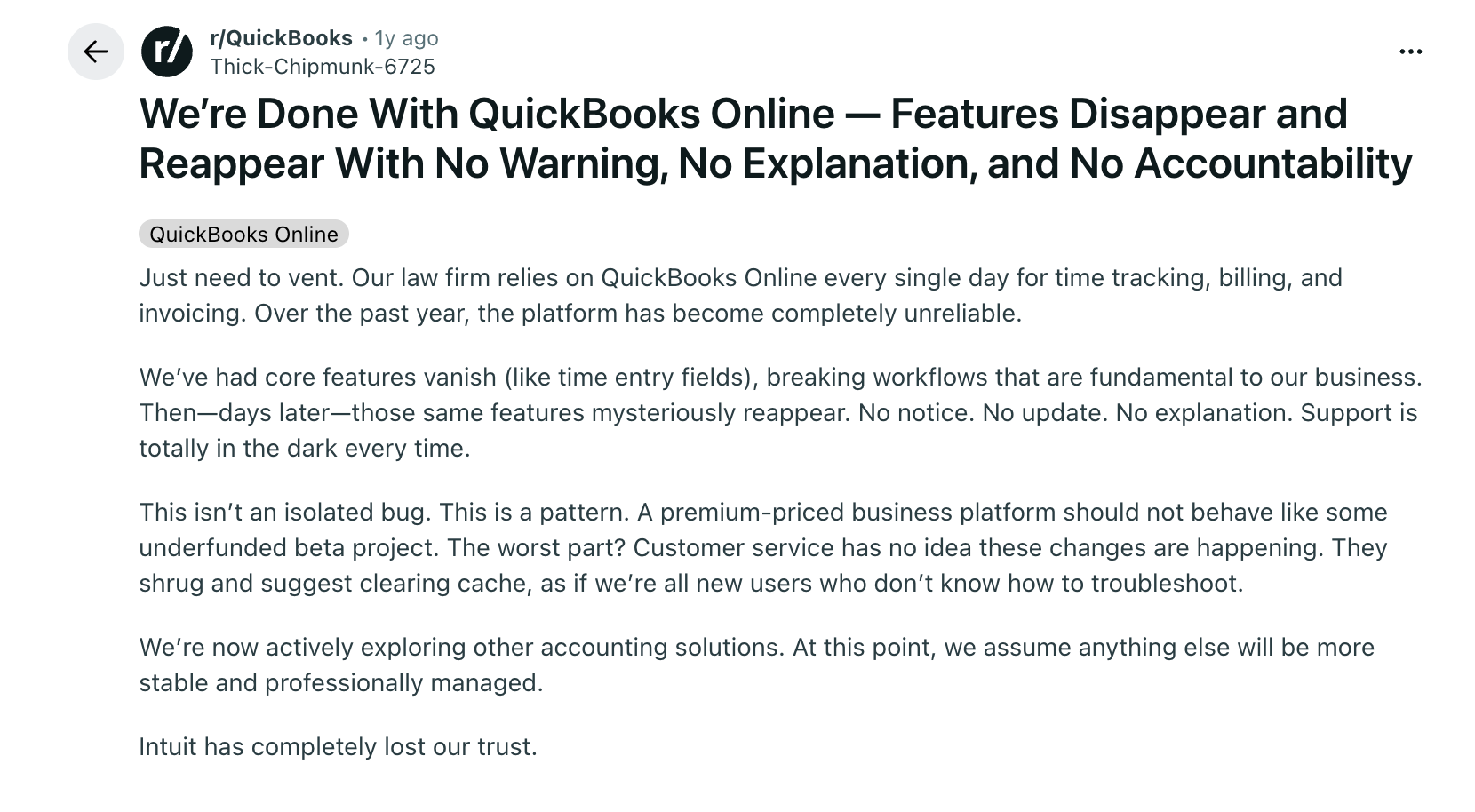
Image Source: Reddit
- What you gain: Mobile access, automatic updates, easier multi-user collaboration, a much larger ecosystem of third-party integrations, and access to features Intuit is actively building.
- Migration difficulty: It’s not plug-and-play. The Intuit migration tool handles core lists, balances, and most transactions, but several specific things consistently cause issues:
- Inventory items getting flagged as non-inventory during conversion
- Sales-order data and workflows not transferring exactly as configured
- Inventory cost basis recalculating to FIFO regardless of your Desktop costing method
- Custom report layouts not transferring
- Bank feeds requiring full reconnection and rule rebuilds
Common mistakes businesses make when facing a discontinuation deadline
When you browse forums, accountant communities, and migration post-mortems, you’ll notice five specific patterns in terms of mistakes businesses might make with QuickBooks discontinuation deadlines:
- Waiting until after the deadline to start migrating: Start the migration plan at least 90 days before your version’s support cutoff.
- Assuming the software stops opening on the deadline: It doesn’t. The false sense of safety this creates leads to running on unsupported software far longer than intended, with payroll being the first to bite.
- Not checking which version they’re actually running: Desktop 2023 reached its support cutoff on May 31, 2026, while Desktop 2024 no longer has a scheduled end date. Confirm your version and its current support status before planning an upgrade or migration.
- Migrating without first cleaning the data: Importing years of duplicate vendors, inactive customers, and miscategorized transactions into QuickBooks Online doesn’t fix the mess. It moves it to a new platform where some of it is harder to clean up than it was in Desktop.
- Choosing Enterprise as a way to avoid the decision: Enterprise solves the deadline problem, but it doesn’t change the long-term direction of Intuit’s product investment. It’s a legitimate choice for businesses that genuinely need its capabilities, but it should be made deliberately, not as a way to defer thinking.
Conclusion
QuickBooks Desktop is not disappearing, but its future now depends heavily on which version you use. Desktop 2023 and earlier have reached their support deadlines, while Intuit has committed to continuously maintaining Desktop 2024. Enterprise also remains available to new customers.
That means Desktop 2024 users no longer face a fixed 2027 deadline. However, it is still worth evaluating whether your current accounting setup supports the way your business operates beyond bookkeeping.
The right decision depends on:
- The version you currently use.
- Whether you qualify to upgrade to or renew Desktop 2024.
- The accounting and operational capabilities your business needs.
- Whether Desktop, Enterprise, or QuickBooks Online offers the best long-term fit.
Method works with QuickBooks Desktop and QuickBooks Online, so you can add CRM and workflow capabilities without basing the decision solely on which QuickBooks platform you choose.
Frequently asked questions
What is the difference between QuickBooks Desktop being discontinued vs. being discontinued for my version?
This is one of the biggest sources of confusion.
What matters is your specific version. Each version has its own support deadline. Once that date passes, your version loses connected services, even though the overall Desktop product still exists.
Will QuickBooks Online replace everything I use in Desktop?
Not necessarily. QuickBooks Online covers most standard workflows like invoicing, expense tracking, and reporting. But some Desktop-specific features don’t fully carry over, including:
- Sales orders
- Advanced inventory workflows
- Detailed job costing
- Certain custom reports
For many businesses, this isn’t a problem. For others, it requires workflow changes or additional tools.
What happens to my data when QuickBooks Desktop is discontinued?
Your data is not deleted.
Your company file remains accessible, and you can still open it, review historical records, and export reports.
If you migrate to QuickBooks Online, your data can be imported, but timing matters. Remember, there’s a window after creating your Online account to complete a full import.
If you stay on Desktop, maintaining regular backups becomes more important over time, since support and recovery options are no longer available after your version expires
Can you still buy QuickBooks Desktop?
It depends on which version you’re looking for. Intuit stopped selling new Pro Plus, Premier Plus, and Mac Plus subscriptions on September 30, 2024, so those are no longer available to new buyers directly from Intuit. Existing subscribers can still renew, though prices increased in February 2026.
QuickBooks Desktop Enterprise is the only version still actively sold to new customers, with no announced end date.
Existing Desktop 2024 subscribers get an extra bit of good news: even though the version isn’t for sale to new customers, Intuit now says it’ll keep supporting it going forward instead of cutting it off in 2027.