Method pay
From quote to cash, all in Method
Method is a CRM with built-in payment processing that syncs to QuickBooks. No extra tools, no double entry.
- Free 10-day trial
- No credit card required
- No-contract trial
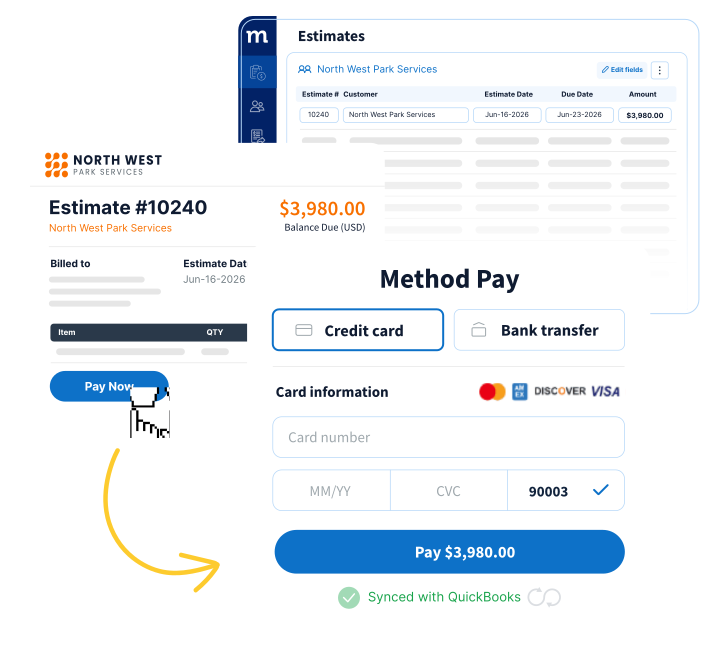
Method Pay is built for how you actually get paid


Yes to transparent pricing
No setup fees, monthly minimums, or cancellation fees.
Domestic Keyed-in Transactions
| Cards | ACH | |
|---|---|---|
| Rate | 2.99% + $0.30* | 1.0% + $0.30 |
| Submit by (ET) | 11:00 PM | 9:00 PM |
| Payout | T+1 | T+4 |
*International, Business and AMEX cards add 0.8%.
These are Method Pay’s standard published rates and may change. Your rates are set by the Method Pay Payment Processing Agreement. Available to US-based businesses only.
REAL-WORLD BUSINESSES
Yes, there’s a Method for getting paid.
YES TO QUOTE TO CASH
Run quote to cash without switching tools
Create quotes, convert them to invoices, collect payments, and sync everything to QuickBooks without switching systems. Every payment automatically matches its invoice and updates your books.
- Convert a quote to an invoice in one click
- Every payment auto-matches its invoice
- Fees, refunds, and chargebacks in one dashboard
YES TO YOUR WORKFLOW
Payments that fit the way your business works
Your brand, your terms, your workflow. Take deposits upfront, bill in stages, set up recurring payments — and give customers a portal that feels like it was built for your business. Because it was.
- Deposits up front, balance on completion
- Customer portals, e-signatures and per-job terms
- Recurring invoicing, autopay, and saved cards that update themselves when they expire
YES TO TRANSPARENT PRICING
Know exactly what you’re paying
Most payment processors advertise their swipe rate — but most business payments are keyed in by phone or invoice, and those transactions cost more. Method Pay includes keyed-in transactions in our standard rate, so what you see is what you pay.
- 2.99% + $0.30, including keyed-in cards
- No hidden fees, no monthly minimums
- We’ll help you compare against your current processor
- The same 2.99% whether you invoice online or key in a card over the phone
YES TO expert support
Real support from real people
From setup and migration to day-to-day questions, our team helps you get the most from Method Pay. You’ll work with experts who understand Method, QuickBooks, and the workflows real-world businesses rely on every day.
Yes, your invoices and payments belong together.


- Free 10-day trial
- No credit card required
- No-contract trial
Your payment processor and your CRM shouldn’t be strangers.
When payments live in a separate system from your CRM and accounting software, your team spends more time organizing transactions, tracking down information, and fixing errors.
Disconnected Providers
- Multiple vendors for support, payments, and accounting
- Manual balancing across systems
- Double entry between CRM and accounting
- Generic payment experience

Method CRM Payments
- One vendor, one login, one support team
- Instant two-way QuickBooks sync
- Single source of truth
- Branded payment links and customer portal
How Payments Work in Method


FAQs
Real Questions from Real-World Businesses
Method Pay is Method’s built-in payment processing tool — so your invoices, payments, and QuickBooks records all live in the same place. Accept credit cards and ACH bank payments, set up deposits and recurring billing, and give customers a branded portal to pay online. Every payment syncs to QuickBooks automatically and matches to the right invoice — no double entry, no tab-switching.
Yes — Method Pay syncs with both QuickBooks Online and QuickBooks Desktop, matching every payment to the right invoice automatically.
Method Pay uses tokenization to protect card data — meaning your customers’ card numbers are never stored on Method’s servers. All transactions are encrypted end to end.
Card payments deposit the next business day. ACH takes about four business days. We confirm timing with you during setup.
All major credit cards and ACH bank payments, keyed in by phone or through your portal. You can also take payments in person with Tap to Phone, which turns a supported phone into a contactless card reader.
No limit on how many you run. ACH is capped at $60,000 per transaction.
You handle disputes, refunds, and returns from the same dashboard, right on the customer’s record.
No. Method Pay replaces it. Your old gateway keeps running through application and review, then you switch over cleanly. You can roll it out by customer group, but you can’t run both at once.
Yes — Method connects to other processors via our shuttle connector. That said, most businesses find that switching to Method Pay eliminates double entry and sync issues that come with running a separate payment tool.
And if something goes wrong with a payment, it matters who you call. With a third-party processor, you’re in their support queue. With Method Pay, you reach our team directly — real experts who know your account and can resolve issues fast.
In most cases, yes — once. If your current processor didn’t store card security codes (most don’t, for security reasons), customers will be prompted to enter their card details one more time when they pay through Method Pay.
The good news: it’s a one-time step that actually improves things going forward. Method Pay stores payment details securely, so customers can pay future invoices in one click — and you’ll see fewer declined payments from outdated or expired cards.
With Method Pay, you contact us directly — not a third-party processor. Our team is available to troubleshoot payment issues in real time, because when something goes wrong with a payment, waiting days for a ticket response isn’t an option.
Yes — every invoice can include a payment link that takes customers to your branded portal, where they can pay by card or ACH without creating an account.
Yes — Method Pay supports recurring payments, staged billing, and deposits without a separate billing tool. More specialized billing setups may require customization work to make sure everything runs the way your business works — this is sometimes covered under your payments implementation, and sometimes a separate engagement depending on the complexity.
Speak with your CSM to understand what’s involved before you get started — we’d rather you know upfront than hit a surprise later.
Not right now. Method Pay processes payments for US-based businesses only, and the rates above apply to them. If your business is based outside the US, you can still use Method to manage customers, send estimates, and invoice. You’d just collect payment through your own processor instead of Method Pay.