The job scheduling software QuickBooks users love
Schedule jobs, dispatch technicians, and keep customers informed with job scheduling software that stays synced with QuickBooks.
Want to see Method in action first? Take me there →
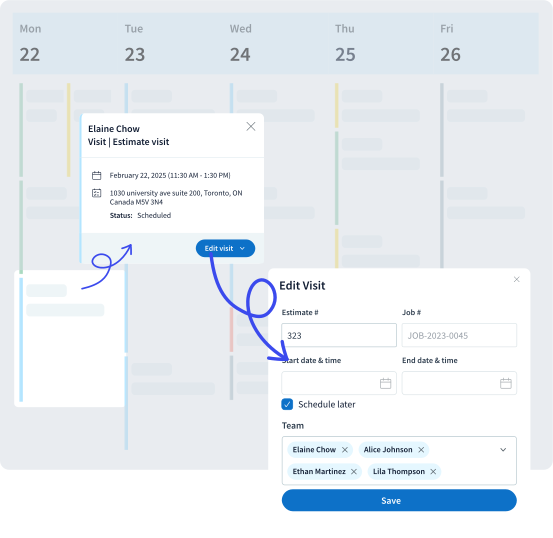
Keep jobs moving from estimate to invoice
Method adapts to the way service businesses actually schedule work so teams can manage jobs, dispatch technicians, and keep customers informed.
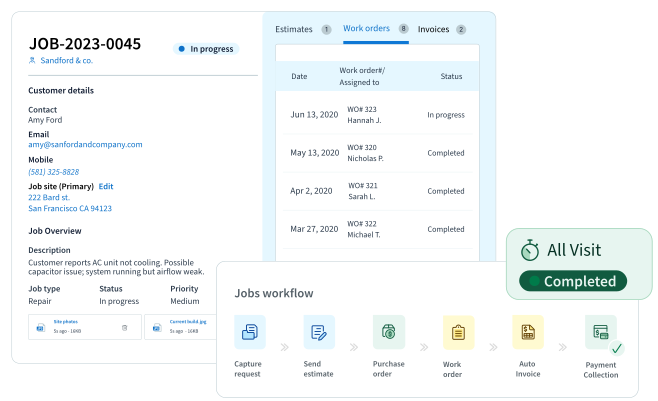
Job flow visibility
Track every job from estimate → work order → scheduled visit → invoice so your team always knows what’s booked, active, and completed.
Dispatcher command center
Schedule jobs, assign technicians, and adjust the calendar in real time so dispatchers can keep the entire day running smoothly.
Job-to-invoice connection
Convert completed jobs into invoices while QuickBooks stays updated in the background.
Built for growing crews
Manage more technicians, locations, and service requests without losing visibility across schedules.
Maximize efficiency in the field
Keep technicians and dispatchers connected throughout the day with mobile-friendly scheduling tools.
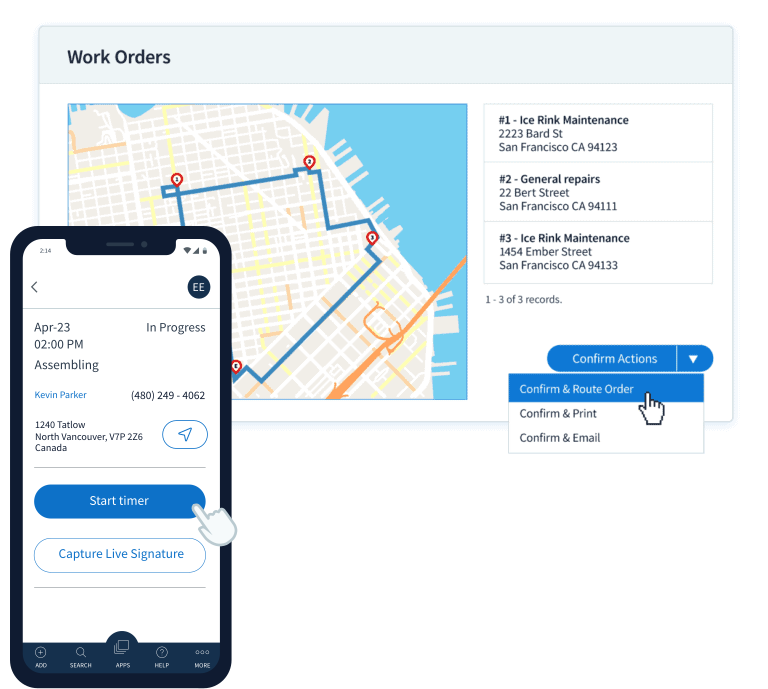
Get to the job site sooner
Technicians can view their daily jobs, routes, and service details from anywhere they have an internet connection.
Navigation made simple
Open a job in Method and instantly launch directions in your preferred mapping app.
Keep your teams in sync
When dispatchers update schedules, technicians see the changes immediately through the Method mobile app.
Choosing the right job scheduling software has never been easier


























Smooth and stress-free job scheduling
Create work orders, schedule technicians, and manage job activity with flexible workflows.
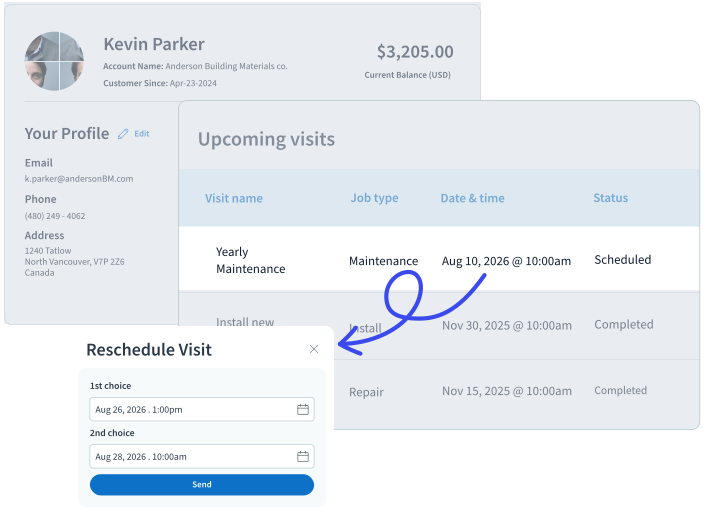
Never disappoint your repeat customers
Managing recurring service is simple with Method’s job scheduling tools. Pre-schedule repeat visits so returning customers always receive service at the right time.
Boost productivity with easy workflows
Move faster from quote to scheduled job by converting QuickBooks estimates into work orders and assigning technicians from a centralized workspace.
Convenient calendar views
Use Method’s shared calendar to see technician availability and schedule new jobs directly into open time slots.
Connect with Google Calendar to keep employees aligned across teams.
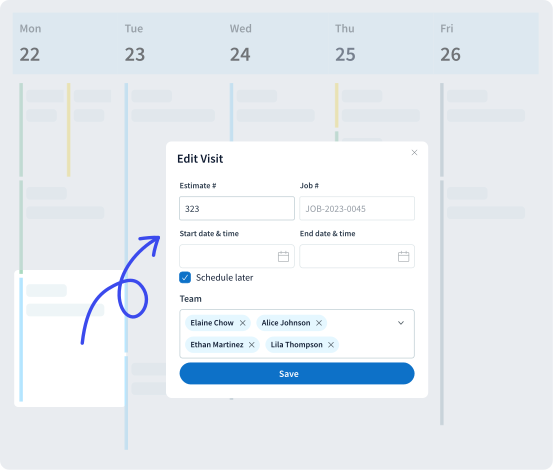
Job scheduling is made easy with Method’s field service management software
Method’s job scheduling software helps service businesses coordinate dispatchers, technicians, and customer requests from one central system. Dispatchers can view schedules, assign work, and monitor job progress while customer and financial data stay connected with QuickBooks.
Method Field Services optimizes scheduling for field technicians across industries
Whether you manage HVAC technicians, electricians, landscapers, or cleaning crews, Method helps teams coordinate jobs and communicate with customers more efficiently.
Technicians can access job details, route information, and customer history from their mobile device, helping them arrive prepared and respond quickly to schedule changes.
How construction crews can benefit from Method Field Services
Construction teams can coordinate schedules, track equipment, and manage multiple job sites from the same platform. Job updates, scheduling adjustments, and invoices stay connected so project information remains accurate.
The result is clearer communication between teams, fewer delays, and better visibility into every active job.
QuickBooks job scheduling software: FAQs
How does Method’s job scheduling software work with QuickBooks Online?
Method’s job scheduling software connects your job scheduling and work orders directly to QuickBooks, so estimates, invoices, and customer data stay in sync in real time. Your team manages jobs in Method, while QuickBooks updates automatically behind the scenes without double entry.
Can I use this software with QuickBooks Desktop?
Yes, the platform supports QuickBooks Desktop through a robust, two-way integration. Job details, invoices, and customer data stay aligned across both systems, reducing manual entry and improving accuracy.
Is this solution designed for small businesses?
Absolutely. Method is built for growing small businesses that rely on QuickBooks and need better control over jobs, customers, and workflows. It connects your scheduling, sales, and operations to QuickBooks in real time, so your team can manage work in one place while your accounting and financial data stays accurate in the background.
Does the software support employee scheduling and time tracking?
Yes, Method supports employee scheduling and tracking employee time. Dispatchers can assign jobs and technicians can log time against work orders, with data flowing into invoicing and QuickBooks. Because Method is customizable, businesses can tailor scheduling and timesheet workflows to match how their team actually operates, which can help improve job costing and operational visibility.
What functions are automated within the platform?
Method offers automation for key workflows like creating invoices from completed jobs, updating job statuses, and syncing customer and financial data with QuickBooks in real time. Because workflows are customizable, businesses can automate repetitive steps across scheduling, billing, and customer management based on how their operations actually run.
Can multiple team members access the system?
Yes, multiple team members can access Method, with permissions based on their roles. Office staff and field technicians can view schedules, update jobs, and work from shared customer and job data in real time, helping keep everyone aligned across operations and QuickBooks.
Does this include CRM capabilities for managing customers?
Yes, the system includes built-in CRM tools to manage customer information, track service history, and streamline communication. This ensures every job is backed by accurate and accessible customer data.
How do notifications help manage daily scheduling?
Notifications and workflow alerts can be configured to keep dispatchers and technicians informed of job changes, new assignments, and schedule updates. This helps teams stay aligned and respond quickly throughout the day.
Is the software available on mobile devices like Android?
Yes, Method can be accessed on mobile devices, including Android, allowing technicians to view job details, update statuses, and stay connected in the field. Data syncs in real time with through Method’s two-way QuickBooks integration.
How does the system work overall?
At a high level, Method connects scheduling, dispatching, and invoicing in one system. As jobs move forward, financial data syncs automatically, keeping operations and accounting fully aligned.
Can Method help coordinate field technicians more effectively?
Yes, Method makes technician coordination easier by giving teams shared access to schedules, customer details, and job information. This helps ensure the right technician is assigned to the right job at the right time.
How does Method improve job scheduling?
Method helps teams schedule jobs from one central dashboard, making it easier to assign work, organize appointments, and keep daily schedules clear and up to date.
Can I continue using my existing accounting processes with Method?
Yes, Method is designed to support businesses that use QuickBooks or Xero for accounting software and bookkeeping. This means you can continue to use these solutions as your source of truth while managing scheduling and operations in Method, without duplicate data entry.