

QuickBooks handles the books. Who handles the order?
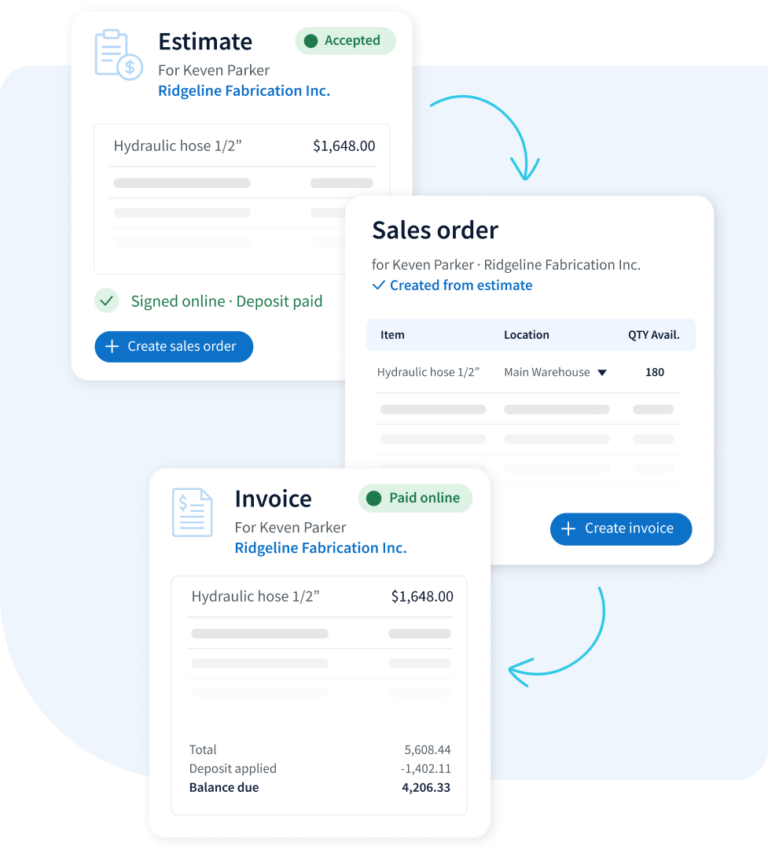
Quote at each customer’s price with stock by location in view, turn the quote into a sales order, and invoice what shipped. Method runs the order; QuickBooks keeps the books.

- Dedicated onboarding specialist
- No credit card required
- Free hour 1:1 workflow customization

18,000+ teams on QuickBooks Online & Desktop trust Method to keep their books and sales in sync.

Intuit Platinum Partner
1,600+
Five-star ratings on, QuickBooks App store, Capterra, & G2
16yrs
Built around QuickBooks since 2010
2-way
Real-time sync with QuickBooks Online & Desktop
How it works
One order, quote to invoice, on one screen
Your reps quote, your ops team ships and your bookkeeper invoices from the same order. Nobody re-types it.
Sales order SO-1042 · Harbor Supply Co.
Shipped| Item | Qty | Price | Amount |
|---|---|---|---|
| PVC fitting, 2 in | 120 | $3.40 | $408.00 |
| Ball valve, 1 in | 40 | $18.75 | $750.00 |
Ops marks the order shipped when it leaves the dock.
Simulated example · sample dataMulti-location inventory
See stock in every warehouse, shop and truck while you quote
Reps know what’s free to sell, and where, before they promise a date.
Ball valve, 1 in · stock by location
Simulated example · sample data| Location | On hand | Promised | Coming in | Free to sell |
|---|---|---|---|---|
| Main warehouse | 210 | 95 | 100 | 115 |
| East shop | 64 | 12 | 0 | 52 |
| Truck 3 | 18 | 18 | 0 | 0 |
Stock by location
On hand, promised, coming in and free to sell for each warehouse, shop or truck.
Stock transfers
Move stock between locations in a few clicks. Record counts and adjustments with a reason.
Purchase and receive
Raise purchase orders, see what’s on the way, and receive stock against the PO when it lands.
Inventory by location works with QuickBooks Online. On QuickBooks Desktop? Method still syncs your customers, orders and invoices; talk to our team about stock.
- Reps see what accounting sees. Customer balances, invoices and payments sync both ways, so nobody calls the office to check.
- Sales works without QuickBooks access. Reps quote and order in Method without logging in to, or changing, your accounting file.
- Enter the order once. The quote becomes the sales order becomes the invoice, and the invoice syncs to QuickBooks.

QuickBooks integration
Your team sells from Method. QuickBooks stays your books.
Method connects to QuickBooks Online and Desktop, so sales and operations work from the same customers, orders and invoices your accountant sees.
Run your next order through Method
Connect QuickBooks after signup and try it with your own customers and items.
- Dedicated onboarding specialist
- No credit card required
- Free hour of workflow setup
quick answers
Frequently asked questions
Yes. Distributors use Method for customer pricing, quotes, sales orders, shipping and invoicing, with a two-way QuickBooks sync. Stock by location is available on QuickBooks Online.
Yes. Method syncs with QuickBooks Online and Desktop, including Enterprise. Inventory in Method is built for QuickBooks Online today, so if you run stock in Desktop, talk to our team about your setup.
On QuickBooks Online, yes. Add each warehouse, shop or truck as a location, see on hand, promised, coming in and free to sell for each, move stock with transfers, and pick the ship-from location on each sales order line.
Sales, purchasing and stock run in Method; QuickBooks keeps the books. Create invoices and bills from your Method orders, and QuickBooks updates quantities and inventory value when they sync. To keep both counts matching, create them from Method rather than directly in QuickBooks.
No. Inventory is built into the CRM, but barcode scanning, bin locations, lot and serial numbers, and assemblies aren’t built in. Pick lists and packing slips can be set up with customization.
Copyright © 2026 Method Integration. All rights reserved.